ericzimmermanOccasional ContributorJoined 2 years ago9 Posts3 LikesLikes received1 SolutionView All Badges
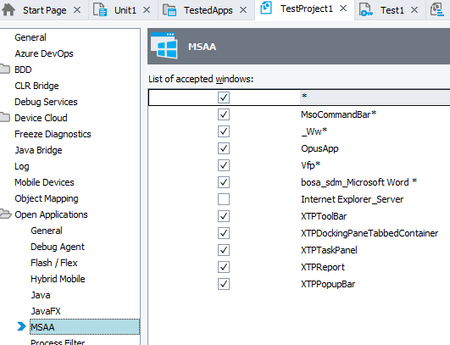
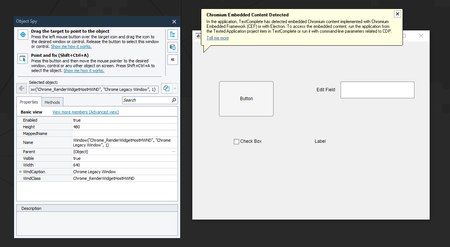
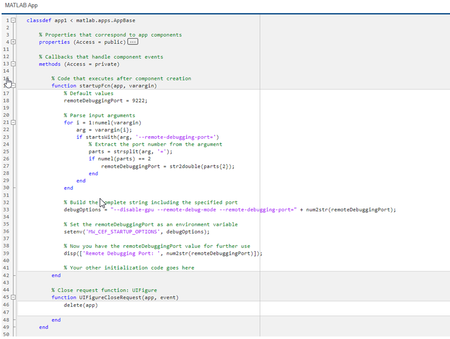
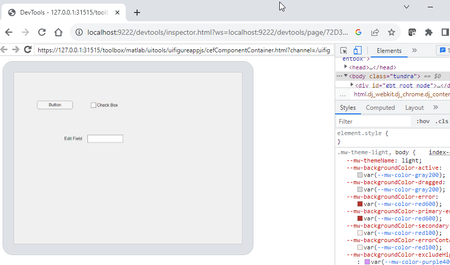
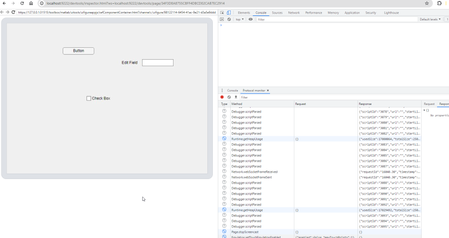
ContributionsMost RecentMost LikesSolutionsRe: Matlab AppDesigner CEF-based application integration I heard back from SmartBear Customer care today. The key was to make sure you have checked "*" from MSAA options Goto Tools > "Current Project Properties" Select "Open Applications" > "MSAA" Add a checkmark the the "*" entry at the top, which is unchecked by default Re: Matlab AppDesigner CEF-based application integration NOTE: The following are actions requested by an active SmartBear support ticket. I will continue to post updates / final resolution when available. I was asked to test without an environmental variables / command line again. I create a new Matlab AppDesigner application without any commandline parsing, and when running without that environmental variable we receive the following when trying to use ObjectSpy. That warning was not present when we set the matlab environmental variable, whether globally or for the application only. Re: Matlab AppDesigner CEF-based application integration Yes, I've been actively working on a support ticket and simply posting screenshots and tasks of things they are asking me to do. The last post was what we first received prior to any command-line or environmental variable changes. Re: Matlab AppDesigner CEF-based application integration side-note: I figured out how to view the protocol monitor for DevTools. Is there anything within there that I should be looking for? Re: Matlab AppDesigner CEF-based application integration We figured out how to modify the AppDesigner application to take the expected startup arguments, but it still has not solved the problem. I set the port to 9224 to ensure that setting the environmental variable is working I launched from TestComplete successfully and verified that the env var settings are working However, when using the TestComplete object spy and placing it over the controls, it is unable to see within the window like it could with the Electron application. Minor update: I changed back to port 9222 just to be sure. Does the following json mean anything with respect to protocol access? How to find out what is missing or why TestComplete doesn't seem to be able to access? logs? test apps? Re: Matlab AppDesigner CEF-based application integration Thank-you for the feedback. From the reading that I've done, it seemed like the DevTools page uses the protocol, so I assumed one meant the other. The questions are now: 1. How do I know that the CDP is running / accessible? 2. How does TestComplete know which port to access CDP? We will likely need to escalate this to Smartbear. Re: Matlab AppDesigner CEF-based application integration Isn't CEF-based all lumped into the same support? ...and I don't see anything in that list specific to Electron or CEF, but Electron is supported. The question was more on how TestComplete knows which port the DevTools are running on... Matlab AppDesigner CEF-based application integration We have been working on trying to get a Matlab AppDesigner-based application working with TestComplete Object Spy. Background Upon researching TestComplete CEF-related errors, we built a simple Electron application and verified proper functionality with Object Spy when passing the '-cdpAutoSetPort' command-line parameter. For Matlab AppDesigner, this did not work and results in an error when launching. However, we found if we set environmental variable 'MW_CEF_STARTUP_OPTIONS' to '--disable-gpu --remote-debug-mode --remote-debugging-port=9222', we're able to get to the DevTools via web browser. Problem: It appears like we've successfully enabled the CDP for our application, but ObjectSpy still cannot access the controls. How does TestComplete know which port we've enabled the tools on? ... is there a way to specify without the 'cdpAutoSetPort' command-line parameter? Does the process tree attached give you any clues as to what is missing? SolvedDocumenting TestComplete python code with sphinx? We were attempting to generate sphinx documentation for our test code and able to use 'sys.path.insert' to locate certain files. We haven't been able to fake out the 'Aliases' object, resulting in an exception being thrown (sphinx.errors.ExtensionError) with exception 'Aliases'. Has this been attempted before? ...or similar documentation frameworks? Any known work-arounds would be appreciated.