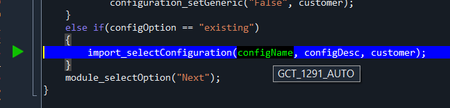
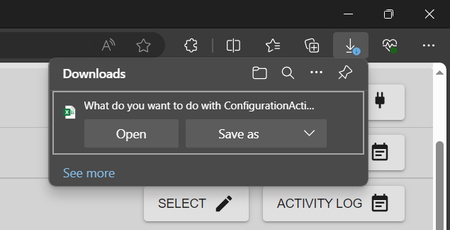
ContributionsMost RecentMost LikesSolutionsRe: clickItem() is not properly selecting dropdown value I believe I have found a work-around, which at the moment is working with TC 15.61 & Edge v121: Doesn't work: for (var i = 0; i < configList.length; i++) { if (configList[i] === configName) { select.ClickItem(configName); Delay(5000); if (select.wText == configName) { Log_Message("Found and selected configuration: " + configName, STEP_NORM); exactMatchFound = true; break; } } } Works: for (var i = 0; i < configList.length; i++) { if (configList[i] === configName) { select.Click(); select.Keys(configName); select.Keys("[Enter]"); Delay(5000); if (select.wText == configName) { Log.Message("Found and selected configuration: " + configName, STEP_NORM); exactMatchFound = true; break; } } } Not sure why select.Keys has such an impact, but this seems to be working as of right now. Re: clickItem() is not properly selecting dropdown value I did not convert it to a listBox, but I have an array of configList[i] that loops through and ClickItem does not work in that instance. Re: clickItem() is not properly selecting dropdown value Correct, it does - Audi is properly selected. However, I do see that "Audi" is the value, which makes things easy to select, but we auto-produce values and use the "Dropdown Field Name", such as: <option value="dsgfdhgty65yhghgf">GCT_1291_AUTO</option> That seems to be an issue, unless we can update this function to differently target it: function import_selectConfiguration(name, description, customerCode) { waiter(SHORT_WAIT); var configName; var select = popupWindow.FindChild("ObjectType", "Select", MED_DEPTH); var configList = aqObject.GetPropertyValue(select, "ContentText").split('\n'); var exactMatchFound = false; for (var i = 0; i < configList.length; i++) { if (configList[i] === configName) { select.ClickItem(configName); Delay(5000); if (select.wText == configName) { Log_Message("Found and selected configuration: " + configName, STEP_NORM); exactMatchFound = true; break; } } } return true; } Re: clickItem() is not properly selecting dropdown value The web application is built using: - Java for the back-end. - React for the front-end. - This is a spring boot application. We are using TestComplete to write BDD tests using JScript. clickItem() is not properly selecting dropdown value Hey all, So currently, our organization is utilizing the following stack, which we have to utilize since all of our other tests are running on the same stack: Version: 15.61.1.7 x64 Version 121.0.2277.106 For some reason, the clickItem() function in TestComplete is not able to properly select the value that is needed in the dropdown, it keeps selecting a different value. Demo: We have been battling with this issue for a while, so I would like to see what I might be able to do. Re: Unable to target download dialog window Unfortunately, I need it to automate the downloads, since I need to be able to click "Save" and all that. Re: Is there any issue with clickitem in TestComplete version15.59.7.7 x64 Also having this same issue, but with Edge - TC 15.61 & Edge v120. Unable to downgrade due to the IT department in control and updated to the latest versions. Unable to target download dialog window Hey all, So I am running into an issue where I am unable to target the "Downloads" dialog window on Microsoft Edge so I am seeking some help to see if anyone might be able to give me some guidance. Here is the window that I am attempting to target: So when I check my objectTree, I am able to see the following object: Then I can see that I have an active Edge browser window: So I have tried all of the following scenarios, here is the first scenario that I attempted: var downloadDialog = Aliases.browser.FindChildEx( ["ObjectType", "Caption"], ["Dialog", "Downloads"], 10, true, 60000 ); The above code returns an empty object, no response. I also attempted to use the following code snippets: var test = Aliases.browser.Dialog("Downloads").Pane(0); var test1 = Aliases.browser.Dialog("Downloads"); Use the above snippets, I am also not able to properly target it. Is there anyone that might be able to assist me with how to properly target an "Downloads" window? Re: Unable to target download dialog window I just edited the post. Re: Unable to target download dialog window I am not sure why it did that, this is the code that I provided for the first: var downloadDialog = Aliases.browser.FindChildEx( ["ObjectType", "Caption"], ["Dialog", "Downloads"], 10, true, 60000 ); And this is the code that I provided for the second code block: var test = Aliases.browser.Dialog("Downloads").Pane(0); var test1 = Aliases.browser.Dialog("Downloads");