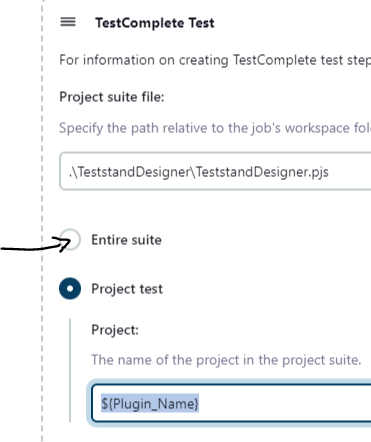
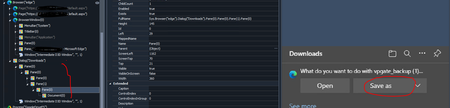
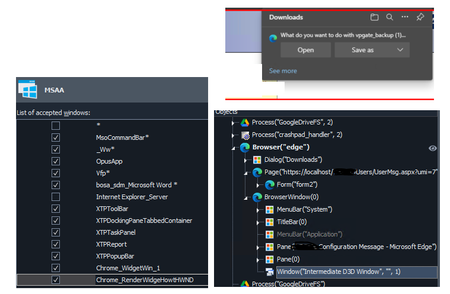
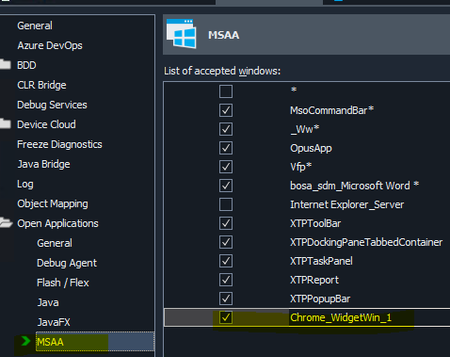
ContributionsMost RecentMost LikesSolutionsRe: How to provide Entire suite as Project test in Jenkins for Test Execute ChandanD This is the Jenkins Pipeline Job I created based on your scenario just an example. Hope this helps...! pipeline { agent any parameters { Choice( name: 'Projects', choices: ['Entier Suite','Project1', 'Project2', 'Project3'], description: 'Select the required Project.' ) } stages { stage('Entier Suite') { when {equals expected: "Entier Suite", actual: "${params.Projects}"} steps { script { try{ downstreamJob = build job: "EntierSuiteJob", propagate: true, wait: true, parameters: [ string(name: 'Parameter1', value: "${Parameter1}"), string(name: 'Parameter2', value: "${Parameter2}") ] } catch (Exception e) { echo 'Exception occurred: ' + e.toString() error("Exception occurred at ${stage_name} --> " + e.toString()) } } } } stage('Project1') { when {equals expected: "Project1", actual: "${params.Projects}"} steps { script { try{ downstreamJob = build job: "Project1Job", propagate: true, wait: true, parameters: [ string(name: 'Parameter1', value: "${Parameter1}"), string(name: 'Parameter2', value: "${Parameter2}") ] } catch (Exception e) { echo 'Exception occurred: ' + e.toString() error("Exception occurred at ${stage_name} --> " + e.toString()) } } } } } } Re: How to provide Entire suite as Project test in Jenkins for Test Execute You need to create a Master Job with dropdown list for entire Suite and all the different projects you need. So that you can run whichever project you need. And this can be more easily created with Jenkins Pipeline. Re: How to provide Entire suite as Project test in Jenkins for Test Execute Looks like you are using "Freestyle Project" but I suggest using "Pipeline Project" gives more options and easier to work. But you can still do with your job too there is an option called "Entire Suite" select it and pass the value. Re: Object Spy doesn't recognize edge browser object download save as rraghvani Excellent yes it does work and all you suggestion was really helpful specially MSAA settings is a trick. Thank you so much for all the support. Re: Object Spy doesn't recognize edge browser object download save as TestComplete - 15.52 Edge - 116.0.1938.62 (Official build) (64-bit) Re: Object Spy doesn't recognize edge browser object download save as rraghvani Yes enabled * in MSAA and its still the same. But the information you provided is really valuable and it helped me to explore more. Will try and see what the other options are to get this. Thanks Re: Object Spy doesn't recognize edge browser object download save as rraghvani Excellent my mistake I was trying different options and took the screenshot before correcting but I did verify its "Chrome_RenderWidgeHostHWND" and "Dialog("Downloads")" is the one I was trying to click on "Save as" and you can see I expanded it. But I'm still not able to recognize the control. As I don't know the exact properties, I was randomly trying to write the code something like this which doesn't work too. var Dialog = Sys.Browser("edge").Dialog("Downloads").Pane(0).Pane(0).Pane(1).Pane(0) Dialog.Find("Name", 'Button("Save as")', 100).Click() Re: Object Spy doesn't recognize edge browser object download save as rraghvani appreciate it for the suggestions. Yes, I did set the value in MSAA in both default and current Projects Properties. but for some reason Object browser doesn't showing the option and even the Object Spy doesn't recognize the control. Re: Object Spy doesn't recognize edge browser object download save as And after this trying to object spy to get the Save as properties but it didn't recognize the control instead identifies the background controls behind the dialog. Re: Object Spy doesn't recognize edge browser object download save as this is what I added the WndClass name to MSAA in my project settings.