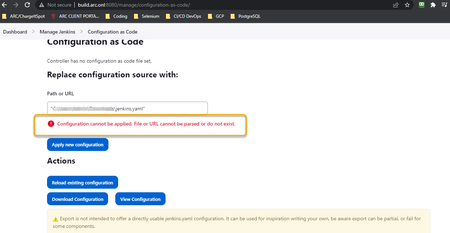
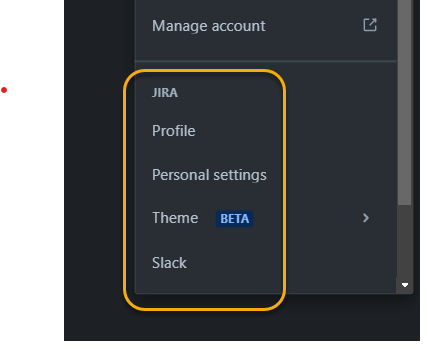
ContributionsMost RecentMost LikesSolutionsRe: Jenkins-Jira/Zephyr Scale Integration - API Key Instructions Out of Date? Thanks so much for the link! Replacing the [YOUR REF] areas that you indicated with our information indeed took me to the correct place to generate an access token. I have asked my admin if there is a permission or configuration that needs to be granted/set up in order for non-admin-role users to see the 'Zephyr Scale API Access Tokens' after clicking into our profile avatars. Unfortunately, overall, the very next step (Configuration as Code) poses a new issue that I'm diving into next. I've tried housing the file in multiple places, but no path is being accepted here. Jenkins-Jira/Zephyr Scale Integration - API Key Instructions Out of Date? I'm trying to get my Cucumber test results to show up in Zephyr Scale. Currently, I'm using the 'Master Thought' (the editor won't let me leave 'master' and 'thought' as one word, which is how the plugin is titled) plugin to generate a 'pretty' test report, and they do show up in Jenkins and are connected to each build. I'm wondering if my API isn't connecting Zephyr Scale Cloud plugin in Jenkins to Jira because I'm attempting to use the wrong key, which is in turn because the directions for generating the key that I need appear to be out of date, or at least don't match what I see in Jira. Following this documentation to connect to Zephyr Scale, step 4 says to enter an API Key for the Zephyr Scale plugin in Jenkins. In that step is a link for generating API Tokens; it says to click on 'Zephyr Scale API Access Tokens' after clicking your Jira Profile avatar here. However, when I click my Jira avatar, I see everything except for a link to generate an API Access Token, as shown below, the difference being clear between my screenshot and the one in the linked doc. Instead, though, when I click on the gear icon to the left of my avatar, I see 'Atlassian Settings', and when I click on that, I see a 'Security' sub-tab that brings me to a place to create API tokens. When I attempt to enter it in a new instance of Zephyr Scale Cloud in Jenkins, though, I immediately get an 'Invalid Credentials' message. This is after a couple of minutes of waiting, as the message you receive in Jira after creating an API keys says it may take a minute or two. I was also unable to enter any value for the Jira Cloud hostname (the placeholder text says it will be created after entering an API key anyway). Any insight is greatly appreciated. Solved