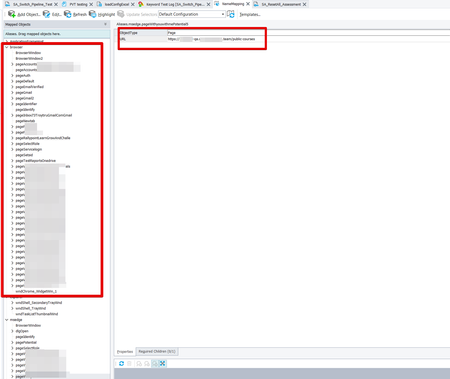
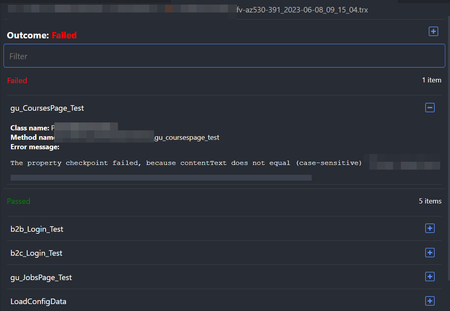
ContributionsMost RecentMost LikesSolutionsRe: Visualizing .trx files from published test results in Azure DevOps Here is the link to VS Code extention that allows viewing trx files: - GitHub - scabana/trxviewer: Home of the vscode-trxviewer extension Here is how it looks like: Re: How do I revert to a previous version of TC? I am having the same issues. Unable to replay or create new tests. Also tried to run sample project from TC. Same result. Version 15.50 did not work for me. Still trying to figure out how to find downloads previous versions. License manager shows only one version 😞 Submitted tech support ticket. Still waiting. The window with the handle 0x00000000 does not exist. This error occurred when the tested window (or control) or its parent object was deleted or recreated right before the method call. For example, you stored a window reference to a variable and then called a method through this variable. If the object has been recreated, then to avoid the error, get the new object before the method call. Tested object: Aliases.browser..... Re: Authenticate with API request or reuse existing authentication state in TestComplete rraghvani wrote: The application that you write will be the Client, and you will send HTTP request/response, to the Server. The Client in this instance will act like a "web browser", which is similar to Postman. Not sure I understand this part. Where this should be done? What is the step number in my example test? Does that mean I should login via API, then send HTTP request (what will be request?) with required headers and then launch browser and go through all actions required in my test? Authenticate with API request or reuse existing authentication state in TestComplete Hello, I am looking for a way in TestComplete to authenticate with API request or reuse authenticated state. I want to test authentication (login) only once and avoid going through login page in all other tests. This could speed up test execution significantly (currently authentication step takes 4-6 sec). I know that TestCompete allows sending HTTP requests Sending and Receiving HTTP Requests From Script Tests | TestComplete Documentation (smartbear.com).However, I am not sure how to implement this with API login, store and reuse authenticated browser state. I was not able to find related solutions in the docs and community answers. I know that this approach is recommended when using other tools like Playwright and Cypress . I would appreciate it if you could guide me on what would be the best way to implement reusing authenticated session in multiple tests. Some context. I do not have much experience with test automation, but I know that our app uses Bearer token and cookie with token sent in headers when user is authenticated. We use Auth0 for authentication and I was able to implement login test in Postman using Auth0 API and user credentials. We have multiple user roles, so, ideally, we would like to store authentication session separately for each user role. We have a subset of tests that can run at the same time with the same account, without affecting each other. Currently most of our tests implemented as keyword tests but we use some scripts too. We plan to run our tests in multiple environments (QA, UAT, production). Example test (currently): 1. (2s) Launch browser 2. (3s) Open login (UI form) 3. (2s) Submit login form 4. (2s) Open Dashboard page 5. (0.5s) Verify dashboard page opened (text is displaying and menu is visible). 6. (2s) Logout TOTAL time: 11.5s. Example test (desired): 1.(0.1s) Login with API or load authentication state from previous test. 2. (2s) Launch browser 3. (0.1s) Apply authentication state in browser 4. (2s) Open Dashboard page 5. (0.5s) Verify dashboard page opened (text is displaying and menu is visible). 6. (2s) Logout. TOTAL time: 6.7s. Thank you, Maksim Re: Authenticate with API request or reuse existing authentication state in TestComplete Hi rraghvani . Thank you for your reply. I understand how to send HTTP requests in TC, I mentioned it in my post, but I think my questions remain unanswered. 1. How can I set header and cookie in browser once I logged in with API request? 2. Does TC provide built-in tools for that? 3. Does TC provide built-in tools to reuse authentication state similar to Cypress and Playwright? (see links in initial post). 4. Example code would be helpful. Thanks How to avoid changing URL in name mapping manually for each object? We created some tests in out TC project. We want to be able to run them in multiple environments (each environment has base URL and some test data) so we created project variables like baseURL. We use a script running before tests to load base URL from configuration file, so we do not need to update variable manually in each test when we want to run tests in specific environment. The problem is that in Name Mapping objects still have hardcoded values like "ObjectType: URL, Page: website-qa.com". Now when we run tests in UAT env, test step opens page correctly in UAT env, but fails because object in Name Mapping is pointing to website-qa.com. This can be solved by using wildcards Using Wildcards | TestComplete Documentation (smartbear.com). However, we have dozens of objects in Name Mapping under browser object pointing to some URL. Updating them manually will be very time consuming and every time we create new test by recording script, new objects with URLs are added to Name Mapping. Is there a way to make our tests work in multiple environments without updating URL for each object in Name Mapping manually? Thank you, Maksim