Satheesh-rajuOccasional ContributorJoined 3 years ago13 Posts1 LikeLikes received2 SolutionsView All Badges
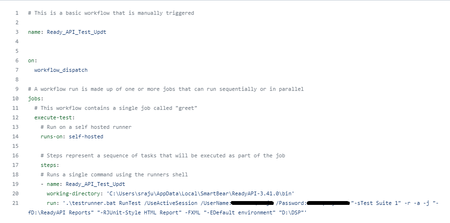
ContributionsMost RecentMost LikesSolutionsFeasibility to check the page loaded in LoadNinja Hi All, I am working on a load testing script and need to add a validation to check if the user is navigated to a specific page during the test. Is it possible to achieve this using JavaScript validation? Sample JavaScript function used function _jsCheckPageNavigation() { const expectedURL ='www.example.com/page1'; const urlToCheck = window.location.href; if (expectedURL===urlToCheck){ return true; } else { return false; } return _jsCheckPageNavigation(); JavaScript validations added are failing with 200 response code Hi, All the JavaScript validations in the test steps are failing with the error - "invalid syntax, or an error occurred during the run." during the execution where the response code displays as 200 in the test results. The JavaScript validations are working without any issues when the script is played back without any load applied. Any pointers to understand the issue? SolvedNTLM authentication resulting in 400 Bad Request Error Hi All, Am having a GET request which uses NTLM as Authentication (WWW-Authenticate: NTLM ). To test this request from ReadyAPI, I used the Authorization profile NTLM in the request and add a header 'Authorization: NTLM' to the request. But when the request is trigger from ReadyAPI am getting 400 Bad request error. Could you please help me in understanding the issue here. PFB the request screenshot if the header Authorization: NTLM is removed from the request then its giving a 401 error even when the authorization profile selected is NTLM Re: Automating OAuth 2.0 with Client credentials grant Hi nmrao , Checked the lib folder, no files present with name containing 'ivy'. Re: ReadyAPI license details not getting fetched while running tests from GitHub Actions Hi All, This issue is fixed by following the document. https://support.smartbear.com/readyapi/docs/general-info/licensing/id-based/headless.html Automating OAuth 2.0 with Client credentials grant Hi All, Am having an OAuth 2.0 authorization with Client Credentials Grant used in my API. I configured the authorization profile in the Auth manager as shown below and the token is expected to refresh automatically as per the settings (Shown Below). But noticed that the token is not automatically refreshed when the test suite is ran and every time before executing the test suite I need to manually create new token using the get token option. Is there any option in automating the process is creating the authorization token ? I tried automating the same by adding a groovy script to the test suite. but getting the error " java.lang.NoClassDefFoundError: org/apache/ivy/util/MessageLogger" PFB the groovy script used: @Grab(group='org.codehaus.groovy.modules.http-builder', module='http-builder', version='0.7.1') import groovyx.net.http.HTTPBuilder import groovyx.net.http.Method import groovyx.net.http.ContentType def clientId = 'Your_ClientID' def clientSecret = 'Your_Client_Screctid' def tokenUrl = 'https://dev.test.com/oauth2/token' // First, we obtain an access token using the client credentials grant def http = new HTTPBuilder(tokenUrl) http.request(Method.POST, ContentType.URLENC) { req -> body = [ grant_type: 'client_credentials', client_id: clientId, client_secret: clientSecret ] response.success = { resp, reader -> // Extract the access token from the response def accessToken = resp.data.access_token // Now we can use the access token to make API requests makeApiRequest(accessToken) } } // Finally, we can use the access token to make API requests def makeApiRequest(accessToken) { def http = new HTTPBuilder('https://api.example.com') http.request(Method.GET, ContentType.JSON) { req -> headers['Authorization'] = "Bearer $accessToken" response.success = { resp, reader -> // Handle the API response println resp.data } } } Re: Runing a composite ReadyAPI project from Github Actions Hi, This I have solved with some changes in the workflow file. Modified the run command as run: | C:\Users\username\AppData\Local\SmartBear\ReadyAPI-3.41.0\bin\testrunner.bat "-sTest Suite 1" -r -a -j "-fD:\ReadyAPI Reports" "-RJUnit-Style HTML Report" -FXML "-ETest" D:\DSP ReadyAPI license details not getting fetched while running tests from GitHub Actions Hi All, Kitt , nmrao Am getting error like 'No Valid license for ReadyAPI' in the log when running the tests from GitHub Actions as shown below. Could you please help in fixing the same? SolvedRe: Runing a composite ReadyAPI project from Github Actions Hi Kitt , nmrao , When the project is configured to github the project is changed to composite project as shown below and dont have any <projectname>.xml file ( As shown below) Project file before configuring GItHub When GitHub is configured in ReadyAPI for the project When I tried to generate the Command line from the TestRunner GUI from ReadyAPI, only the destination of the composite project is shown as the Default Environment argument Am able to run that command in the command prompt in my local machine and the tests are running without any errors. The mentioned error " No Project file specified" is displaying only when I try to run the tests from Github Actions with the same command line generated from TestRunner GUI. Runing a composite ReadyAPI project from Github Actions Hi All, nmrao Am trying to execute a test suite from ReadyAPI project in GitHub via GitHub Actions on a self-hosted runner. As per the documentation available on ReadyAPI, I wrote the following workflow file in GitHub. But while running the workflow from Github am getting the error "No project file is specified." To upload the project to GitHub the ReadyAPI project is converted to composite project and the composite project don't have the readyapi project.xml file. Any suggestions on how to write the command line in the workflow file to run the ReadyAPi tests from Github Actions PFB the workflow file am using now (which is giving the error "No project file is specified.) Solved