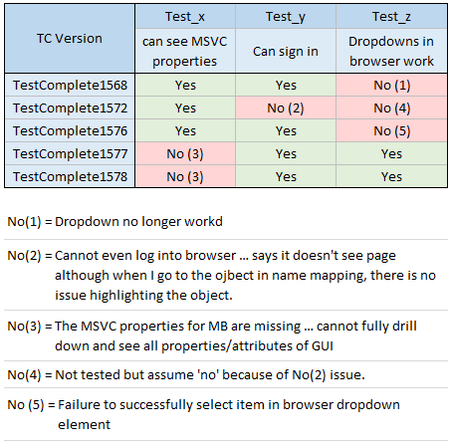
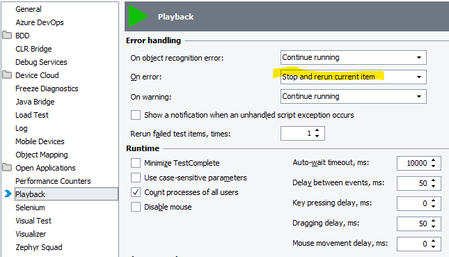
ContributionsMost RecentMost LikesSolutionsRe: TestComplete detects the table control itself, but none of the internal row/cell objects are exposed So something like this wouldn't work? (Note: all the code examples i list here are in Javascript). var list = Aliases.Icad.dlgAECStylesManager.Item.SysListView32; var rowCount = list.wItemCount; for (var r = 0; r < rowCount; r++) { for (var c = 0; c < 6; c++) { Log.Message("Row " + r + ", Col " + c + ": " + list.wSubItem(r, c)); } } Re: TestComplete detects the table control itself, but none of the internal row/cell objects are exposed You might already be aware of the below but it took me a while to figure out ... Additionally, for some tables, it is not always obvious how to retrieve a cell and retrieve the cell data (because of the objects the developer used to create the table). Sometimes you can access table data as you would expect (like you would in Excel) using the table.Cell(row,column) function like shown below: function getRow() { var table = Aliases.MyApp.ATable; var numOfRows = table.RowCount; var foundRow = -1; for(let row = 0; row < numOfRows; row++) { var cellText = table.Cell(row, 0).Text; if(cellText === ItemName) { foundRow = row; break; } } return foundRow; } and then sometimes you access table data through an iterator like shown below function Update_Table_() { // Comment: // The table contents in the file has a '\n' at the end of each line and instead of the columns being separated // by a comma, the columns are separated by '|' verticle line. var table = Aliases.myApp.ATable; var items = table.Items; var totalRows = items.Count; var contentForFile = ""; for(var row = 0 ; row < totalRows; row++) { var item = items.Item(row); var description = item.Description_2.OleValue; var stringVal = item.StringValue.OleValue; var name = item.Suffix.OleValue; var units = item.UnitsName.OleValue; contentForFile = contentForFile + `${name}|${stringVal}|${units}|${description}\n`; } aqFile.WriteToTextFile("C:\\Temp3\\DescriptionSortAscending.txt", contentForFile, aqFile.ctUTF8, true); } Re: TestComplete detects the table control itself, but none of the internal row/cell objects are exposed If you can't find any way to actually access the table object, you can always use the OCR table recognize feature: function OCR_Table(tableObject, hasHeader = true) { // -- OCRTable Object --- // Specify the preferable search area var searchPref = spNone; // Recognize the table content var table = OCR.Recognize(tableObject).DetectTable(searchPref, hasHeader); return table; } You can find more about this at the following link: TestComplete - Detect Table Re: General issues interacting with Desktop/Web app Thanks rraghvani , I ended up submitting a case ticket. If there is a solution/fix I'll post it here. General issues interacting with Desktop/Web app Main Question: Does anyone else use TestComplete to test a C++ MFC (Rogue Wave + Stingray) application? If so, are you able to see the MSVC attributes when using TestComplete version 1577 and/or 1578? Background: Today I've spent testing out different versions of TestComplete. Version 15.68 through 15.76 have no issues accessing the MSVC properties (attributes) of the C++ application. However, version 15.77 can no longer see certain attributes for the C++ application. However, version 15.77 is the first version that can successfully interact with dropdowns in a browser (chrome 141). I cannot downgrade the version of Chrome. Currently I am forced to use version 15.76 or earlier for testing the desktop application and version 15.77 or later to test the web applications. This is not optimal and am concerned about the more recent versions not able to access the MSVC properties. Re: Issue with edge browser I see the same issue. I'm still on TestComplete version 15.68.8.7 x86. I'm glad to hear others are seeing this and it's not just me. I'll have to upgrade to the latest version. If anyone here upgrades and it resolved the problems, let us know. Re: OCR Checkpoint posting a warning I've wanted this for a long time but never put in a feature request for this. There is a 'Tools | Current Project Properties' which will allow you to chose what happens when your test had an error (do you want to keep running or stop that test and go to the next one). This is about the closes you will get. However, there are some checkpoints which I would like to log as an error but continue running (especially image compares or flakey checkpoints I need to improve). It would be nice to have the option on each checkpoint, "do you (a) want to stop or (b) keep going". For me it would be nice for it to still show as an error though (or some indicator between error and warning ... something more critical than just a warning but not as critical as an actual error ... not red ... not yellow ... but maybe an orange which would mean 'flakey or bad coding or unreliable checkpoint which needs to be fixed/improved'). And OCR checkpoints can be flakey at times for sure depending, I guess on how the machine is feeling that day :|. If you create a feature request for something like this I would definitely give it a thumbs up. Re: Regex Checkpoint Javascript HELP! It looks like Hassan_Ballan is correct in that it only works for string values unfortunately. Re: Regex Checkpoint Javascript HELP! I don't know if you need 'RegExp' before the regular expression. Can you try just putting "-?\b\d+\b" in the last argument instead of RegExp("\d+"). Does that work? Allow 'Group' objects to be used as Log Folders It would be so nice if we had the option to use the 'Group' object as a 'Log Folder'. I use Groups heavily to organize my tests. I am guessing everyone does. It would be nice if the 'Group' object had the option as to whether or not you wanted to use the group in the log to group the results. Currently, you must use the 'Append Log Folder' and 'Pop Log Folder' to create this hierarchical folder structure. However, if you have already used Groups to create the hierarchical structure in the code, why can't these Group objects/feature be used to group output in the results? I understand that a tester might now want each Group object inserted into the results, so it could be an option in the Group dialog, as to whether or not you want to use a particular Group object to hierarchically structure your results. Why? I would be okay with using the 'Append Log Folder' and 'Pop Log Folder' features, but this will add too much bulk and clutter to the test. It will make the tests more difficult to debug. This would be a god-send if this could be implemented. Additionally, It would be really nice if we had the option to write comments to the log as well. Comments look great in the keyword tests because they have the ability to span multiple columns of the keyword test area, plus they are blue ... this makes them ideal for visual separators in your work. This would be another god-send if we had the option to print these out to the results as well. If it is too difficult to make these into links in the results (so that when you double click on them it would take you to that location in the test suite) that would be okay. It would still be well worth the effort to implement; at least for me.