pkudrysFrequent ContributorJoined 3 years ago124 Posts41 LikesLikes received5 SolutionsView All Badges
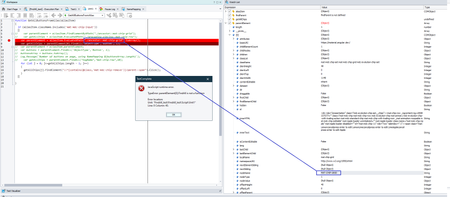
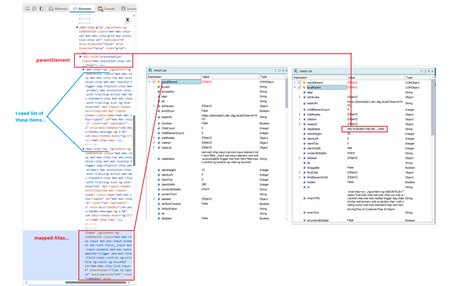
ContributionsMost RecentMost LikesSolutionsRe: TestExecute 15.73 not working: 'Parent object not found' The problem of using old TC versions is, that they does not support recent browsers. And in our corporate environment, our browsers are managed by the company policy and they are simply updated as soon as the new version is out. Which makes the old TC versions practically useless. It's outrageous that they are unable to fix such critical issue for such a long time. We even provided reproducible steps and sample project several months ago! They are pretty agile when it comes to increasing prices and calling us to upgrade earlier to "save" money. But they seem to be quite incompetent, when it comes to bug fixes. We are really disappointed and seriously considering lowering number of TC licenses. Re: TestExecute 15.73 not working: 'Parent object not found' I just replied to the last support's answer to my ticket with "slightly unhappy" tone, demanding escalation of the issue to someone responsible. It's absurd that we are paying a premium price for crippled product, which forces us to use several versions old release. Not to mention that we are wasting our time trying every single new release, only to find out that the bug is not fixed yet. Re: The object does not exist Hi, what you are experiencing, is most probably a problem discussed here: TestExecute 15.73 not working: 'Parent object not found' | SmartBear Community The only reasonable solution for now is using 15.71 or lower and wait for the fix. The only other solution is to add WaitFor... methods here or there. But due to the semi-random nature of this issue, it's almost impossible task. One would have to add WaitFor almost everywhere. Re: TestExecute 15.73 not working: 'Parent object not found' Unfortunately, 15.76 did not fix the problem. And there is no news regarding this issue from support. Guys, if you are experiencing these random "element not found" errors, please contact TC support regarding this problem and link this post. We need to make a pressure on them. I even provided a reproducible sample project showing this issue. It's absurd that such critical bug is not fixed after 4 months of reporting it. Re: TestExecute 15.73 not working: 'Parent object not found' Hi folks, just released TC 15.76 may eventually (finally) fix the problem with WaitAliasChild! I can't test it right now, but I hope the problem is solved ;) Fixed regression that caused errors when using WaitAliasChild().Exists on non-existent windows. It restores behavior from version 15.71. Re: getting "FindAll is not a function" error Hi, thank you for the suggestions! Yeah, I will most probably have to use one of these workarounds. To be quite honest, I don't quite like them, because they add unnecessary complexity and hardcoded xpaths ;) I would still prefer to use aliasElement as the reference and fnid its parent or certain ancestor. Do you know what's funny? As I mentioned before, FindElementByXPath failed to find the ancestor. You explained that TC uses an outdated JS, which may be the cause of this issue. However, I found out, that EvaluateXPath does exactly what's expected to do! It finds the expected ancestor element, which FindElementByXPath fails to find. The problem is, that it returns an object, which is again not compatible with FindElement and other find-related functions :D As you can see here, the EvaluateXpath found proper element. But FindAll fails with "FindAll is not a function" error. Re: getting "FindAll is not a function" error It's an Angular-based app. I just found a public sample page, where this can be tested: https://material.angular.dev/components/chips/overview#autocomplete I've updated the test project with this particular page and elements. FindAll_test.zip Basically, I need to find all mat-chip-rows and click [x] button for each row. Of course, I know there is an easy way to achieve this by using name mapping and simple loop. But I can't use it that way. This project is just a simplified sample. In original project, I'm collecting all form inputs (using the complicated xpath) and do various things for each input. Basically collecting IDs/values, storing them in JSON, eventually loading IDs/values from JSON and filling individual form inputs. Therefore, I'm working on a generic method, which should work with various forms, containing variable number and types of elements. Re: getting "FindAll is not a function" error Thanks for the investigation! Yes, this approach kind of works. I can retrieve the mat-chip-rows this way. The problem is, I can't do anything with them :) They can't be clicked or used as a reference for any of the Find functions (to find certain element in them). Getting the same "xxx is not a function" error. In a meantime, I tried slightly different approach using FindElementByXPath using aliasItem as a reference. But to my great surprise, even this approach does not work. It simply does not find the aliasItem's ancestor element, even though the same xpath works fine in chrome dev. mode. var findParent = aliasItem.FindElementByXPath("./ancestor::div[contains(@class,'w3-row')]") Re: getting "FindAll is not a function" error Thank you for your investigation! I really missed the part about Object Browser requirement. Unfortunately, the solution you are suggesting is not what I can use. The above sample is just a simplified example, not the real-world problem. If you check my original code in the first post, I need to get the list of mat-chip-row tags, which are located on the same level as the inputElement (alias item). And because watch list shows directly what I want under the node parentElement property (of the obtained alias element), I hoped to use it in my code. Is there another way to get the list of items according of my needs? Using alias element, pointing to the input, instead of direct parent element, is apparently not an option? In other words, is there a way to get a direct HTML parent (not mapped parent) of an element, which is referenced by the Alias object? Re: getting "FindAll is not a function" error Hi, thank you for the reply. inputElement is filled with the alias object and parentElement is a property of the inputElement. I've created a simple test project showing the issue: FindAll.zip As shown on the previous image, localParent appears to be the same object (the structure of the object), like inputElement, so I'm a bit surprised FindAll does not work with it. Any idea how to access the object properly?