tender82Occasional ContributorJoined 3 years ago8 Posts2 LikesLikes received1 SolutionView All Badges
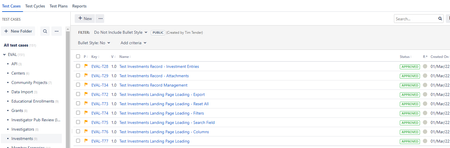
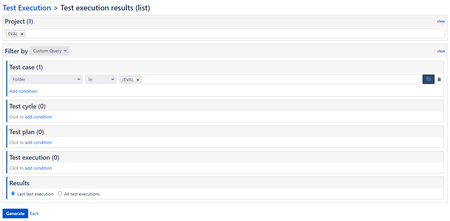
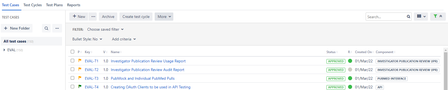
ContributionsMost RecentMost LikesSolutionsRe: Backspace in Test Script Steps Automatically Removes Space After Previous Word Unfortunately, I am still seeing the issue and haven't heard of any fixes or workarounds yet. It's a bummer as this has been around since at least Mar '22. SmartBear, any chance we can get this fixed? Re: Is It Possible To Show Last Execution Date on the Test Cases Screen? I posted this to the ideas forum after support suggested I do so. Please feel free to upvote this... https://zephyr-scale-cloud.ideas.aha.io/ideas/TM4JC-I-683 Re: Is It Possible To Show Last Execution Date on the Test Cases Screen? In thinking more about it, I would much rather prefer to see that information here in the test cases area anyway. If it were here, I could easily do a sort or filter for cases not executed during this release and quickly add them to a test cycle for end-of-release regression. Right now, it's only a colored dot to indicate if the test has ever been executed and what its last status was. Having a date there would be super helpful. Re: Is It Possible To Show Last Execution Date on the Test Cases Screen? Hey Josh! Thanks for the reply and the suggestion. I'm noticing that while that mainly works, it's not showing any of the cases that haven't been executed yet. Here's the inputs I used to generate the report (image attached). I basically grabbed all of the cases from my project (EVAL) and then pulled in all cases from the folder /EVAL. I tried futzing with the 'Test Execution' section (not pictured) but even when I change it to Result > Not In > Pass, it only shows 3 test cases (2 that have failed and one that was skipped) and not the ones that have never been executed. Is It Possible To Show Last Execution Date on the Test Cases Screen? Right now, you can see whether or not a case was executed and what that execution status was (pass, fail, etc) with the dot on the main test cases page. What I am struggling with is determining when the last execution was for all of my cases. I don't know how to actually determine which of my, say 120, cases have been executed in this release (and get a list of the ones that haven't been checked yet). I've looked through the reports and I can't figure out how to achieve this. Any help would be appreciate. Thanks! Tim (Image of the test cases page showing the green circles (execution status) next to the test case status.) Re: Running Traceability Matrix Fails When Filtering by Test Cycle Update to this... a ticket has been put in and acknowledged. Feel free to reference TMJCSUP-5641 Cannot Save Test Case When Precondition Section is Collapsed. Running Traceability Matrix Fails When Filtering by Test Cycle When I attempt to filter by test cycle for the traceability matrix report, I get a 400 error. Repro: 1. Go into Traceability Matrix. 2. Choose your project. 3. Filter by 'Test Cycle'. 4. Choose a test cycle. 5. Settings are defaulted to 'Coverage -> Test Cases'. 6. Run it. 7. Get error. See the attached file for the error messages from the console. SolvedBackspace in Test Script Steps Automatically Removes Space After Previous Word Hi guys, In the test script steps, I'm having a weird issue where the text editor isn't respecting the backspace as it should. Repro: Type the word 'hello' Type a space Type the word 'world' Hit backspace until you get to the 'w' and notice it works fine Hit backspace one more time to get rid of the 'w' and notice that it backspaces the space between 'hello world' as well, positioning the cursor after the 'o' in 'hello' This is super frustrating. I noticed that it doesn't do this in the 'objective' or 'precondition' in the details page. Any chance that this could be fixed?