dhundleyRegular ContributorJoined 3 years ago253 Posts61 LikesLikes received16 SolutionsView All Badges
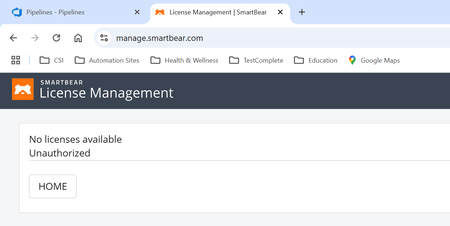
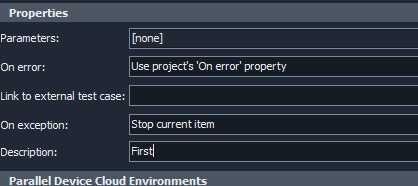
ContributionsMost RecentMost LikesSolutionsRe: execution plan properties description blanking out i am starting my retirement after this Friday so i'm not going to be here long enough to submit a case to the support team and be around to see if they fix it. i've enjoyed all the help and support from this community over the years. Merry Christmas and Happy New Year to you all! Re: execution plan properties description blanking out i first want to know if anyone using 15.80 is seeing this issue. if so, then i will report the issue to smartbear and back off to 15.79. thanks! execution plan properties description blanking out i just upgraded my testcomplete to 15.80. on the execution plan properties in the Description field i can type some text but as soon as i click away from it, the text i entered disappears. anybody else seeing this? Re: Renaming a project suite under git control i used testcomplete to perform the renaming as you suggested but for the first of two cloned repos it would not allow me to do the commit/push from testcomplete. i was, however, able to commit/push from the git context menu on the windows folder. for the second of the two i was able to do everything from testcomplete. right after doing the rename in testcomplete both times, the projectsuite had the question mark icon next to it. i used the source control context menu to do the Add process which converted it to a plus sign. The end result was that i now have the original and two successfully cloned and edited copies that have the correct and distinguishable names when i open them in testcomplete. thanks for your help Re: Renaming a project suite under git control I keep getting this error when i try to commit fatal: Unable to create 'C:/Users/david.hundley/Documents/TestComplete 15 Projects/NuPoint_TDA/.git/index.lock': File exists. yet if i do a search for *.lock in the TestComplete 15 Projects folder it says there are no items that match my search Renaming a project suite under git control does anyone have any experience with renaming a project suite that is under git version control? i have a project suite that essentially has three projects in it but i want to split them apart into three separate project suites. after cloning the project suite and doing the necessary editing to remove the other two extraneous projects from each of the three new ones I'm left with the problem that all three project suites have an identical name for the .pjs file. if i rename the .pjs file inside test complete it will have the git "?" icon. Can i simply right click the top level project suite when i have the project suite open in test complete and perform a source control -> add? or would it be better to rename the <suitename>.pjs file (and the <suitename>.pjs.tcLS and the <suitename>.tcCfgExtender files) in the windows folder? or is it maybe a combination of both these things? Just trying to avoid any issues in git. i've cloned projects before but i've never cloned a project suite and just wondering if anyone out there has. SolvedOCR service failed. request contains invalid argument wanted to post this here before i open a case with smartbear. a few weeks back i started noticing that some of my test cases were getting this OCR service failed error message when it was attempting to click on a tab object to select it. The details of the message are: The OCR service failed to process the document. Details: Image dimension: 2364x23 Size: 2178 bytes Hash: bedd9dc113a17fb2d4ba39c6a7bcc41e Request execution time: 35250 ms Server: https://ocr.api.dev.smartbear.com Status code: 500 (Internal Server Error.) Error message: Request contains an invalid argument i can run this test case on my local workstation without any issue and if have run it on our automation VM successfully using the Network Suite. But when it runs on that same VM having been triggered by an Azure pipeline it takes this error (see attachment). at first i was using the OCR.Recognize in this manner OCR.Recognize(Aliases.NuPoint.frmContainer.MdiTabGroupControl).BlockByText("Teller").Click(); when that starting getting the error i developed a function that did the recognize on the whole tab structure, let objTabs = Aliases.NuPoint.frmContainer.MdiTabGroupControl; let objRecognizedText = OCR.Recognize(objTabs); then i got the block count (number of tabs), initiated a for loop looking for the tab text "Teller" then clicked that block and did a break out of the for loop. as i said, worked great locally and on the VM via Network Suite but still fails on the VM pipeline when it encounters the OCR.Recognize statement. let objRecognizedText = OCR.Recognize(objTabs); shown above with the "Request Contains an invalid argument" Has anyone encountered this. my workstation and VM's are running the latest version/release of TestComplete/TestExecute. SolvedRe: Error when accessing license management site on Chrome that worked! Re: Error when accessing license management site on Chrome nope. i had completely logged out over the weekend and this morning i am still seeing the same thing on chrome. works fine though on Edge Error when accessing license management site on Chrome this morning I, and another colleague, are receiving this error when we attempt to open https://manage.smartbear.com/ using Chrome. if we open it with Edge it prompts for our creds and comes up normally but even after doing that we still get this in Chrome anyone else having this issue this morning? Solved