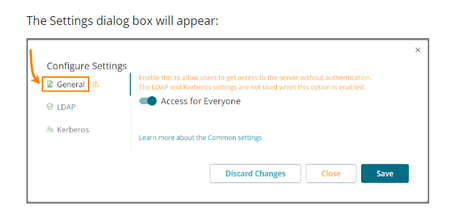
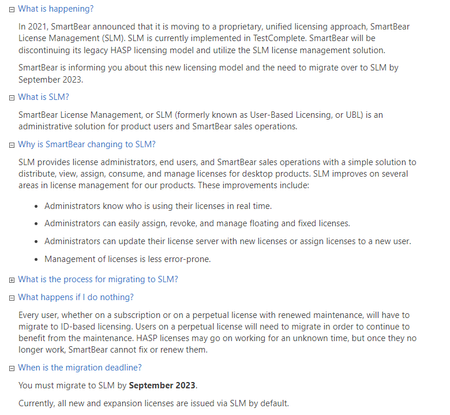
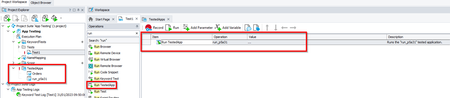
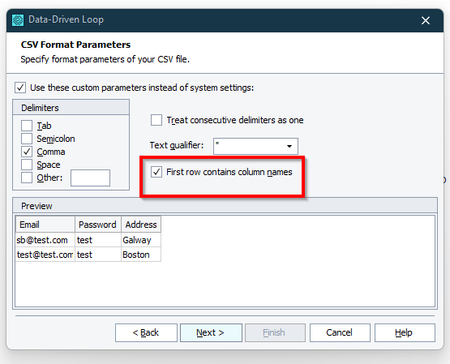
ContributionsMost RecentMost LikesSolutionsRe: End of Life for Support & Maintenance for perpetual licenses. Hi lclark I would suggest raising this with our support team as they would be best placed to get back to you on this and the specifics of your licenses. https://support.smartbear.com/ Re: Testcomplete offline On-Premise License Manager Hi tarttdh How did everything go with the configurations? Machine 1 can be set up as the host device and all licenses can be exported onto this Machine. Machine 2 (and any other devices) will need to be able to configured to be able to access Machine 1 and the license. Kind Regards, Shane Re: Testcomplete offline On-Premise License Manager Hi tarttdh, There is the following option "Access for Everyone" which bypassed the need to enter e-mail address. To make a license available to users in your network without them having to input credentials, you can turn on the Access for everyone setting. Please see the following guide on Configure On-Premise License Manager Let me know if that helps, Shane Re: End of Life for Support & Maintenance for perpetual licenses. Hi lclark We have the following Licensing FAQ, which may help with your query. We also have the following guide on SmartBear License Management, which details the new SLM an has a variety of guides / video's about the new license method. Kind Regards, Shane Re: Granting license management permissions to other users? Hi zgibanez License Administrators use License Management to assign, revoke, and manage SmartBear licenses. Please see the following guide on the steps involved to do this; https://support.smartbear.com/licensing/docs/en/work-with-smartbear-licence-management/license-management-for-license-administrators.html Specifically here's the steps to revoke a users access, Release a license (Disconnect a user) Regards, Shane Re: TestComplete Web Module does not interact with Firefox Hi PartyK Currently TestComplete supports Firefox versions; Mozilla Firefox 91 - 102.1 ESR, 94 - 112 (both 32- and 64-bit versions) Reference - https://support.smartbear.com/testcomplete/docs/app-testing/web/supported-browsers/index.html As per eykxas reply if you revert to Firefox 112 it will resolve your issue. Kind Regards, Shane Re: Error while doing PDF extraction Hi tvklovesu It might be your settings, as per the following guide on the requirements; Your computer must have access to the ocr.api.dev.smartbear.com web service. If you have firewalls or proxies running in your network, they should allow your computer to access the web service. Your firewall must allow traffic through port 443. Please let me know if that helps. Shane Re: Starting Android devices on the Server Machine Hi jaredjamieson Have you tried running the Batch File from within TestComplete. You can add the Batch file to the Tested Apps Repository; https://support.smartbear.com/testcomplete/docs/testing-with/tested-apps/adding.html Once added you can have a test step to Run TestedApp; https://support.smartbear.com/testcomplete/docs/keyword-testing/reference/test-actions/run-testedapp.html You could have a Batch file for each Android device and launch from within TestComplete to run the specific device. Please let me know if that helps. Thanks, Shane Re: Excel loop not stopping after finishing the Data Hi vantaku01 When configuring the data loop there is an option to set the "First row contains column names" On the next screen you then have the option to run the file from the beginning to the end or alternatively you can run up until record 30 to avoid any unwanted data being processed; Please let me know if this helps. Kind Regards, Shane Re: Make log entry Bold Hi MW_Didata There is the following Bold Property ref; https://support.smartbear.com/testcomplete/docs/reference/project-objects/test-log/log-attributes/bold.html As per the description "The Bold property specifies whether the text of a message or a folder to be posted to the test log will be displayed in bold font." Please let me know if this helps. Kind Regards, Shane

 StaffStaff