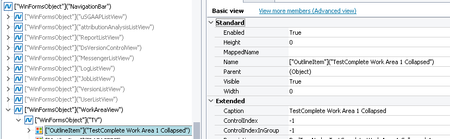
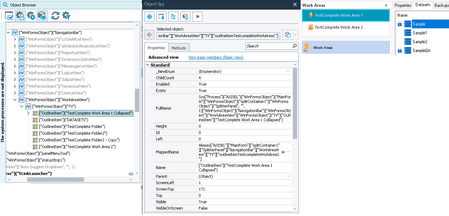
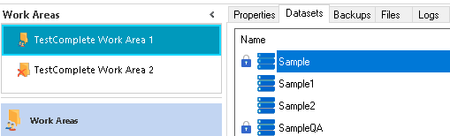
ContributionsMost RecentMost LikesSolutionsRe: TestComplete multiple inquiries / issues Hi rraghvani, Thank you for your reply. 2) I think it's a bug introduced in TestComplete 15.77 version, it wasn't behaving like this before. I am trying to select 2 objects in the script below while simulating Shift key. After executing the test case below whatever I execute afterwards it simulates Shift Key. // Select the second dataset to compare var axisel = Sys["Process"]("AXISEL"); var masterListView = axisel["WinFormsObject"]("MainForm")["WinFormsObject"]("splitContainer1")["WinFormsObject"]("SplitterPanel", "", 2)["WinFormsObject"]("splitContainer2")["WinFormsObject"]("SplitterPanel", "", 1)["WinFormsObject"]("WorkAreaDetailView")["WinFormsObject"]("splitContainer1")["WinFormsObject"]("SplitterPanel", "")["WinFormsObject"]("tabControl")["WinFormsObject"]("tabPageDatasets")["WinFormsObject"]("DatasetView")["WinFormsObject"]("splitContainer1")["WinFormsObject"]("SplitterPanel", "", 1)["WinFormsObject"]("ItemList"); var listItem = masterListView["ListItem"](DatasetName2); listItem["Click"](75, 10, skShift); listItem["ClickR"](75, 10, skShift); Delay(500); masterListView["StripPopupMenu"]["Click"]("Advanced|Compare|Compare Two Highlighted Datasets... "); Delay(1000); Re: TestComplete multiple inquiries / issues Hi Hassan, Sorry about that, I thought instead of creating multiple threads I would ask all questions in one thread. I didn't know the Rules, I will be careful next time and it makes sense. Thanks, Hina TestComplete multiple inquiries / issues Hi, I have few inquiries I thought to list them all at once: How to scroll and click an object that is not visible on screen on desktop application, SetFocus() doesn't work. TestComplete new version 15.77 is simulating shift key while executing test cases, if key method is called anywhere with any parameter. I am working with C#, if it helps. I am trying to execute multiple projects in sequence. I have specified the sequence of test cases to execute in Execution Plan. I have also specified and enabled Projects to run in Test Items under Project Suite properties. Currently I have 2 projects in project suite and when I try to run 1 test case from each project by right clicking project suite and clicking run, it runs the test cases I have selected but when I select all test cases and try to run project suite, it only runs first project, it doesn't run the second project, not sure why it's doing that. Alternatively, please also provide the script to run the project suite from command line using TestComplete as I do not have Test Execute. Thanks, Hina Re: There was an attempt to perform an action on a zero-sized window Hi rraghvani, I have tried all the workarounds suggested by you and by everyone else, unfortunately nothing is working. I would talk to the developer (he is away right now), lets see what he has to say. Thank you so much for all the help everyone!! Re: There was an attempt to perform an action on a zero-sized window The function SafeClick doesn't work. I am still not able to click the object. Re: There was an attempt to perform an action on a zero-sized window I am posting the screenshot of the Object Browser, Properties and the UI: Here are the methods available for this object: While clicking the object, I am not passing any parameters. Re: There was an attempt to perform an action on a zero-sized window Hi Hassan, The steps you listed above are correct, just want to clarify one thing method Refresh works on second attempt if I rerun the test case, on first attempt even if I put Refresh twice it doesn't work. Also RefreshMappingInfo is not available for the object/application I am testing. Re: There was an attempt to perform an action on a zero-sized window Hi rraghvani, I am posting the screenshot of the UI, the object "TestComplete Work Area 1" is always visible, so there's no change in UI when the height and width is 0 vs when it's not 0. Re: There was an attempt to perform an action on a zero-sized window I tried using Sys.Process("AXISEL").Refresh(); in my code, in my first attempt when I run the test case I get the same error as I reported. I tried putting a Delay upto 25000 milliseconds but no luck. In my second attempt it always work, not sure about this behavior. Re: There was an attempt to perform an action on a zero-sized window I am posting a screenshot of the Object Browser, the highlighted object is what I am trying to click: This object is always visible physically, as you can see in the screenshot the object is visible but still the Height and Width is 0. I am also including the screenshot of the object browser after restarting the application, where Height and Width is not 0 and I am able to click the object: