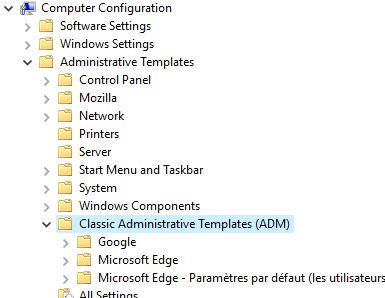
ContributionsMost RecentMost LikesSolutionsRe: TestComplete can't detect elements in Microsoft WebView2 window Hi Frits Could you give us the version supported ? thanks Re: TestComplete can't detect elements in Microsoft WebView2 window Hi the support SB reply about this issue, perhaps a solution at the end of this year ... We regret to inform you that TestComplete currently does not support WebView2. However, we want to assure you that our development team is actively working on incorporating WebView2 support, and we expect it to be available by the end of this year. Re: TestComplete can't detect elements in Microsoft WebView2 window Hi the support SB reply about this issue, perhaps a solution at the end of this year ... We regret to inform you that TestComplete currently does not support WebView2. However, we want to assure you that our development team is actively working on incorporating WebView2 support, and we expect it to be available by the end of this year. Re: The latest version of Edge (114) no longer always opens Mht files. Hi dhundley You must find in "Classic Adminstration Template (ADM)" This screenshot is from window server 2019, it's normally the same on Windows 10 Re: The latest version of Edge (114) no longer always opens Mht files. ok, so try the solution if you need and dhundley too: https://learn.microsoft.com/en-us/deployedge/edge-ie-mode-policies#configure-internet-explorer-integration regards Re: The latest version of Edge (114) no longer always opens Mht files. Hello I find a solution with smartbear support ! in this link https://learn.microsoft.com/en-us/answers/questions/450116/how-to-enable-ie-mode-on-microsoft-edge more exactly : There're two steps required to configure IE mode: Configure Internet Explorer integration Redirect sites from Microsoft Edge to IE mode rraghvani if it's works for you, i think your It manage policies and it configured them for your computer 😉 Re: The latest version of Edge (114) no longer always opens Mht files. rraghvani What is the language OS ? I have a VM in english and an other in french : the one in french doesn't work ! Re: The latest version of Edge (114) no longer always opens Mht files. I apologise for the confusion. I have the version windows 10 22H2 so I don't understand whats the matter I have posted a ticket to the support thanks for your help Re: The latest version of Edge (114) no longer always opens Mht files. yes indeed, the directory Internet explorer always exists I've just tried in windows 11 and it's ok Are you sure you are using win10 ? your capture seems come from win 11...no ? Re: The latest version of Edge (114) no longer always opens Mht files. ok thank you I've just uninstalled IE from windows server 2019 and it's the same thing... It's a mistack !