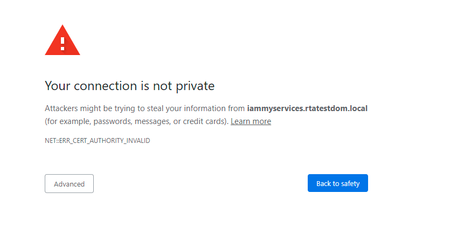
ContributionsMost RecentMost LikesSolutionsHow to apply checkpoint on string value to check if it is integer. In my test cases I want to apply multiple checkpoint lik text value is int, text value is not null, text valu is 10 characters long. How to apply these kinds of checkpoints through scripting just like we do in Selenium. Re: Access web elements inside iframe Hi rraghvani I have passed the same arguments through scripting but it is unable to locate the element as posted in my question. Access web elements inside iframe Hi I'm unable to access web elements inside an iframe. After reading the documentation I'm using the below line of code to launch the browser but still it is unable to access the iframe elements. Browsers.Item[browser_name].RunOptions = "--disable-web-security --user-data-dir=\"C:\\Users\\qpros_nssial\\AppData\\Local\\Google\\Chrome\\User Data\\Default\" --disable-site-isolation-trials -private" Delay(3000) Browsers.Item[btChrome].Run(url) Sys.Browser().BrowserWindow(0).Maximize() Re: How to interact with web element that is inside iframe in scripting Hi Thank you for your reply. Can you please share any sample code to interact with the element inside the iframe. How to interact with web element that is inside iframe in scripting Hi, I usually do automation in Selenium but recently started working on TestComplete. Im automating test cases using python scripts. I want to know how to interact with the element that is inside the iframe. In selenium we do switchToelement but not sure how to do that in TestComplete using python scripting or any other scripting language. Please share any sample code. Re: Bypass your connection is not private Thanks, Marsha_R for your response. Yes fixing the certificate issue is the best solution However there is an alternate way to bypass this error message that I found on official page of SmarBear: https://support.smartbear.com/testcomplete/docs/app-testing/web/general/preparing-browsers/chrome.html Re: Python wait for element visible Hi Marsha_R Thank you so much for your reply. I have gone through the link that you have provided but these waits are for specific system processes. I actually need wait example for a web element just like in Selenium we do wait for element visibility and wait for element to be clickable just like that. Python wait for element visible How to wait for an element to be visible on screen in python? Delay(6000) username = page.FindElement(USERNAME_XPATH) username.SetText(CUSTOMER_USERNAME) Currently, I'm using delay but I want to use the proper method to wait for an element until it is visible on screen. Bypass your connection is not private I am automating a login scenario. When I open the login page in chrome incognito mode it is showing this secure connection page. How to by pass the page? I'm using chrome in incognito mode so this comes again and again even if click on advance and proceed with it. Re: Unable to connect to TestComplete Hi Thanks but I'm using git to send my code to AzureDevops...