Hyung-Mok-LEEOccasional ContributorJoined 4 years ago10 Posts1 LikeLikes received4 SolutionsView All Badges
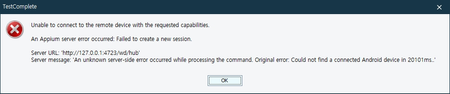
ContributionsMost RecentMost LikesSolutionsRe: Error after upgrading to TestComplete15.40 Hi In conclusion, the issue has been resolved. After reinstalling TestComplete 15.40 around 09:00 today (Korea Standard Time), The license server is easily connected. Maybe yesterday from 18:00 to 21:00, regarding SmartBear license check, I think there was a problem. Thank you very much for your concern. Error after upgrading to TestComplete15.40 Hi there. After upgrading to TestComplete15.40 today, I cannot connect to the license server. It seems that you need to check. After uninstalling TestComplete 15.40 and reinstalling it to the previous version (version 15.31), it connects to the license server. SolvedRe: An Appium server error occurred: Failed to create a new session Finally, the environment should be set up as follows. 1. setup JDK and add Environmental variable "JAVA_HOME" 2. Appium server setup 3. Android Studio setup 4. download and setup the mobile sample from smartbear website 5. connect the mobile phone to my computer. 6. Execute testComplete 15.30 7. Create project suite and project 8. Check the current project properties - Mobile devices > General > Mobile device cloud (BitBar and local Appium) 9. Click "Show Mobile Screen" 10. Input Server URL, Application path, and Parameters (JSON) 11. Finally, I clicked the OK button. Set up Appium on Windows for Testing Android Devices | TestComplete Documentation (smartbear.com) Re: An Appium server error occurred: Failed to create a new session It's going really well as you said. Thank you. One thing I missed was that I didn't install JDK. After installing JDK, I added JAVA_HOME to the environmental variable, and it works properly. Re: An Appium server error occurred: Failed to create a new session I was going to give up on the mobile test using the Appium server. Since you're so interested, I'll have to start over. I've already succeeded in connecting to the mobile using BitBar. Using BitBar was really comfortable and nice. However, BitBar was paid, so he tried to use a free Appium server. I'm a beginner at mobile testing, so in your last post, I didn't understand run "adb devices". Now I understand a little what you're asking me to do. I'll try again and leave a message as you wrote. Thank you very much. How to set the environment for mobile testing. I want to do a mobile test, but even if I try it over a few days, I can't even connect to the mobile. Please tell me in detail about the program that needs to be set up for the mobile test and how to connect to the mobile. What I want to know is to conduct a mobile test using the Appium server. (BitBar has already tried and confirmed successful access.) Please explain so that we can follow it step by step. I'm beginner. I've taken all the free mobile online courses offered by SmartBear, but I don't quite understand. SolvedRe: An Appium server error occurred: Failed to create a new session As you said, I tried to increase the "newCommandTimeout": "600", but the same error occurs. Please check if I'm doing something wrong. I worked as follows and I didn't connect the mobile phone to my computer. 1. Appium server setup 2. Android Studio setup 3. download and setup the mobile sample from smartbear website 4. Execute testComplete 15.30 5. Create project suite and project 6. Check the current project properties - Mobile devices > General > Mobile device cloud (BitBar and local Appium) 7. Click "Show Mobile Screen" 8. Input Server URL, Application path, and Parameters (JSON) 9. Finally, I clicked the OK button. Did I do anything wrong among the activities above? Please let me know. An Appium server error occurred: Failed to create a new session Hello. I'm making the first attempt for a mobile test. So I'm studying Smartbear's Academy course - TestComplete Mobile Automation Engineer. I try to run the sample file while watching the video, but I can't access the Appium Server due to the following error. (For your information, I downloaded the sample file from the site below. https://support.smartbear.com/testcomplete/downloads/samples/) Please Help me.. My Appium Server Information in TestComplete SolvedRe: I can't find the mobile sample file. I resolved this problem. I could download it from the site below. TestComplete Samples | SmartBear Software I can't find the mobile sample file. Hello. I'm making the first attempt for a mobile test. So I'm studying Smartbear's Academy course - TestComplete Mobile Automation Engineer. By the way, I can't find the mobile sample file in the "C:\Users\Public\Documents\TestComplete 15 Samples" directory. There are only "web", "desktop", "BDD" folders in the TestComplete 15 Samples directory. Where I can find the mobile sample files? Thank you. Solved