mgormsenOccasional ContributorJoined 4 years ago19 Posts6 LikesLikes received2 SolutionsView All Badges
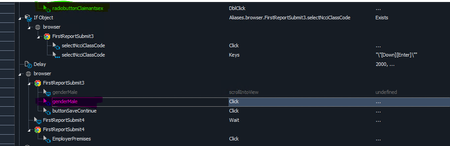
ContributionsMost RecentMost LikesSolutionsRe: Chrome minimizes and reopens every on screen action Not sure why you don't want to upgrade to the latest version. I am guessing you have other things that break if you upgrade? I will say that we have been stuck on 15.71 for months. At first 15.72 was causing issues with our web tests. We kept trying every release when it came out, eventually 15.76 fixed our web issues, but now our Win Apps were broken so we stayed on 15.71. Until this chrome update broke our web tests completely. I put in a ticket for the Chrome issue 2 weeks ago and received a hotfix file last week, Unfortunately, while that hotfix did fix the browser issues, it still broke our Win App tests. We had to upgrade half of our computers to the 15.76 hotfix so we could run our web tests, then the other half had to stay on 15.71 to run our Win App tests. This week though we installed 15.77 and it finally fixed all the issues we have had in our tests since 15.72 came out. Web tests and our Win App tests ran just fine yesterday. So it might be worthy trying the 15.77 update to see if it fixes your issues. If not, you should put in a ticket if you haven't already. If you already have one, you should update it to let them know you are still having issues. Re: TestExecute 15.73 not working: 'Parent object not found' I just found this thread. I have been having issues for months as well. it started on Websites and would only find certain items if I put a debugging pause, then right-clicked on that step and chose "Highlight on screen." It would highlight, and then if I resumed the test it would work fine (unless it got to another item it didn't like). 15.71 was the only version that worked. I put in a ticket. 15.76 fixed the website issue for us, but now our Windows app is broken and doing the same thing. I let them know in the ticket but they said it is a different issue now, so I need a new ticket. So I put one in last week, but not much has happened with it yet. Now with the Chrome/Edge update breaking all of the web tests, we are going to need to update to 15.77 to fix those and I am assuming our Windows apps are going to break again. Not fun. Re: Chrome minimizes and reopens every on screen action Our tests have the opposite issue. When the dropdown opens, the screen minimizes and comes back and the dropdown stays open. It flashes like that for a while then the test fails and says something to the effect of "Could not close the dropdown window." We changed our tests to run in Edge and they mostly worked yesterday, but I guess our computers got the Edge update last night because now the same thing is happening there. Re: NameMapping issues after IF Object statement returns false? I added the 2 second delay to see if that would help. It does not. This is a page with a form to fill out. The steps in question are 10-steps into the form, so nothing is loading or changing on the page for at least 10 seconds before getting here. The SmartBear tech has seen a few customers with this similar issue now and agrees this is likely a bug. They have escalated to the dev team and recommended I downgrade back to 15.71 until they can fix the issue. Re: NameMapping issues after IF Object statement returns false? The SmartBear tech has seen a few customers with this similar issue now and agrees this is likely a bug. They have escalated to the dev team and recommended I downgrade back to 15.71 until they can fix the issue. Re: NameMapping issues after IF Object statement returns false? Sorry, I don't get email notifications on replies, I will need to look into my settings. The scroll was just a left over step from when the test was recorded. It is actually disabled and should be deleted. The double click is not something normally in the test, I added that while troubleshooting, there is no specific reason it is a double-click, just what I happened to select when I added it to the test. The green and pink stuff I was talking about was a poor way to explain that the name mapping itself isn't the issue, it always happens to the very next step after the if statement returns false. If I move an item to before the if, that item will now work, but the next one after the if fails. If I take a step that is working while above the if and move it immediately after it, then that step is the one that fails now. I spent some time with the support tech last week and it seems to be related to the name mapping caching. If we put a refresh name mapping step after (and outside of) the if statement, the test will work fine. That shouldn't be needed though. They are seeing similar behaviors from other clients and are pretty sure this is a bug in the last two versions. They have escalated to the dev team to look into it and recommend downgrading to 15.71 if people are running into this issue in their tests. Re: NameMapping issues after IF Object statement returns false? Oh, hah. Those looked like a single screenshot. When I am paused in debugging mode, refresh is not active for me on the name mapping page. Strange. Re: NameMapping issues after IF Object statement returns false? Thanks for the suggestion. I don't know how to refresh during debugging, so I could not test that. I did add a RefreshMappingInfo for the item that follows the If statement. That does work, but it does still struggle a bit. It does the "Preparing an object recognition hint." stuff and scrolls up and down the webpage looking for the item for 10 seconds after doing the refresh. It does then move on successfully after that though. So it could be a work around, but it is probably easier to just stay on 15.71 for now instead of needing to change a bunch of tests to add that line. Re: NameMapping issues after IF Object statement returns false? Yes, it works fine in 15.71, but in 15.72 and 15.73 it fails. If I downgrade back to 15.71 the test works fine again. It is hard to describe I guess, but you see the If Object line in the screenshot? It is looking to see if an item exists on the screen. In this case it does not. When that If returns false, the very next step following the If statement will throw a name mapping failure message. The name mapping itself is fine. If I disable that If statement, the test will complete fine. If I move the item that failed above the If statement, it will complete that step, but will now fail on the next step that is following the If statement. If I put a debugging pause on the step immediately following the If, then when the test pauses I right click on that step and choose "Highlight on screen" it will highlight and when I hit continue the test will complete fine. If I pause, but do not highlight the item, when I hit continue, the test will still fail like it does without the debugging pause. Hope that helps you understand what is happening. NameMapping issues after IF Object statement returns false? I submit a ticket through support already, but has anyone else seen an issue in 15.72 and 15.73 where a web test will fail with an "Unable to find the following object when executing the Click command:" error immediately following an IF Object statement that returns false? I am seeing this issue on two separate web test suites. If I use debugging to pause the test on the failing line, then right-click and "Highlight on screen" then continue, the test will work. If I just pause, then continue it will still fail. I moved that item above the IF Object statement and it works, but now the next one after the IF fails. In this image, the green item fails when by the pink item, but works when I moved it above the IF. Now the pink one fails. If I go back to 15.71, this does not happen. Solved