How to access elements at "Your connection is not private" Chrome page?
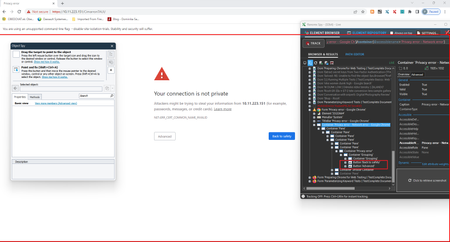


Thank you for the reply. Well, Ranorex is able to control these elements and it works quite well in our tests. Now the big question is, how to deal with such kind of elements in TC? The thing is, it's not just a question of this particular page, but there are also other Chrome UI elements, which needs to be occasionally controlled by tests. For example "Restore pages" popup and similar "native window" elements.

To handle the Chrome "Restore" popup, you can try the following:
I have a brief post on how to run TestComplete using the latest browser version of Chrome and some things you can do to mitigate auto-update [here].
For the issue of bypassing the "connection is not private" page, you can try one of the following:
OR
This option will only work for requests to localhost over HTTP.
Thanks for your suggestions. I will definitely try them. I'm just not sure about this one:
Kitt wrote:For the issue of bypassing the "connection is not private" page, you can try one of the following:
- Click a blank section of the denial page.
- Using your keyboard, type "thisisunsafe". This will add the website to a safe list, where you should not be prompted again
I see no effect of clicking inside the denial page? Where exactly should be entered "thisisunsafe"?

Hi Kitt
I have tried below solutions as per link shared by you:
For the issue of bypassing the "connection is not private" page, you can try one of the following:
OR
This option will only work for requests to localhost over HTTP.
The first option works temporary , if I clear cache , it starts showing up again
The second option does not work for me , I enabled the below option :
but noting happened.
Is there any other way to by pass your connection is not private
Thanks,

neelam , you need to incorporate this into your automated test.
So in javascript it would be something like this:
sitepage.Keys("thisisunsafe");
In your script, you will also have to figure out if this page appeared or if it was already cached and therefore did not appear.
pseudocode:
If I did not reach home page (or the expected page)
Then I must be at 'connection is not private' page and must type 'thisisunsafe'