Forum Discussion


HKosova Alumni
14 years agoAlumniHi Megha,
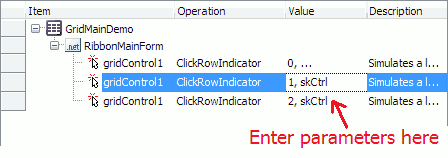
You can input the skCtrl value directly in your keyword test. To do this, simply click the operation's parameter list twice, and when the in-place editor appears, enter the row number followed by a comma and skCtrl -- see the attached screenshot.
Without seeing your test, it's difficult to say what might be wrong. Could you please zip your test project (with the log of the failed test run) and attach it here? If you don't want to post it on a public forum, you can send it privately to our Support Team using this form.
When i played the script ( here it is Keyword Script) nothing happen when the script came at that certain point.
...
I chnaged it to ClickRowIndicator method. But still it does not select the required rows.
Most likely, you selected another object in the Object Spy, for example, a helper panel inside the grid - that's why, you didn't see this method. However, if you record clicks on row indicators, TestComplete will record ClickRowIndicator applied to the grid.
Previously i verified it in Object spy in which it does not display the ClickRowIndicator method.
Yes, skCtrl specifies a click with the Control key pressed, which is typically used for multiple item selection.
I guess this is for Control Key which enable to select multiple selection. But in Keyword I didnt find skCtrl ?
You can input the skCtrl value directly in your keyword test. To do this, simply click the operation's parameter list twice, and when the in-place editor appears, enter the row number followed by a comma and skCtrl -- see the attached screenshot.