Forum Discussion


Manfred_F
10 years agoRegular Contributor
nice!
Her is how I'm doing it:
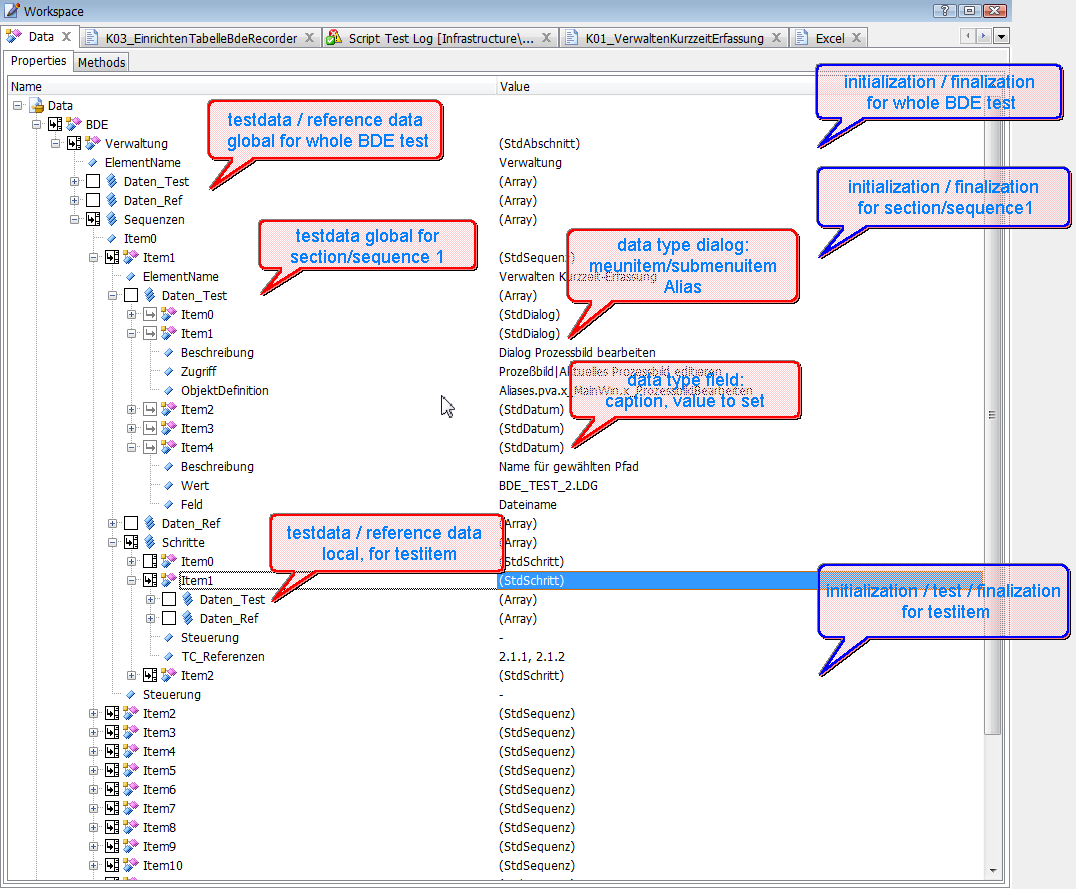
I use ODT to organize test runs. ODT is structured hierarchically, so it enables me to set up really complex tests.
The ODT test Definition tree is absolutely parallel to the log tree, giving me a Maximum of clarity what happened where.
I'm so sad that ODT was cancelled, as only few guys were able to really make use of it!
Have a look on the screenshot: You see a test Definition hierarchy. Test data and reference data can be defined on the desired Level and reused anywhere below. I created two Standard data types for Dialog definitions and for field definitions.
Initialization, testing and finalization can also be set up at the appropriate Level. This enables me to execute single sections, in many cases even to execute single test items.
A powerful library gives me easy Access to the test data:
As an example, in the context of the test Routine BDE.Item1.Item1, I just code
Td = PVA_0.ODT.TestDatenArr(This, 0)
to Access the test data Array of the item. To get the test data of superordinate Levels, I'd have to fill in a 1 or 2 instead of the Zero.
Once having Access, I can
- have TC get/set the text, Click the button or item for test data definitions by simply handing in the context of the control (the Frame or row object where it is actually located);
- open a Dialog by menu or by button for Dialog data definitions.
This works nearly perfect.
What I'm doing now is to make the test run more controllable from outside by configuration. I want to be able to just run BDE.Item5, for example, regardless of whether the ODT items are enabled or not.

Colin_McCrae
10 years agoCommunity Hero
Having never used ODT, a suspect parts of this are lost on me!
But it sounds good. And I like how it matches closely to the log. But with ODT in play, I have no idea how I would separate all this out in some sort of external control file .....
- Manfred_F10 years agoRegular Contributor
For me, the main Advantage of the Approach is the tree structure. You can also emulate this in Excel, but it is not as beautiful there.
A second Advantage is the ability to use generic subtesting for Standard test purposes. This will be very hard to get based on Excel..
About applying the control worksheet:
Of course the data is in the ODT tree (or in any store with ist key in the ODT tree), not in the Excel workbook.
So what has to be done is to execute ODT items on demand.
I Limit the granularity of control to Level 3, meaning Test.Section.Sequence, as the Items can not in every case be executed independently from each other, whereas Sections and Sequences can.
For this purpose, there are two mechanisms: ODT elements can be enabled/disabled or filtered.
There is a Scripting Interface to the ODT tree (enabling) and the ODT classes (filtering). I tried it out: to do filtring, You have to Change properties of the ODT class. Unfortunately, this does not work because of a Software bug: the Change is done, but the result is not written back to the ODT.xml file.
I tried writing the ODT elements "checked" property this way to simulate enabling. This works, I do not have to Change the XML myself.