joffre
14 years agoRegular Contributor
Reading Web Components
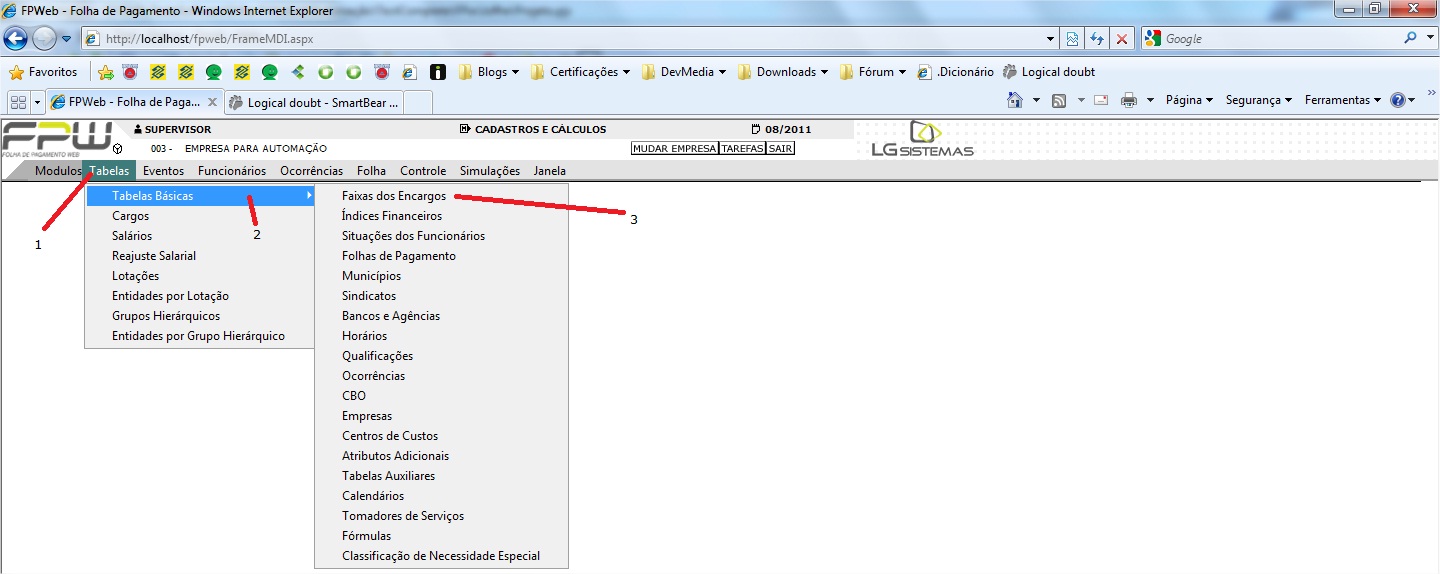
Image attached for a better understanding.
Here are my itens MappedNames:
1
2
3
On all three examples above I'm using the property ".Click()" to open it. Just the last one (3) opens a new frame that is my form.
This names were mapped by TestComplete, but it isn't working. When I run my script it recognizes the first line but doesn't find the two others.
Ideas about how I can fix it?
Here are my itens MappedNames:
1
Aliases.iexplore.pageFpwebFolhaDePagamento.frameFrame1.formForm1.panelBarra32.panelMenuCache10.textnodeTabelas
2
Aliases.iexplore.pageHttpLocalhostFpwebBarraprinc.panelOuterBorder.panelInnerBorder.panelScrollContainer.table.cellTabelasBSicas
3
Aliases.iexplore.pageHttpLocalhostFpwebBarraprinc.panelOuterBorder.panelInnerBorder.panelScrollContainer.table.cellFaixasDosEncargos
On all three examples above I'm using the property ".Click()" to open it. Just the last one (3) opens a new frame that is my form.
This names were mapped by TestComplete, but it isn't working. When I run my script it recognizes the first line but doesn't find the two others.
Ideas about how I can fix it?