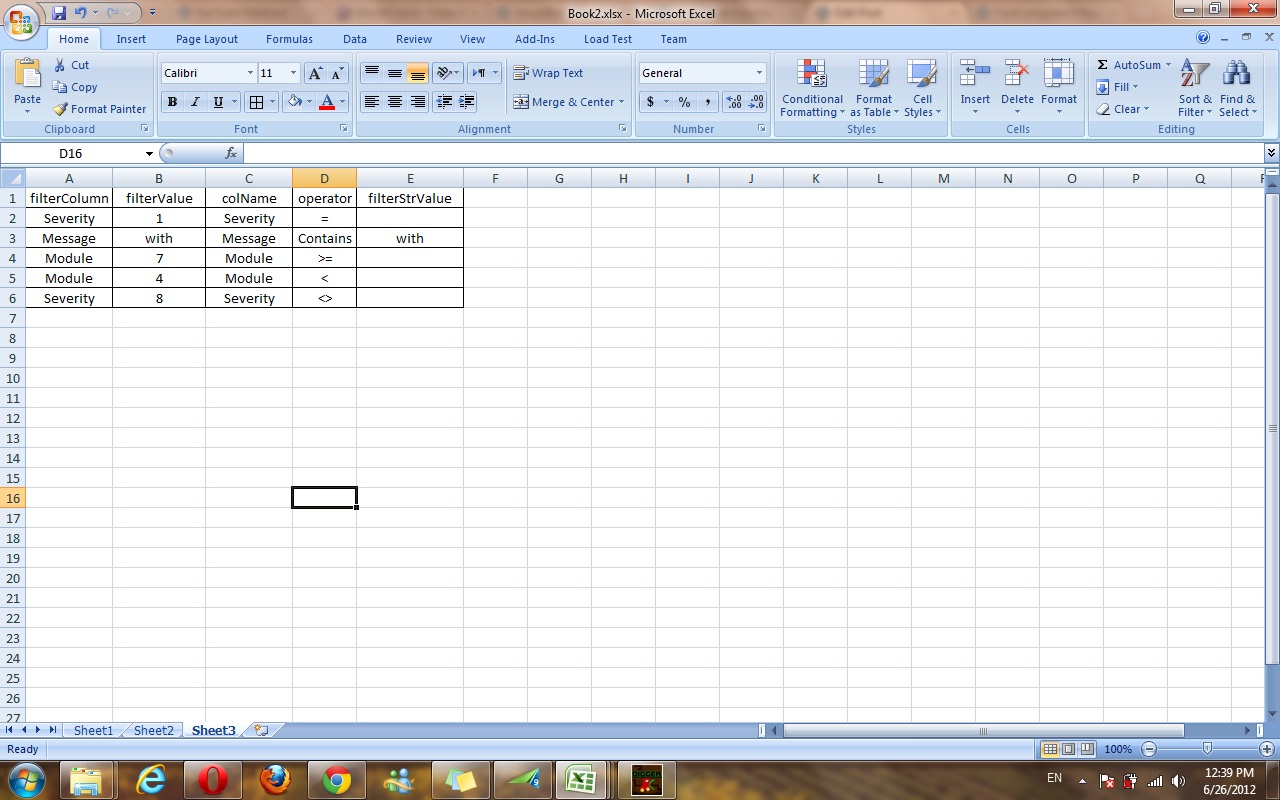
You seem to have a mixed data reading issue described in the following Microsoft KB article:
http://support.microsoft.com/kb/257819As stated previously, ADO must guess at the data type for each column in your Excel worksheet or range. (This is not affected by Excel cell formatting settings.) A serious problem can arise if you have numeric values mixed with text values in the same column. Both the Jet and the ODBC Provider return the data of the majority type, but return NULL (empty) values for the minority data type. If the two types are equally mixed in the column, the provider chooses numeric over text.
For example:
* In your eight (8) scanned rows, if the column contains five (5) numeric values and three (3) text values, the provider returns five (5) numbers and three (3) null values.
* In your eight (8) scanned rows, if the column contains three (3) numeric values and five (5) text values, the provider returns three (3) null values and five (5) text values.
* In your eight (8) scanned rows, if the column contains four (4) numeric values and four (4) text values, the provider returns four (4) numbers and four (4) null values. |
To avoid the problem, you need to store numbers in the filterValue column as text. To do this, prefix the numbers with an apostrophe ( ' ), e.g. '1.
Please also see the following thread for details:
Excel column returns null for non-numeric characters