Forum Discussion

3 Replies
 MarekFricOccasional Contributor
Hi Alex,
I have tried Aliases.SignatusMobile.SettingsAndPreferences.Content.Menu.ClickItem("Send by email")
Error reported to the log is:
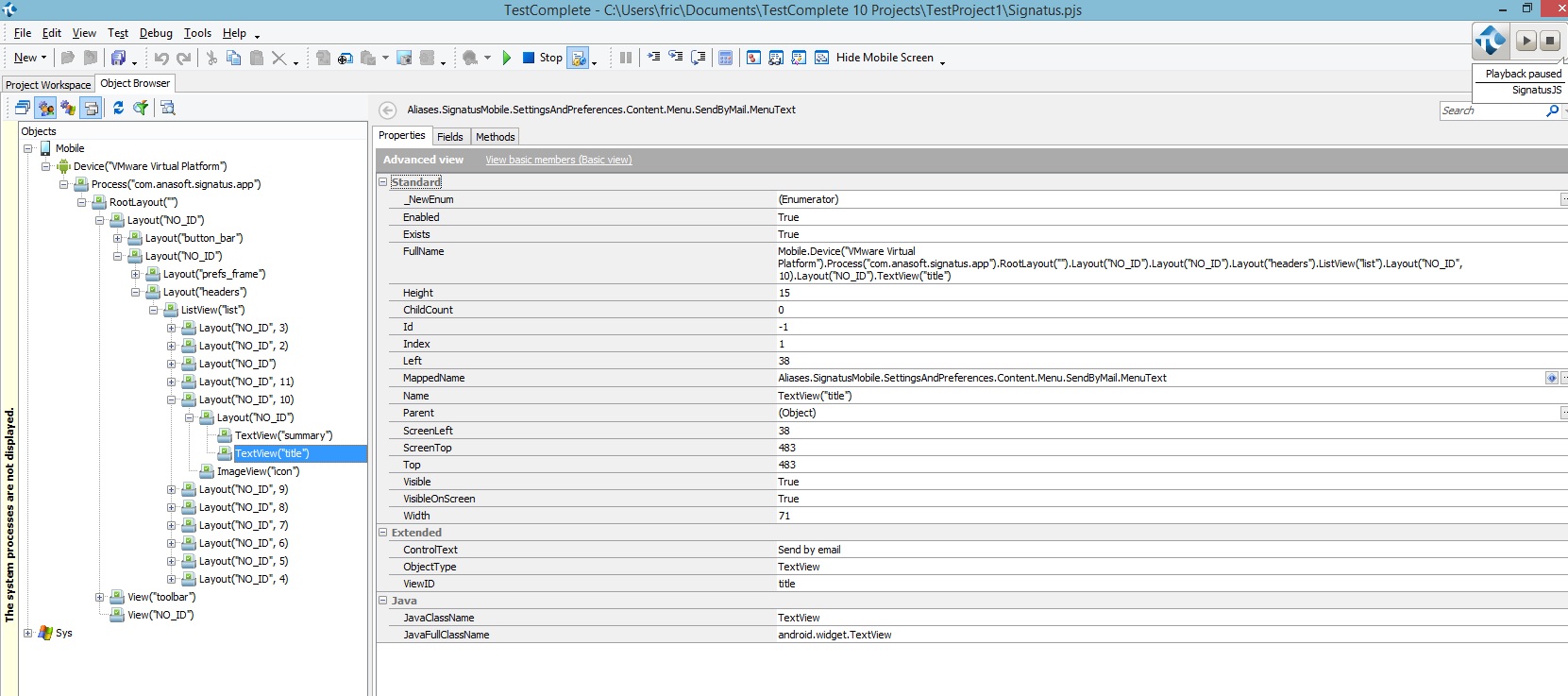
Total number of items: 14. Items: '', '', '', '', '', '', '', '', '', '', '', ... Tested object: Aliases.SignatusMobile.SettingsAndPreferences.Content.Menu (Mobile.Device("SM-T365").Process("com.anasoft.signatus.app").RootLayout("").Layout("NO_ID").Layout("NO_ID").Layout("headers").ListView("list"))
So far nothing from http://support.smartbear.com/viewarticle/75711 didn't help.
If object is visible on screen then method e.g. FindEx works well and I can click on on object, but if object is not on screen then FindEx do not find requested object.
- AlexKarasCommunity Hero
Marek,
> If object is visible on screen then method e.g. FindEx works well and I can click on on object
Have you tried to scroll the item into view as recommended here: http://support.smartbear.com/viewarticle/74368/ ?
- MarekFricOccasional Contributor
Hi Alex,
I tried method listViewObj.smoothScrollToOffset(1)
In the log was: Object doesn't support this property or method.
listViewObj.wItemCount = 14 so listViewObj is ListView with 14 childs(JavaClassName = LinearLayout). Each of this childs has Layout object (JavaClassName = RelativeLayout) and each of them has TextView object on which I want to click.