Solved
Objects getting failed in a Keyword test because of Name Mapping structure keep on updating
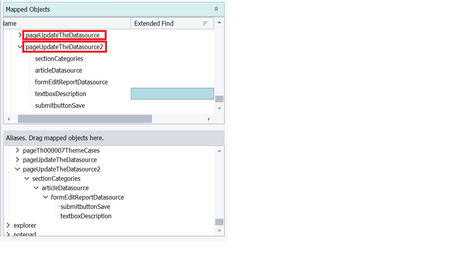


It is recommended that you read and fully understand https://support.smartbear.com/testcomplete/docs/testing-with/object-identification/index.html and https://support.smartbear.com/testcomplete/docs/testing-with/object-identification/name-mapping/index.html
TestComplete also supports https://support.smartbear.com/testcomplete/docs/reference/misc/using-wildcards.html

Hi Raghunandanits, what attributes are in the properties section for targeting the element?
It is likely that you have an attribute selected where the value changes each time the application is run. I have had this happen many times and it causes exactly what you're seeing as it thinks it's a separate element.

Hi WesWhit
These are the properties from the object browser, could you please have a look at it.
It is in Basic view.
Above are the screenshots related to the advance view of properties, if it is not correct, please let me know how to check with attributes in the properties section of the targeted element.
if it is correct please let me know the steps to resolve the issue.
Thanks