Forum Discussion

battieE's avatar
battieE
Occasional Contributor
1 month ago

New Install TestComplete 15.79 : Slowness on some buttons...

Hello Everybody,

We use TestComplete 15.76 because for some buttons, the execution of a scenario rise from 2 to 16 minutes...
I've got the same behavior since 15.77... 15.78 : one ticket, no solution (go back to 15.76...)

This morning I try the latest release, 15.79, push some Guinea Pigs Scenarii, and... always the same Slowness for those buttons.

As someone have this behavior?

12 Replies

  • Hassan_Ballan's avatar
    Hassan_Ballan
    Icon for Champion Level 3 rankChampion Level 3

    One more angle that might help isolate and resolve this slowness issue:

    1. Clean reinstall: Uninstall TestComplete completely, reboot, then install fresh — this rules out corrupted install or legacy config.
    2. Minimal new project: Create a project that only tests the problematic button, mapping it with the most stable property first and minimal fallback criteria — this isolates whether the issue is project-specific.
    3. Playback timeout: Reduce the ā€œAuto-wait timeoutā€ (Project → Playback) to something like 3–5 seconds to prevent long waits when fallback/conditional mappings are evaluated. See documentation on playback options. (SmartBear Support)
    4. Conditional Mapping Criteria: Make your first condition the primary, most reliable match and use fallback conditions sparingly. Poorly ordered or excessive fallback conditions can cause sequential long waits. See SmartBear’s documentation on conditional mapping: Conditional Mapping Criteria.

    These steps minimize delays caused by installation issues, project mapping, or sequential evaluation of mapping conditions.

    šŸ¤– AI-assisted response
    šŸ‘ Found it helpful? Click Like
    āœ… Issue resolved? Click Mark as Solution

  • rraghvani's avatar
    rraghvani
    Icon for Champion Level 3 rankChampion Level 3

    The controls that your application uses, are they supported by TestComplete as shown in Supported Technologies and Applications?

    Are you using extended find or self-healing?

    How long does it take for the Object Spy tool to recognise the control?

    Create a new project, using either keyword test or script, try with and without name mapping, and perform a simple click. Is there any improvement?

    • battieE's avatar
      battieE
      Occasional Contributor

      Hi rraghvani,

      Sorry the Translantor has kept the French release...
      Thank you for the reply ! I'll check the link !

      My Test ware running fine until 15.76... Could some Controles be removed from TestComplete between 15.76 and 15.77... ?

      • rraghvani's avatar
        rraghvani
        Icon for Champion Level 3 rankChampion Level 3

        In English please!

        I understand that your controls are not working as expected. However, I'm more interested in the behaviour of your AUT and TestComplete.

        If you could answer those questions, that would be great. As it would provide a process of elimination.

  • scot1967's avatar
    scot1967
    Icon for Champion Level 3 rankChampion Level 3

    Hello BattieE,

    Could you give us a peek at the code used for these actions and how the buttons  are mapped?  It's hard to tell what may be happening otherwise.   From your description it sounds like visually it will stall on the button click (waiting for the application?  waiting on button identification?  code looping or hard/state based delays?).

    In this post I discussed the use of TestComplete performance monitoring to enhance visibility into what could be causing performance issue in test runs.

    Testcomplete is running really slow on Azure Virtual Machine | SmartBear Community

    ... If you find my posts helpful drop me a like! šŸ‘ Be sure to mark or post the solution to help others out and/or to credit the one who helped you. šŸ˜Ž

    • battieE's avatar
      battieE
      Occasional Contributor

      Hello Scot1967,

      Thank you for your reply !

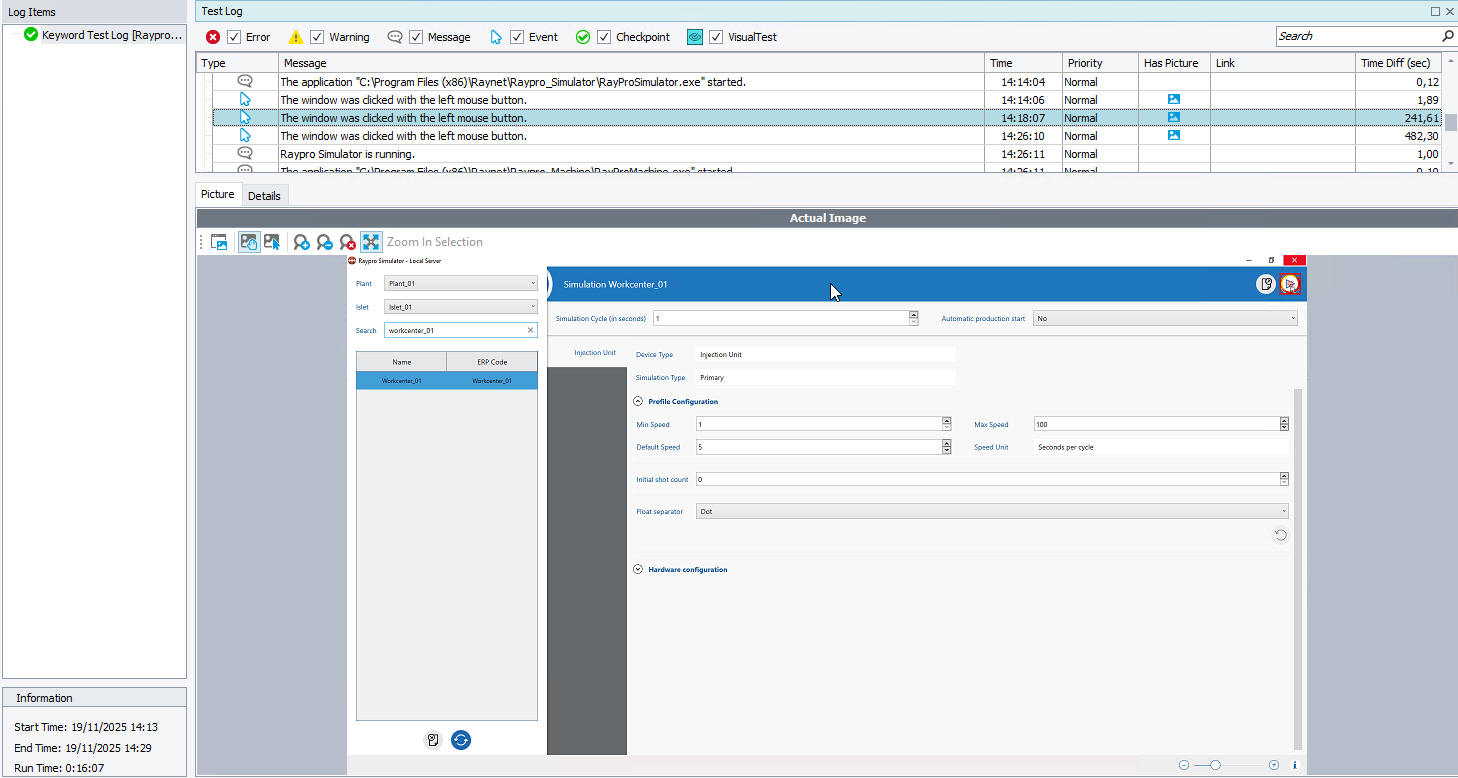
      You'll find enclosed some new sceenshots : the slowness error vs the related code

  • battieE's avatar
    battieE
    Occasional Contributor

    I do another "new test" : Highlight the 1st Button (scenario stopped at the right place)
    -> Response time: immediately !
    -> Then I try to "Run Selected Operation" on this button: 4 minutes...

    There is a thing strange: How is it possible for TestComplete to wait/search several minutes searching a button? Without any "Timeout"...

    • rraghvani's avatar
      rraghvani
      Icon for Champion Level 3 rankChampion Level 3

      TestComplete will search and wait for the object to appear, based on the criteria defined in the name mapping. The delay is based on your Project Settings -> Playback,

      Global project settings can also affect delays,

      Also, the chosen language could also cause issues too. If you look through the changes in Version History, you should be able to narrow down the issue. For example,