Forum Discussion


MrDysprosium
9 years agoContributor
So many questions. The documentation does a great job of explaining "why", but not "how".
How do I use the "Run Script Routine" operation?
How do I tell SmartBear that my script is Python?

tristaanogre
9 years agoEsteemed Contributor
To answer your second question first, when you created your automation project, you were prompted to select a scripting language. If you selected Python then the assumption, even in Keyword tests, is that the syntax of everything is Python.
As for how to use the "Run Script Routine", drag the operation over into your keyword test and let the wizard do it's work. :) Basically, you'll be prompted first to select the code unit and then the script routine to execute, if the script routine has parameters, you'll be prompted to provide them as values. Honestly, it's really that simple. :)
- MrDysprosium9 years agoContributor
>Honestly, it's really that simple.
simplicity != intuitive- MrDysprosium9 years agoContributor
I promise I'm not trying to be dense... I'm not sure I understand your terminology, and I'm obviously doing something wrong.
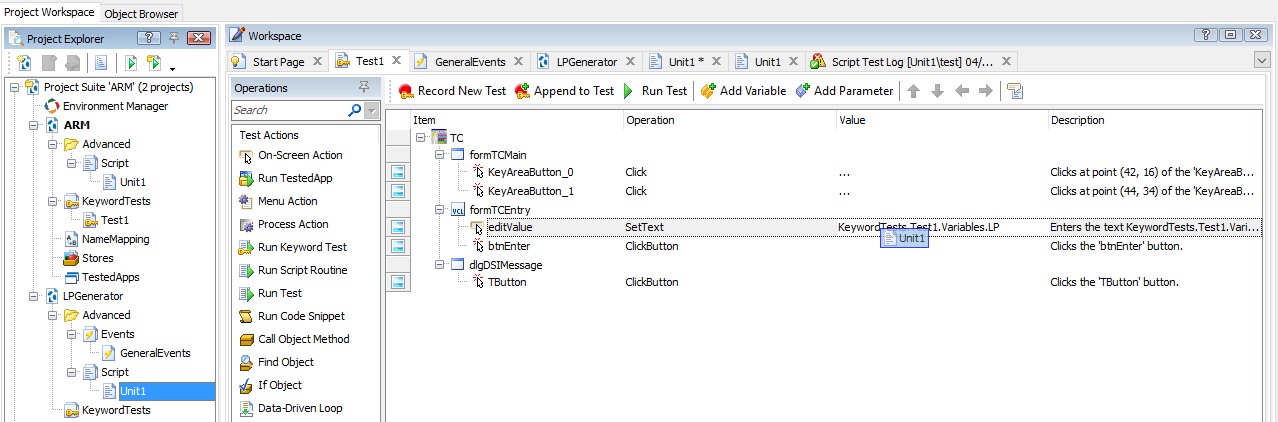
Here's my attempt to follow your instructions.- tristaanogre9 years agoEsteemed Contributor
Okie dokie... starting from the top.... forgive me but I'm not a Python coder so what I'm going to demo is using JavaScript but the principles you're asking for are the same.
First of all, I've created a unit of code that contains a single function. Really silly, actually:function getData(dataSeed) { return 'The data you asked for is ' + dataSeed; }All this is going to do is return a string that contains the text I'm passing in.
Now, my keyword test... It's a pretty simple thing. I'm going to call that function and then log the result. In the left side of the keyword test, in your list of operations, there's a test action called 'Run Script Routine'
Drag that over into your keyword test, you will be prompted to select the code unit and the function within that unit that you want to run:
When you click OK on the method you want, if necessary, it will prompt you for parameters. I'm adding it as a Variable that I'm creating in the keyword test that I'll use later for my for loop counter:
The result is that now, in my keyword test, I have a call to run the script routine with the desired parameter:
Now, I'm going to use the results of that method (what is returned) in a Log call... so, I'm going to drag over a Log message call and, when prompted for the message parameter, I'm going to select "Last Operation Result":
So, my keyword test now consists of calling a script routine and then logging a message using the value returned from the routine.
Now... I want to wrap all that in a for loop. So, from the Statements group in the operations, I'm going to drag over a For loop operation:
Note that I've selected that counter variable as the loop variable. Now, I just need to set the End value to a value that I want to max out at. Not shown in a picture because that should be pretty self explanatory. Now... I need to take the code that I have and add it to be child operations under the loop. This is done by selecting the operations and then "indenting" them.
The result is that now I have a test that will run my function and then use the results of that function to log a message. The function takes the loop variable and returns a string that contains that loop variable. My loop goes through a max value of 5.
Hope this helps.
Pretty much, this is how building a keyword test "by hand" is done... dragging operations over, populating parameters, settings, etc, in the wizard dialogs, indenting or outdenting code within loops or if/then conditionals, etc.
- tristaanogre9 years agoEsteemed Contributor
If you haven't done so yet, I'd highly recommend registering for and participating in the monthly TestComplete 101 webinars. For someone JUST getting started with the tool, they are HIGHLY valuable. You can watch the recording of one of the recent ones at
https://support.smartbear.com/testcomplete/videos/smartbear-academy-test-complete-101-trainingHere's the link for registration.
https://support.smartbear.com/testcomplete/training/free-training/
- tristaanogre9 years agoEsteemed Contributor
There are also tutorials built into the Help system in TestComplete. I'd strongly recommend walking through a couple of those just to get a feel of the tool and how it operates.
Of course, we're always here at this community to answer questions. Feel free to ask away. :) - MrDysprosium9 years agoContributor
I did the 101 yesterday. It was an hour on how to use the object checkpoint tool.
I'm not seeing a tutorial on how to incorporate code into a test.