[Java AUT / JavaScript test] .Exists waits when window exists but is not visible
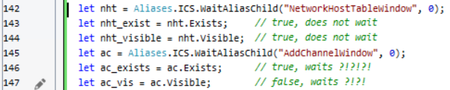


RefreshMappingInfo() makes it worse. It causes the waitAliasChild() to wait as well.
Here is proof that the issue is nothing to do with a quirk of the AUT.
Example Java App:
package com.example;

import java.awt.*;
import java.awt.event.*;
import javax.swing.*;

public class App extends JPanel implements ActionListener {
    private static JFrame childFrame;
    private static boolean secondFrameVisible = false;

    public App() {
        childFrame = new JFrame("Child Window");
        childFrame.setName("Child Frame");
        JLabel childLabel = new JLabel("This is a child frame");
        childLabel.setPreferredSize(new Dimension(400, 400));
        childFrame.getContentPane().add(childLabel);
        childFrame.pack();
        toggleSecondFrameVisibility();

        JButton toggleButton = new JButton("Toggle visibility");
        toggleButton.setActionCommand("vis");
        toggleButton.addActionListener(this);
        add(toggleButton);
    }

    private static void createAndShowGUI() {
        JFrame frame = new JFrame("FrameDemo");
        frame.setName("Main Frame");
        frame.setDefaultCloseOperation(JFrame.EXIT_ON_CLOSE);
        frame.setContentPane(new App());
        frame.pack();
        frame.setVisible(true);
    }

    @Override
    public void actionPerformed(ActionEvent e) {
        toggleSecondFrameVisibility();
    }


    private static void toggleSecondFrameVisibility(){
        secondFrameVisible = !secondFrameVisible;
        childFrame.setVisible(secondFrameVisible);
    }

    public static void main(String[] args) {
        javax.swing.SwingUtilities.invokeLater(new Runnable() {
            public void run() {
                createAndShowGUI();
            }
        });
    }
}
It looks like this - a main window ("FrameDemo") with a child window ("Child Window").
When you click the "Toggle Visibility" button in the main window, the Child Window is set to invisible.
Then create a Javascript project in TestComplete, add the following code to script Unit1:
function debugme(){
  Aliases.javaw.WaitAliasChild("Child_Frame").Exists; // <-- set breakpoint here
  Aliases.javaw.WaitAliasChild("Child_Frame").Exists; // <-- set breakpoint here
  Aliases.javaw.WaitAliasChild("Child_Frame").Exists; // <-- set breakpoint here
  Aliases.javaw.WaitAliasChild("Child_Frame").Exists; // <-- set breakpoint here
}

 Champion Level 3
I'm not able to reproduce your issue. If I run the following code against a new project,
function main()
{
    Log.Message("Start");
    var mf = Aliases.java.WaitAliasChild("Main_Frame")
    if (mf.Exists) {
        Log.Message(mf.Exists);
        Log.Message(mf.Visible);
    }

    var cf = Aliases.java.WaitAliasChild("Child_Frame");
    if (cf.Exists) {
        Log.Message(cf.Exists);
        Log.Message(cf.Visible);
    }
    Log.Message("Finish");
}
the following output is shown,
Main window visible and Child window visibleMain window visible and Child window invisibleNotice the time differences, it's not waiting X number of seconds.
What version of TC are you using?
By the way, your instructions were perfect. Thanks!
TC version is 15.65.12.6 x64
Looking at your screenshots, I guess what you are showing is the "Time Diff" column? Showing that there is no wait?
function debugme(){
  Log.Message("Start");
  var cf = Aliases.javaw.WaitAliasChild("Child_Frame");
  Log.Message("Checking exists");
  let w = cf.Exists
  Log.Message("Finish");
}
As you can see, when it's not visible, it waits 10 seconds
Champion Level 3Yes, I'm looking at the time difference.
How have you defined your name mapping for "Child_Frame" ? For example (ignore the comments),
The 10 seconds delay seems to be coming from project settings i.e. auto wait time. TC is not able to find the object, which could suggest that the name mapping property value(s) might not match, when window is invisible.
Yes, it's defined.
Furthermore, if I modify the code like so:
function debugme(){
  Log.Message("Start");
  var cf = Aliases.javaw.WaitAliasChild("Child_Frame");
  Log.Message("Checking exists");
  let w = cf.Exists
  Log.Message("Exists: " + w);
  Log.Message("Finish");
}
It shows that it exists: