Forum Discussion


tristaanogre
9 years agoEsteemed Contributor
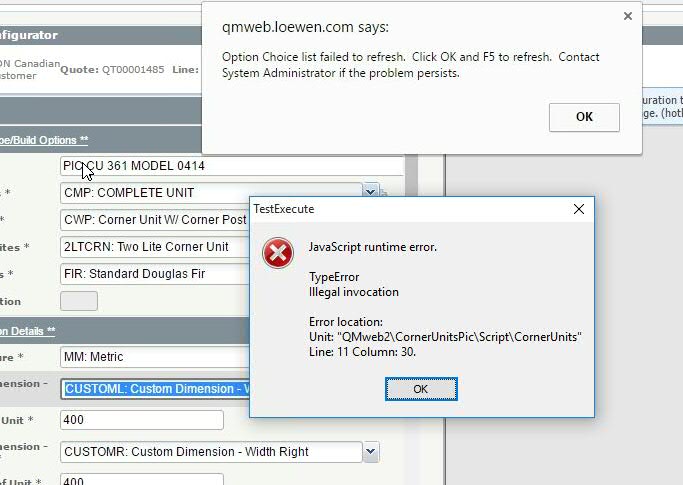
What's on line 11 in that unit of code? I mean, obviously, you're trying to do something that JavaScript doesn't like... but it would help us help you more if we know what you are attempting.
All that I'm seeing out there with a quick google search basically is that when you're invoking a method where you've lost the original context of the method, you'll get that error. So, something on line 11 may be doing exactly that... But can't say for sure without seeing the code... and probably we'll need more than just that one line, perhaps the unit or the full method... or even any methods that it is calling.
 nwall9 years agoNew Contributor
function ApplyButtonPause(d)
{
aqUtils.Delay(d);
var form;
form = Aliases.browser.pageQmwebLoewenComConfigureConfi.formCfgform2;
while(form.panelConfigapply.Enabled == false)
{
aqUtils.Delay(1000);
}
}
The 'while' line is the 11th line. I call this function multitudes of times in every script, and I only got the error after it had already called this function 1500 times in the test.
- tristaanogre9 years agoEsteemed Contributor
OK... Couple of things about the code..
1) Your while line is using too many symbols. You can achieve the same result with
while(!form.panelConfigapply.Enabled)
Enabled is a boolean to begin with... there's no need to compare it to anything, simply negate it.
2) This routine is checking to see if a component is enabled.... but you're assigning a completely different component to a variable. I would ACTUALLY change it to be something like
configPanel = Aliases.browser.pageQmwebLoewenComConfigureConfi.formCfgform2.panelConfigapply;
That would make more sense since you're wanting to test that component, not the form. But, even so... I'd really make the change even differently than that...
3) Looking at the screenshot, there's a completely different thing going on there than just the invocation error... there's this browser popup indicating that something different needs to be done. I'd be willing to bet that panelConfigapply doesn't even really exist yet because of that... so, the whole routine I'd change... it would look more like...
function ApplyButtonPause(d)
{
aqUtils.Delay(d);
var form;
form = Aliases.browser.pageQmwebLoewenComConfigureConfi.formCfgform2;
while(!form.WaitAliasChild('panelConfigapply', -1).Enabled)
{
aqUtils.Delay(1000);
}
}
The WaitAliasChild call basically makes no assumptions that the panel itself exists. It instead looks for it and waits for it to show up within the time limit. The -1 tells the method to use the default timeout as configured in your project properties... typical default is 10 seconds. If it comes back before the 10 seconds, then you'll have all your properties. If not, properties like Enabled, Exists, Visible, etc. will all be false and you'll go into your while loop, wait one more second, and then do the whole "Wait" thing all over again.
Now, this is assuming that the illegal invocation is actually with the enabled property... it COULD be that the problem may be that you are losing context on formCfgform2... that you are assigning non-existent object to your form variable and then trying to access a child object of it... in which case, you should do a better check of formCfgform2... in other words....function ApplyButtonPause(d) { aqUtils.Delay(d); var form; form = Aliases.browser.pageQmwebLoewenComConfigureConfi.WaitAliasChild('formCfgform2' -1); if (form.Exists) { while(!form.WaitAliasChild('panelConfigapply', -1).Enabled) { aqUtils.Delay(1000); } } else Log.Error('Could not find formCfgform2'); }My guess is that the illegal invocation will be fixed by implementing the above judicious uses of WaitAliasChild. There maybe a slightly "neater" way of doing this, but this should at least demonstrate the concept.
One side note... That page object Alias name is UUUUUUUUGLY. The whole purpose of Aliases is that you can give your objects meaningful names that you can use in your tests so you don't have to depend on the more complicated internal names. Consider doing some renaming of objects in your Aliases to make your code more readable.