Forum Discussion

samirc23's avatar
samirc23
Contributor
13 years ago

Hover Mouse

Hi,


there is one scenario where i need to click on object A and after clicking on object A, it gives other objects like B, C and D.


I need to hover mouse on object B, when i hover mouse on object B, it gives other objects.


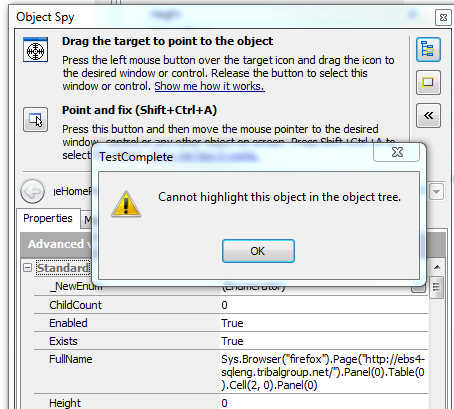
i capture object B with object spy (point and fix) (object B is mouse hover operation after clicking on object A), when i select show object in object tree from object spy window, it gives message that 'Cannot highlight this object in the object tree'


Please let me know how to highlight mouse hover object in the object tree?


Please find attached screenshot.

Many Thanks,

Sam

8 Replies

  • paul_scroce's avatar
    paul_scroce
    Frequent Contributor
    Hi,


    I would guess that if you move the mouse to the object spy window it is no longer hovering on object B so the other objects might not exist anymore. If that is a problem then try using Alt + Tab to switch windows from your application to TC without using the mouse.
  • Hi Paul,


    Thanks but in order to highlight object B in object tree i have to click on button (in object spy window - highlight object in object tree button). As soon as i take mouse from object B to click on object tree button then object B no longer on page as its mouse hover object and because of that it give message saying Cannot highlight this object in the object tree'.


    Anything else can be done to highlight mouse hover object into the object tree?


    Many Thanks,

    Sam
  • paul_scroce's avatar
    paul_scroce
    Frequent Contributor
    In some cases using Alt Tab without moving the mouse while it was hovering over a menu for example, I could switch to TC and those objects still exist, but it might not work in other applications. Just curious what do you need to access in the object tree that is not available in the Object Spy Window?
  • Hi Paul,


    well full name from object spy window, but since i m not able to highlight that object in object tree i cannt map and cannt create aliases for that object.
  • Hi Paul,


    In order to map the object user should able to highlight that object into object tree and when I click on highlight object in object tree I get error message as explained in my 1st post.

    I understand that when we record test it automatically map the object, but I want to rename the object in Aliases section I cannot find the correct object because since this is mouse hover object it doesn’t highlight on screen.

     
  • paul_scroce's avatar
    paul_scroce
    Frequent Contributor
    Hi Sam


    I can only suggest select Show Object in Name Mapping Editor from the Object Spy Context Menu, then rename the alias. You could also find the mapped name in the Object Spy Window properties then manually select the desired object in the Name Mapping Editor Mapped Objects tree, but I don't think that you can use Highlight in Object Tree unless the object still exists.
  • Hi Paul,


    Thank you very much for your reply, but i found some work around by using function called map object from screen and find that object manually into Aliases section and rename it.


    Many Thanks,

    Sam