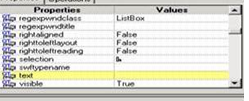
Getting Garbage Value in "all items" and "selection" property of WinList:ListBox
We are getting garbage text in “all item” and “Selection” properties of object WinList:ListBox
The Snapshot is attached as "a"
The Text Property is blank.
I have tried getting the text present in the list box using GetROProperty”text”,”all Items” and “selection” but I am getting values as shown below.
· I have also applied GetVisibleText but by using that also I am not getting the correct data.
· Applied the GetVisibleText and tried to write the data into Excel file then also I am getting the wrong data.
· Have applied descriptive also by using below code.
· If Window("…..").Window("……").WinList("ListBox").Exist Then
Dim objCHild
Set sobjCHild = description.Create
SEt objCHild = Window("………").Window("……….")'.WinList("ListBox")
Set Mychildren = nothing
set objChildren = objCHild.ChildObjects(Mychildren)
intChildOBJECTs = objChildren.count
msgbox "Child count = "& intChildOBJECTs
msgbox objChildren(6).GetROProperty("all items")
msgbox objChildren(25).GetROProperty("all items")
For intCounter = 0 to intChildOBJECTs - 1
strType = objChildren(intCounter).GetROProperty("Value")
strName = objChildren(intCounter).GetROProperty("class name")
msgbox intCounter & " Name = " & strName & " Value = " & strType
Next
Else
msgbox "Does not exist"
End if
Set objCHild = NOThing
Set objChildren = NOThing
Set Mychildren = NOThing
Here also my efforts are gone to vain.
Please help please……..
Many thanks in Advance !!!
Adi