Forum Discussion


prateeksharma
9 years agoOccasional Contributor
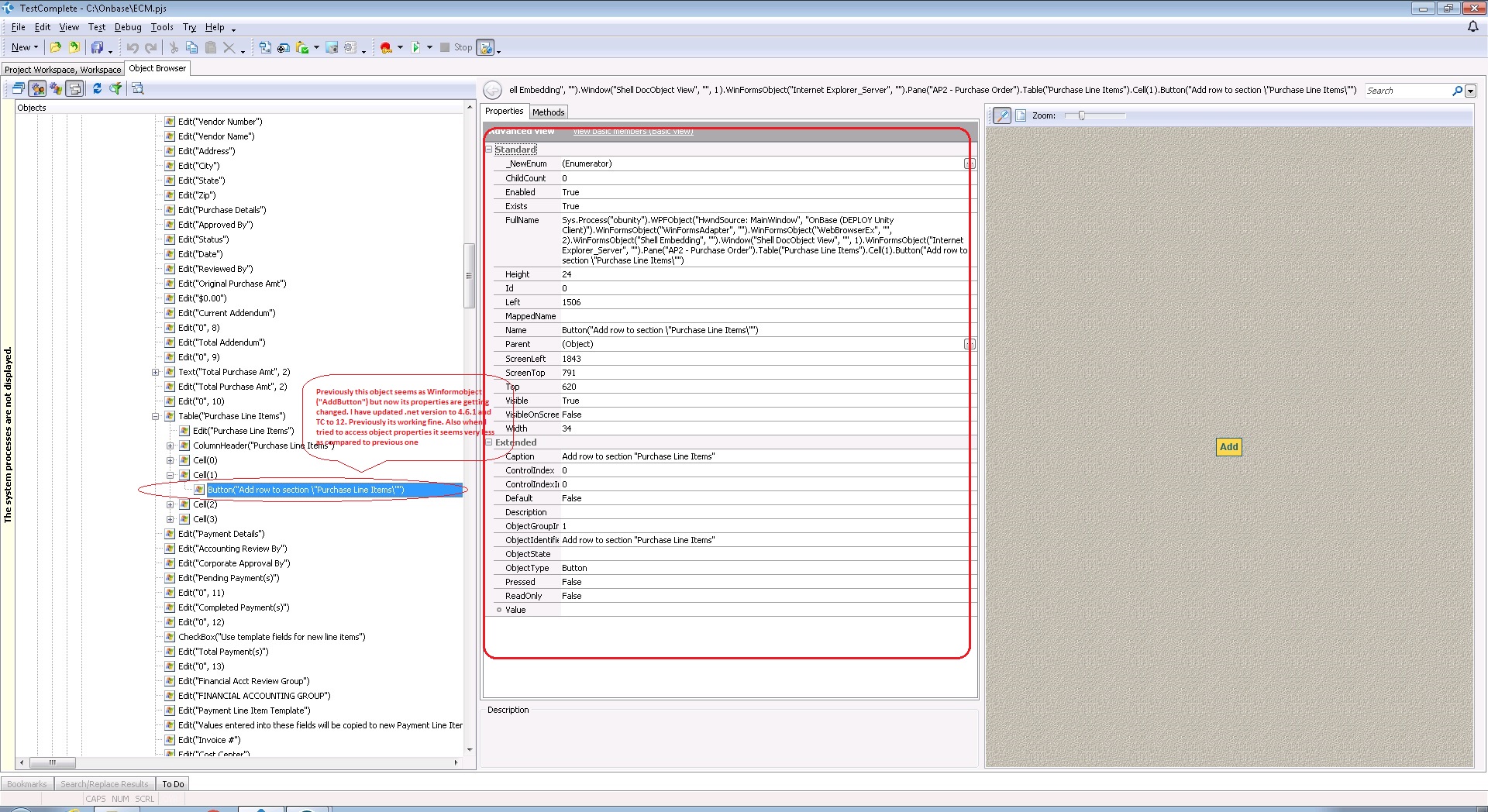
Not working. After making this change test complete unable to expose objects under form
Properties of the form in which other objects not exposed
wndClass= Internet Explorer_Server
ClrClassName= KeyboardEventsNativeWindow
ClrFullClassName = Hyland.Canvas.Controls.WebBrowserEx+KeyboardEventsNativeWindow

joseph_michaud Staff
Staff
9 years agoStaffYou have two variables in play here: a change to TestComplete 12 and a change to .NET 4.6.1.
I've seen a similar problem with TestComplete 11.31 and a change to .NET. Try going back to TestComplete 11.31 and your previous version of .NET. Verify that that problem does not exist. Change .NET and check if the problem appears. (I suspect it will.) Now try TestComplete 12 and check that the problem still appears.
Open a support case. There is a patch (CC-6531) to TestComplete 11.31 that may (or may not) fix the problem but you'll need to investigate this with the support team. Further investigation would then be required for TestComplete 12.
- prateeksharma9 years agoOccasional Contributor
Thanks Joseph for your findings
Previous version of .Net framework is working fine with Test complete 12, I have upgraded my application software version which required .Net framework 4.6.1 so I upgraded .net framework to 4.6.1 after that my all existing scripts are getting failed.
- tristaanogre9 years agoEsteemed Contributor
Because Microsoft is Microsoft, I would suspect that the problem resides, not in TestComplete 12 but in the new 4.6.1 CLR. If you recompiled your application with the new .NET and it had previously been 4.5 or 4.0, objects may change in how they are identified.
I agree with what joseph_michaud suggests... roll back both TC and .NET and change one aspect at a time. To check to see if it's TestComplete, try just upgrading TestComplete and keeping .NET as the old version and see if the problem still happens. - prateeksharma9 years agoOccasional Contributor
Degraded Test complete version to 11.31 and .netVersion to 3.5.1
Result = working fine
Upgraded Test complete version to 12 and .netVersion to 3.5.1
Result = working fine
Upgraded Test complete version to 12 and .netVersion to 4.5.1
Result = Not working
Please suggest
- joseph_michaud9 years ago
I had wanted you to try TC 11.31, change .NET from 3.5.1 to 4.5.1 (and see it succeed and then fail) so that we could then apply patch CC-6531 to see if it would then suceed. If it does, then this would be a strong clue that the fix for TC 11.31 in that patch is also relevant to TC 12.0.
 emathew8 years agoNew Contributor
I'm not sure where I can find the CC-6531 patch, but we downloaded the latest installer available for TestComplete 11.31 and tested it with .Net 4.6.1 and we see that it works fine.
Following are the combinations we tried:
TC11.20 +.Net 4.6.1 = Works fine
TC11.31 +.Net 4.61 = Works fine
TC12 + .Net 4.6.1 = Cant see the CLR properties such as Caption, ObjectIdentifier, etc
TC12 + .Net 4.5.1 = Cant see the CLR properties such as Caption, ObjectIdentifier, etc
TC12 + .Net 4.0 = Cant see the CLR properties such as Caption, ObjectIdentifier, etc
We would appreciate if you can provide some help as early as possible as we have a huge inventory of tests that needs this and are blocked from upgrading to TC12.