We are building a new experience for our SmartBear Community.
This site is now read-only. You can still browse and search as usual. Learn More
This site is now read-only. You can still browse and search as usual. Learn More


Hi cst99003,
Assuming that the datasource is set correctly, your assertion should work if you change the JSONPath expression to:
$.CalculatedOptions[${Datasource#CALCOPT_CNT}].RetirementDate
So:
1. You didn't place the dollar sign ( $ ) before the expression and
2. You put the quotes ( ' ' ) inside the square brakets which is wrong since this makes the value being taken as a string.

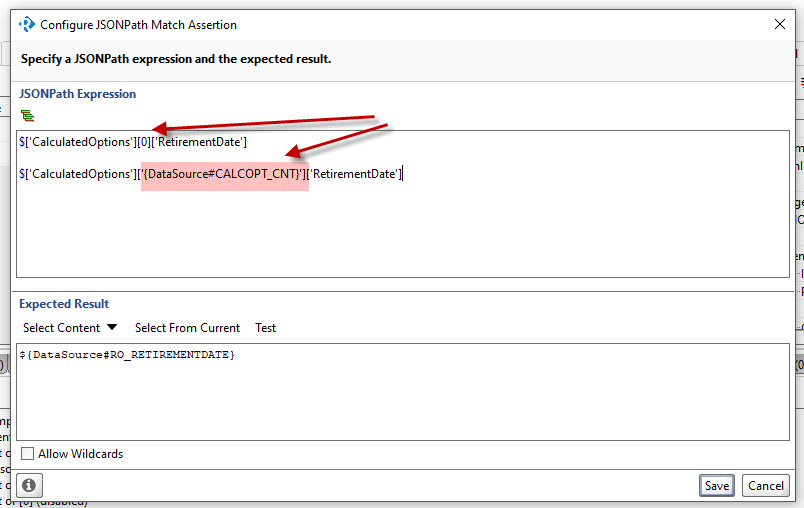
See image.
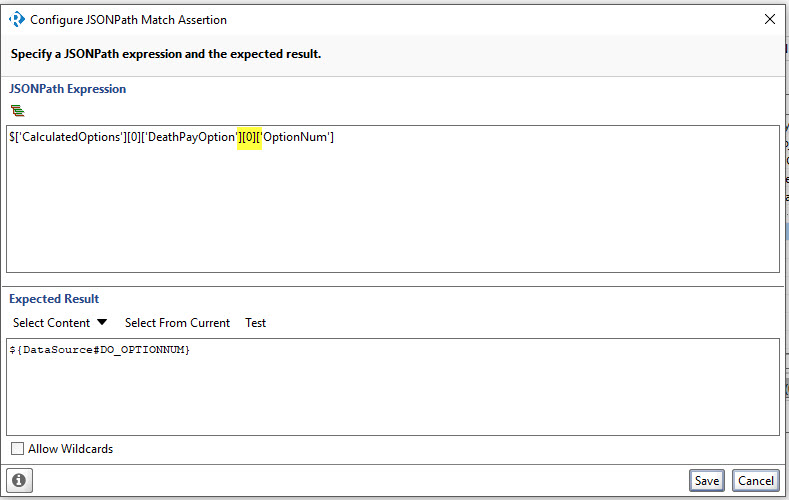
I am trying to parameterize these value from the image
Hi cst99003,
Assuming that the datasource is set correctly, your assertion should work if you change the JSONPath expression to:
$.CalculatedOptions[${Datasource#CALCOPT_CNT}].RetirementDate
So:
1. You didn't place the dollar sign ( $ ) before the expression and
2. You put the quotes ( ' ' ) inside the square brakets which is wrong since this makes the value being taken as a string.
Is there a way to wrap some logic around this to say if the record does not exist then skip?
The is an outer join in the DB query which means that sometimes there may not be any data and I would not want the Assertion to trigger.
Suggestions?

Hi cst99003
You'll need some groovy to do this as far as I can tell. The Assertion is on the test step and will fire as soon as the step executes so im guessing the assertion will execute as soon as the outer join executes. one for the groovy scripters I think!
As an aside - going back to the 'fix' Lucian supplied - can you confirm what it's doing? I've never seen >1 JSONPATH in the expression section of a JSON Content Assertion before and would welcome the education!
Lucian's update to your Assertion was as follows:
JSON EXPRESSION
$['CalculatedOptions'][0]['RetirementDate']

$.CalculatedOptions[${Datasource#CALCOPT_CNT}].RetirementDate

EXPECTED RESULT
${Datasource#RO_RETIREMENTDATE}
So - your expected result is a value set in your Datasource and I'm guessing you are asserting that two attributes in yoru response match the RO_RETIREMENT property.
HOWEVER - I don't understand what the following is actually doing:
$.CalculatedOptions[${Datasource#CALCOPT_CNT}].RetirementDate
Thankyou! - Sorry I couldn' t be more help!
rich