QueryParameters not added to URL when using testRunner.sh
Hi I have a REST service that accepts three parameters as query parameters. When running a testcase against the REST service with defined query parameters in SOAPUI GUI the query parameters are added to the URL and the testcase passes. But then running the testace using testrunner or using soapUI Maven plugin the query parameters are not added to the URL and the testcase fails. I have been testing using both query parameters on resource and method level, none works.
Using SoapUI Pro GUI version 4.6.0 SoapUI Pro maven plugin version 4.6.1
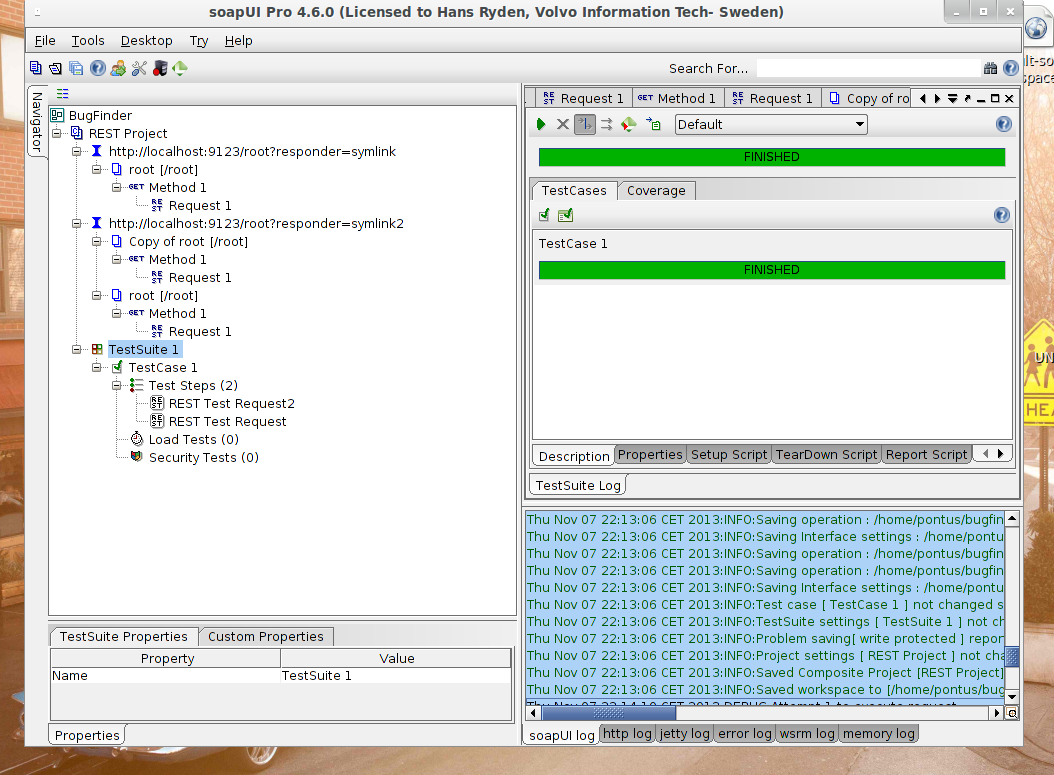
Hi I was able to recreate some problems tonight. What I did: - I created a new composite project in a new workspace. - Added a restservice with a query parameters - Added a testcase for the rest service - Added another restservice (almost same url) - Added testcase for that restservice (I cloned the first restservice once, but then deleted it again) Everything worked fine here, same result and urls logged from testrunner and in soapui. But I dont have any logs.
- Then I cloned the second added restservice and added a queryparameter (t=t) to the cloned resource. - And I saved project (note: no new teststep for the new resource) - Testcase when executed in soapui gives same results as before, see logs below - But when executed from testrunner the log shows that latest created resource is requested instead as the one configued in the GUI. This happend all time, even after saving the project again and again. Also note: What I saw in SOAPUI GUI was two rest services, the first with one resource and the second with two resources.
Project is attached as a bugfinder.tar.tz including workspace xml. Stdout from soapui attached as GUI.log. Stdout from testrunner attached as testrunner.log soapui.log for gui attached as soapuigui.log soapui.log for testrunner attached as soapuitestrunner.log screenshot of gui attached, workingInGUINotInTestrunner.png
After that I did some more tests. I stopped soapui and started it again and opened the testproject What I first saw was that the rest resource that I had deleted on the first rest service was showing again, see attached screenshot deletesResourcesShowing.png And I got the same logged requested services in the GUI as with testrunner. But one of the requested services is not the one set the teststep to request (the one with query parameter t=t) See attached stdout from gui as GUIAfterReload.log See attached stdout from testrunner as testrunnerAfterReload.log
- Then I changed testStep "REST Test Request" to user resource "Root..." instead of "Copy Of Root...." ("Root..." was the one I originaly configured the teststep with). When running the test from the GUI I got the same result as before I restarted the gui now but testrunner still is using the wrong resource. See attached stdout from gui as GUIAfterFix.log See attached stdout from testrunner as testrunnerAfterFix.log
#### And one more thing. As a last thing for the night I decided to remove resource "Copy of Root" that was not used by teststep. Then SOAPUI also removed my the teststep that was set to user resource "Root...." And then I reloaded project, and not remove teststep was gone, but the removed resource "Copy of Root" was back again, see screenshot, afterRefresh.png.
I hope you understands what I have done. Please call me if needed on +46763200170 and I can explain and answer questions what I did.
(See next post for the rest of the attachments) Thanks Pontus
I'm able to reproduce the issue with deleting a resource and saving the project, then upon restarting SoapUI the deleted resource is still there.
The logs posted were soapui and testrunner logs. Can you also post the soapui-errors.log that should be located in <SoapUI install>\bin? Check in that file if you are seeing an error that says:
"[errorlog] Failed to delete temporary project file;"
Hi I found this in my soapui-erriors.log: 2013-11-07 21:24:57,464 WARN [errorlog] Failed to delete temporary project file; /home/pontus/bugfinder/project-temp-7228077855187384119.xml 2013-11-07 21:25:04,093 WARN [errorlog] Failed to delete temporary project file; /home/pontus/bugfinder/project-temp-1018991532639707779.xml
The timestamps looks like last time when I played with project uploaded before.