Forum Discussion

Mircea_Untea's avatar
Mircea_Untea
Occasional Contributor
15 years ago

How to use DataSource settings in LoadUi

Hi,
How to use dataSource settings in LoadUi if I don't want to use any row more than once?

I have the following scenario :
Sopaui TestCase :
Step1- DataSource(xls file with cca 3000 rows)-GetUsernameAndPass
Step2 Http -Login
Step3 Property transfer : transfer username and session Id to TestCase properties
Step4 Http Logout

Properties for DataSource(step1) is set to share the DataSource between threads during LoadTest.

LoadUI Scenario:
Step1 : Fixed Load : 100 threads
Step2 : SoapUI Runner with option "Adds the soapUI TestCase Properties to the result message, at the end of each run" and Output level ="TestCase Only"
Step3 : Table Log (for results)

In Table Log I find the same user used more then once .


Can you please check how can I handled this in order to have an unique value(in this case Username) from DataSources for each thread.


Thank You
Cata

8 Replies

  • Hi Cata!

    Without a DataSource Loop, you will always get the first value of the DataSource (in this case the first row). Would adding a DataSource loop solve the problem?

    Have a fun weekend!

    /Henrik
    eviware.com
  • Mircea_Untea's avatar
    Mircea_Untea
    Occasional Contributor
    Henrik,

    Thank you for your prompt response, but I forgot to tell you, I need concurrent sessions with unique users .
    My requirement is : to run 100 session concurrently ( I try to use virtual users generator but I get the same results , one row from my datasource is used more than one time )

    Cata
  • Hello,

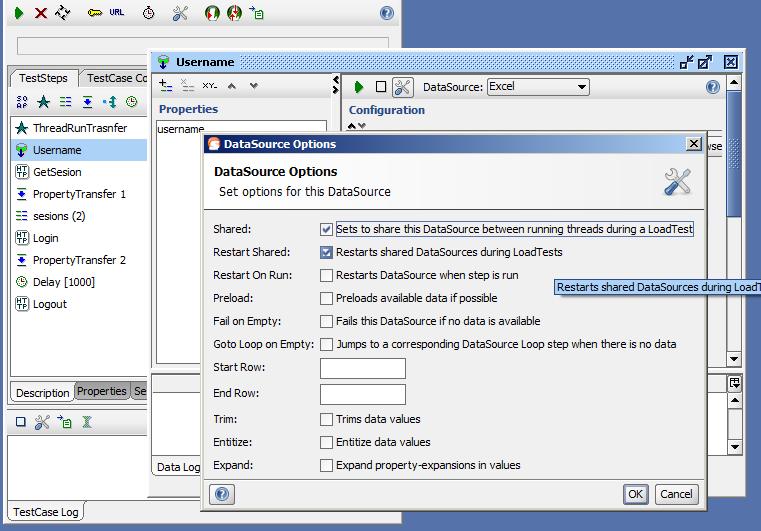
    Can you attach a screenshot showing how you've configured your DataSource? You should make sure to have "Shared" and "Restart Shared" checked, and you shouldn't have "Restart On Run" checked.

    What do you want to happen once the 3000 rows have been exhausted? With the setup I described it should start again from the beginning.

    Also, if you are trying to achieve 100 concurrent users, you should probably use the Fixed Load Generator in loadUI.

    Regards,
    Dain
    eviware.com
  • Mircea_Untea's avatar
    Mircea_Untea
    Occasional Contributor
    Hello again,


    Yes, this is my settings for DataSources : "Shared" and "Restart Shared" checked (please see attach DataSourceSetings)
    Also I added new properties for TestCase named ThreadAndRun and I used a groovy script to trasfer Thread and Run count , but in LoadUI I have the following values in TableLog (please see attach TableLogValue).

    It could be 2 issues :
    a. For different index of thread and runs in LoadUI Table Log is logged the same value of username (that is the reason which made me to open this topic, please see attach DiferentThradsameUser)
    b. Threads beetween 0 and 100 is not logged at all in LoadUI TableLog. (please see attach LoadUiThreadMissingfromLog)

    Could you please check if I do something wrong , I think you can easily replicate this problem in your Lab.

    We are using for this type of test LoadRunner tool , but I'd really like to use LoadUi, because is more fun and suitable (like you said guys ) .

    Best Regards
    Cata
  • Hello,

    Would it be possible for you to send us your soapUI project and the Excel file used in the DataSource? If you don't want to attach it here you can email it to us at support@eviware.com

    It looks like you have an incorrect component setup with the Delay component in your screenshot. This shouldn't be causing the concurrency issues you're having, but may be causing some other problems.

    The Fixed Load generator needs feedback from the Runner Component to regulate the rate of requests. For this to work you need to connect the second output from the left on the Runner Component (labeled "Requests Currently Running") directly to the second input of the Fixed Load Generator (labeled "Sample Count"). No other component should be placed inbetween these. I've added a screenshot showing the correct setup here.

    Regards,
    Dain
    eviware.com
  • Mircea_Untea's avatar
    Mircea_Untea
    Occasional Contributor
    Hi Dain ,

    Thank you, you open my mind.
    I need to make some cleanup in my Soupui Testcase and maybe I should try to add an command generator like "ping" in my Loadui Test.


    Thank you again.
    Cata
  • brext2005's avatar
    brext2005
    New Contributor
    Hi Cata,

    Have you any success in this:
    Mircea Untea wrote:
    Hi Dain ,
    I need to make some cleanup in my Soupui Testcase and maybe I should try to add an command generator like "ping" in my Loadui Test.


    I also want to use the shared DataSource in my project and faced the same issues... any help would be appreciated.

    Thanks,
    Alex
  • d00wirre's avatar
    d00wirre
    Occasional Contributor
    I have used a script connecting to a database with modulus as a twist to get new users for each request.

    The following script needs the Oracle jar driver to work. It can easaly be adopted to other DBs.


    com.eviware.soapui.support.GroovyUtils.registerJdbcDriver("oracle.jdbc.driver.OracleDriver")
    def groovyUtils = new com.eviware.soapui.support.GroovyUtils( context )
    import groovy.sql.Sql;

    //Establish JDBC Connection to the DB
    def con = Sql.newInstance( "jdbc:oracle:thin:@server:port/serivce", "user", "passwd", "oracle.jdbc.driver.OracleDriver");

    //Modulus user
    con.execute("UPDATE user_mod SET user_id = mod( (user_id +1 ), (select count(1) from user_account) )")

    //get user
    def res = con.rows("Select username, passwd from user_account a, user_mod m where a.user_id =(m.user_id +1)")

    con.close()

    groovyUtils.setPropertyValue("Properties", "user", res[0].username)
    groovyUtils.setPropertyValue("Properties", "passwd", res[0].passwd)
    testRunner.testCase.properties['user'].setValue( res[0].username)