We are building a new experience for our SmartBear Community.
This site is now read-only. You can still browse and search as usual. Learn More
This site is now read-only. You can still browse and search as usual. Learn More

How do I get a data source value for JSONPath Match assertion on the expression
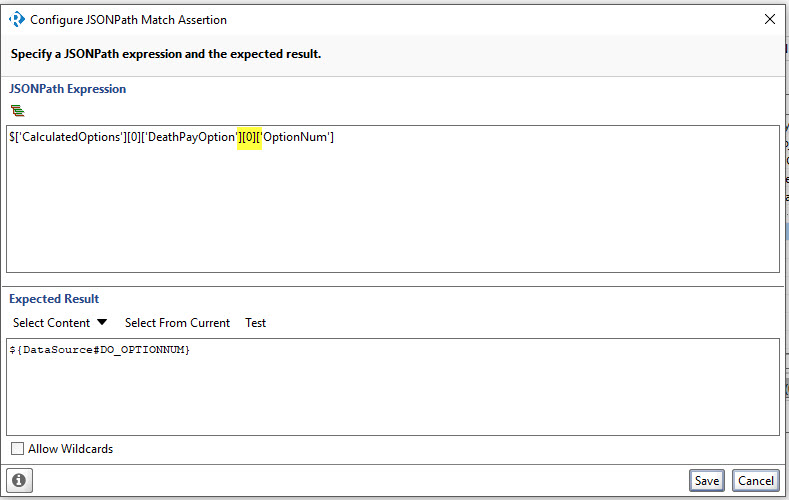
Here is the compare values that gets compared, but the 0 is only valid for the first record.
JSONPath Expression
$['CalculatedOptions'][0]['DeathPayOption'][0]['OptionNum']
Expected Results
${DataSource#DO_OPTIONNUM}
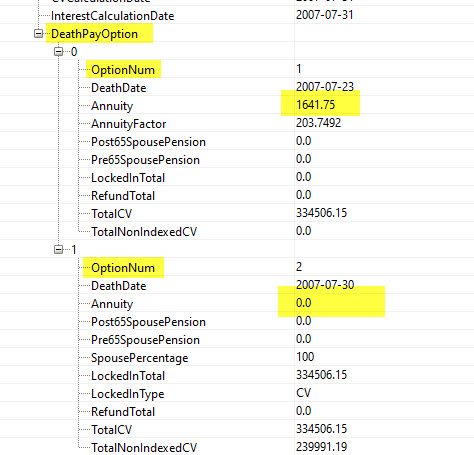
What I would like to do is get the value from the datasource to replace the 0 value in ['DeathPayOption'][0] because there are multiple values of DeathPayOption
Hi cst99003,
Assuming that the datasource is set correctly, your assertion should work if you change the JSONPath expression to:
$.CalculatedOptions[${Datasource#CALCOPT_CNT}].RetirementDate
So:
1. You didn't place the dollar sign ( $ ) before the expression and
2. You put the quotes ( ' ' ) inside the square brakets which is wrong since this makes the value being taken as a string.


Thank you for your response.
I am trying to confirm the datasource data matches the REST response.
The datasource from the database has one to many records so the value that I am looking for, in the compare is for ['OptionNum'] is the ['DeathPayOption'][1]. The DeathPayOption value is in the spreadsheet so i want to use that to get the correct attribute.
Assume I have two records in the datasource in two rows. The
$['CalculatedOptions'][0]['DeathPayOption'][0]['Annuity']
${DataSource#ANNUITY} will work for the first record but because it looks at index = 0 but the second will fail because I need to look at index = 1. I have a value in the datasource to tell me there are two records so i should be able to specify the index value for ['DeathPayOption'][0]
JSONPath Expression
$['CalculatedOptions'][0]['DeathPayOption'][0]['OptionNum']
Expected Results
${DataSource#DO_OPTIONNUM}
or......
$['CalculatedOptions'][0]['DeathPayOption'][0]['Annuity']
${DataSource#ANNUITY}
Sorry if my question is confuing but I assume I should be able to use the datasource to set the value.
Hey cst99003
you'll have to forgive me - I'm quite literal so I'm struggling a little still.- my ADHD doesn't help me to concentrate either.
You mention database, datasource, spreadsheet
"The datasource from the database has one to many records" - are you using a datasource step object in your test case? Can you please describe the steps in your test case just so I have a littel background?
From the mention of datasource and database - are you using a Data connection datasource object and using this to connect to a database? If yes - can I assume you are using this to build the content of your request?
you mention " The DeathPayOption value is in the spreadsheet so i want to use that to get the correct attribute." - what spreadsheet? I'm sorry - you never mentioned a spreadsheet before - are you using a spreadsheet as your datasource - or are you using a database? Confused... ;)
Is it REST? SOAP?
Are you doing a POST? or is it a GET?
Essentially - you are doing some sort of REQUEST that is returning a .json body (so I'm assuming REST, not SOAP). in this .json body you have >1 record returned.
You are saying one option fails because you can assert on $['CalculatedOptions'][0]['DeathPayOption'][0]['OptionNum'] but you also have a record at $['CalculatedOptions'][0]['DeathPayOption'][1]['OptionNum'] - can you not just assert on this second instance of OptionNum to prove the value is correct?
It would help a lot if I knew what the content of your datasource is. you mention you are trying to assert the OptionNum attribute against ${DataSource#DO_OPTIONNUM} - but I don't know what DO_OPTIONNUM actually is.
I'm sorry - some of other lads who are cleverer than me might be able to infer the content - but I need it laying out before I can visualise.
Thanks man,
richie