Custom HTML reports - Need Your Contribution
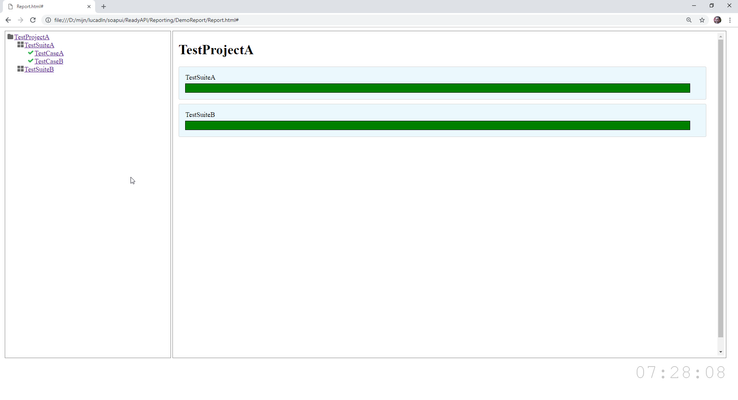


I wish I had some of the skills you're looking for so that I could contribute, but this is awesome!

haha thx. It's actually pretty simple to do. I just requires some time... :manvery-happy:
My cat is still working on it...

Hi Lucian, this is a bit rough and ready, but does the following project teardown script help at all?
log.info('Project Teardown')

// I don't think you can trust the order matched the order displayed in the GUI
project.getTestSuites().each(){ testSuiteName, testSuite ->

    log.info(testSuiteName)
    def currentSuiteResult = runner.getResults().find{it.getTestSuite().getName() == testSuiteName }

    // Assume if null test suite doesn't have results as it hasn't been run - probably need to do something smarter here
    if(currentSuiteResult){
        log.info(currentSuiteResult.getTestSuite().getName() + ' = ' + currentSuiteResult.getStatus())

        // I don't think you can trust the order matched the order displayed in the GUI
        testSuite.getTestCases().each(){ testCaseName, testCase ->

            log.info(testCaseName)
            def currentCaseResult = currentSuiteResult.getResults().find{it.getTestCase().getName() == testCaseName }

            // Assume if null test case doesn't have results as it hasn't been run - probably need to do something smarter here
            if(currentCaseResult){
                log.info(currentCaseResult.getTestCase().getName() + ' = ' + currentCaseResult.getStatus())
            }else{
                log.info(testCaseName + ' not run, probably disabled???')
            }
        }
    }else{
        log.info(testSuiteName + ' not run, probably disabled???')
    }
}
I have the following code:
if ( it.getClass() == com.eviware.soapui.impl.wsdl.teststeps.HttpTestRequestStep ) {
				reportFile.text = '''<!DOCTYPE html><html><head><style>html,body{margin:0;padding:0;}html{height:100%;}body{height:98%;}h1{font-size:20px;}h2{font-size:16px;}.column{float:left;border:solid gray 1px;height:90%;margin-left:4px;padding:5px;}.assertion_container{margin:4px;background-color:white;border:solid gray 1px;width:95%;padding:4px;}.assertion_details{margin-left:60px;}#content_wrapper{width:100%;height:60%;}#request{background-color:#F0F0F0;width:48%;height:100%;overflow:auto;}#response{background-color:#F0F0F0;width:48%;height:100%;overflow:auto;}#assertions_wrapper_container{background-color:#F0F0F0;float:left;margin-top:4px;margin-left:4px;padding:5px;border:solid gray 1px;height:30%;width:97%;overflow:scroll;}</style></head><body>
	    							 <h1>''' + it.getName() + '''</h1><div id="content_wrapper"><div id="request" class="column"><div id="request_title"><h2>Request</h2></div><div id="request_content"><pre>''' +
	    							 new String(it.getTestStep().testRequest.messageExchange.rawRequestData) + '''</pre></div></div><div id="response" class="column"><div id="response_title"><h2>Response</h2></div><div id="response_content"><pre>''' +
								 new String(it.getTestStep().testRequest.messageExchange.rawResponseData) + '''</pre></div></div></div><div id="assertions_wrapper_container"><div id="assertions_title"><h2>Assertions</h2></div>'''
	     		if ( it.getAssertionList().size()  == 0 ) {
	     			reportFile << '''<div><i>There are no assertions in this test step<i></div>'''
	     		}
	     		else {
					it.getAssertionList().each() {
						reportFile <<  '''<div class="assertion_container"><div class="assertion_name"'''
						if ( it.getStatus().toString() == "PASS" ) {
							reportFile << ''' style="color:green"'''
						} else if ( it.getStatus().toString() == "FAIL" ) {
							reportFile << ''' style="color:red"'''
						}
						reportFile << '''><b>''' + it.getStatus() + '''</b> - ''' + it.getName() + '''</div>'''
						if (it.getErrors())
							reportFile << '''<div class="assertion_details"><t/><i>''' + it.getErrors()[0].getMessage() + '''</i></div>'''
						reportFile << '''</div>'''
			     	}
				}
				reportFile << '''</div></body></html>'''
			} else if ( it.getClass() == com.eviware.soapui.impl.wsdl.teststeps.DebuggableWsdlGroovyScriptTestStep ) {
				reportFile.text = '''<!DOCTYPE html><html><head><style>html,body{margin:0;padding:0;}html{height:100%;}body{height:98%;}h1{font-size:20px;}h2{font-size:16px;}#script{background-color:#F0F0F0;width:97%;height:60%;overflow:scroll;border:solid gray 1px;padding:4px}#log_container{margin-top:4px;background-color:#F0F0F0;border:solid gray 1px;width:97%;height:30%;padding:4px;}</style></head><body><h1>TestStep2 from TestCaseA from TestSuiteA</h1><div id="script">''' +
                                      '''<h2>Script content</h2><pre>''' + it.scriptText + '''</pre></div><div id="log_container"><h2>Script log</h2>The script log is not yet available @TODO</div></body></html>'''
			}
I am iterating through each step. If the step is of type HTTP step then the report is already done. I am trying now to do the same for Soap steps.
Hi Lucian,
I was looking at your code, and if you don't mind may I make a sugestion? Rather than handling each type of step independently, when you loop through the steps have you considered checking to see if they implement an interface and then handle that for all steps? For example I see you get the assetion details for the HttpTestRequestStep, but you could check to see if the step implements the Assertable interface and if so then process with common code regardless of type.
You can use the "in" keyword to check to to see if an object implements an interface, the following post is an example where I have done this:
I'm a bit short of time at the moment, but can I point you towards this post of mine:
It might help.

Can you please share your latest code ?
Just commited the latest code.
If you open the project in \ReadyAPI\Reporting you should be able to see the code that I created so far (in the project tear down script).
The problem is the api is cumbersome as ReadyApi uses both the old SoapUI api and the new one so it's difficult for me to create the report. Still WIP.

i tried for once for generating pdf report using external jar.
a) write the code in eclipse.
b) export the code as jar.
c) put this in ext folder
d) restart the soapui.
e) import the related pkg. for your utility.
f) call the method to generate report.
it works for me hope the same for you.
please accept as solution if it works.

 Alumni
Hi Ashu248,
Thanks for your contribution! Lucian, are there more features to do in this project?

Added the posiblity to filter results (all tests vs only the failed ones).
Thanks Radford,
This is what I came up with:
testSuitesResult.each() {
	log.info it.getTestSuite().getName()
	log.info it.getStatus()

	testCasesResults = it.getResults()
	testCasesResults.each() {
		log.info it.getTestCase().getName()
		log.info it.getStatus()

		testStepResults = it.getResults()
		testStepResults.each() {
			log.info it.getTestStep()
			log.info it.getStatus()
			log.info it.getTestStep().getName()

			testAssertionsList = it.getTestStep().getAssertionList()
			testAssertionsList.each() {
				log.info it.getName()
				log.info it.getStatus()

			}
		}
	}
I am now looking for a way to get the explanation on why a test assertion failed. Something like: "Expected value was 1, Actual value is 2". Also the assertion type would be nice to be know.
I already tried something simillar but it didn't work. I will try to see what's going wrong.
Ok. Solved that also.
 Alumni
Hi all,
Bharathi2003, I guess, the latest version of the report that Lucian created is located here, on GitHub.
Lucian, it looks like the work on the report is complete now, am I right? If so, do you mind modifying the initial post in this thread and update it with the list of specific features this report has and with a link to the project for more visibility? This will allow us to add this topic to the TechCorner area.
Thanks in advance,
AlumniCommunity, any ideas on how to modify this code so that it could work for Soap steps?
Sorry for the late response, Radford. Your suggestion is good. This was actually my starting point.
However, either I'm missing it or there is no common interface for all type of requests. From what I can see ReadyApi uses both new methods (from the premium product) and old methods (from the free version of SoapUI) which makes it difficult for me to work with it.
Hey,
Thanks for the suggestion. However, I was specifically looking for an html report.