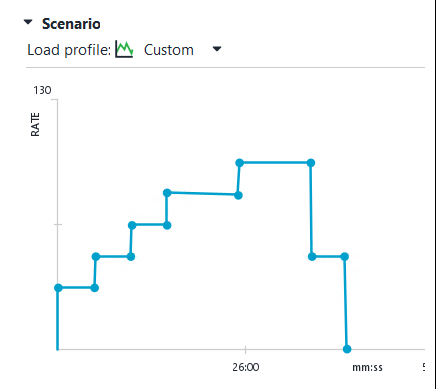
ReadyAPI 3.65.0 feature extension request
Dear all, We are trying to implement a custom load test where the load will increase gradually and then in the end will decrease until zero. We would like it to have the following profile: So, in detail: for 5 mins we would like to have x transactions per minute for the next 5 mins we would like to have y transactions per minute for the next 5 mins z transactions per minute for the next 10 mins a transactions per minute for the next 10 mins b transactions per minute and finally for the last 5 mins we would like again y transactions per minute where 0 < x < y < z < a < b The problem is that currently the load is assumed to be calculated per second. We would like an additional option to be able to use load per minute. I am using Ready API 3.65.0 In case there is any more information you need, do not hesitate to contact me. Best Regards, Georgios Leandros Kyriazis QA Engineer Test and Software Quality Center Group IT Quality Assurance 8 Iolkou & Filikis Eterias Str., Building A’ 142 34, Nea Ionia, Greece m. +30 6948 29 676779Views0likes0Comments
ReadyAPI Performance: ramp down capability
ReadyAPI Performance: requesting a feature for ramp down capability for a duration of time. We need the capability to ramp up for a duration of time, run steady state, and then ramp down for a duration of time for API load and performance tests.59Views0likes0Comments
Distroless docker images for Test Runner and LoadUI Agent
Dear Smartbear, we are planning to use the pre-configured Docker images (Test Runner and LoadUI Agent) to run tests in our GitLab CICD pipelines. But after consulting with our IT Security Department, only distroless images are allowed to use within our company. The bare minimum of a distroless image - as required by our IT Security Guideline - is that it contains no package manager. It can be achieved, for example, by a multi-stage docker build, in which the package manager is removed at the last stage. Thus, I would like to ask you to provide officially distroless Docker images for the Test Runner and LoadUI Agent. In addition, distroless Docker images are becoming best practices and the default choice for deployment containers. So I'm pretty sure, that a lot of your users would benefit from it 🙂 Thank you very much in advance! Best regards, your ReadyAPI user528Views0likes0Comments
Possibility to change page orientation for last and performance Report (in Statistics)
Hello, I am using the function to compare test runs in "Performance Tests" under the "Statistics" section. I have configured a lot of charts and I want to output them as a printable report. The diagram does not look nice because the generated document has portrait orientation and the diagram is compressed. There is no way to change the orientation to landscape. The page orientation landscape gives the diagrams more space. The extra space stretches the diagram. The stretching will make the diagram easier to read.608Views0likes0CommentsAdd password parameter for the loadtestrunner
Hello, I'm using the latest version from RedayAPI (3.0.0) and my project is password protected - the properties are encrypted. When I want to run functional tests in pipeline, I can give the password over the command-line parameter -p but this parameter doesn't exists for the loadtestrunner. This fact is not an error but a missing function. Without this feature, encoding the properties in a project is a major drawback when you want to automate the load test because I must deactivate the passwort protection to run the loadtestrunner. This is a strong security restriction, especially if you want to protect the passwords/token/secrets used in cloud repositories. A lot of services are provided in the cload nowadays and the trend is increasing, besides the reason I ask the reader to vote for the function to introduce the password parameter for the loadtestrunner as well. Thanks in advance for the votes. Greetings, Giovanni2KViews2likes2Comments
LoadUI - Server Monitor Grouping
Could we get a way to group up similar server monitors? We have a cluster with multiple nodes and currently if we want to see things like CPU usage we have to check each node individually. It would be useful to have a way to see what the average CPU, RAM, etc. across all nodes is. It would also be useful to group the monitors in the statistics page. We would be able to create reports that show avg. cpu usage based on the number of running VU's.848Views0likes0Comments