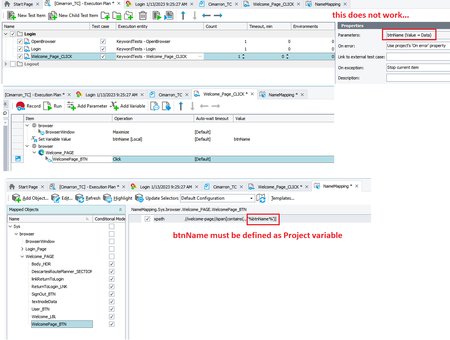
Variables in DB Table (query) variable
Would be nice if I could add a variable in the DB query variable, so it would be more flexible. Because now I need to build the entire script if I only want to add variable in the query or I need to add many DB Table variables if I only need to change one parameter in the query. Example in the screenshot.42Views0likes0Comments
Script Test - Show Usage/references
When we create reusable script routines to serve some common purposes, and use the same in different script files, and functions, TestComplete should have the ability to find and show all the usage / references of the reusable function, like the other standard IDEs.77Views0likes2Comments
Github Copilot Integration
GitHub Copilot suggests code completions as developers type and turns natural language prompts into coding suggestions based on the project's context and style conventions. One new idea would be having a copilot plugin for testcomplete would increase productivity and coding efficiency URL for reference - https://github.com/features/copilot633Views5likes0Comments
Allow variables to be passed to database check point custom queries
Would like the ability to pass a variable value into a database checkpoint custom query. E.g. be able to store a case reference that will change each time and add that into the custom query so when calling the database its finding the specified record148Views0likes0Comments
Implementation of OnWebPageDownloaded event for Chrome & Edge browser
As part of the Event Handlers, we have lot of events in TestComplete which are easy to implement in Project and helps to reduce manual effort. There is one Event called 'OnWebPageDownloaded' which occurs post the web browser loads a page specified by URL. However, this event is supported to IE browser and MS Web Browser control only. This event is not supported to Chrome & Edge browser as both are mode from Chromium engine. Please implement this event for other browsers like Chrome, Edge & Firefox browser as a future purpose.. That will helps to implement same event across all the browsers.1.1KViews4likes3CommentsPlease add a RowCount property to DDTDriver object
Please add a RowCount property to DDTDriver object. At the moment, there is only ColumnCount property available and the only way how to get the row count seems to be using below code: let csvRowCount=0; DDT.CSVDriver("c:\\path\\to\\file.csv"); while (!DDT.CurrentDriver.EOF()) { csvRowCount++ DDT.CurrentDriver.Next(); } Thanks for the attention! 😉241Views0likes0Commentspossibility to use module Parameter as variable in Name Mapping selector
Hi, At the moment, Name Mapping selectors could be variabilized only by using Project variables. Unfortunately, this is very limiting approach. For example, I want to create a single-purpose module, which will be used at multiple places in my test execution plan and which should click a button of certain (variable) name. Therefore, I want to pass the name of button, via module Parameter, defined in Test execution plan, instead of defining huge list of Project variables. Not to mention it would be impossible to assign multiple button names to the same project variable name. Or is there another approach? Thanks.249Views0likes0CommentsOpening new tab places it next right and closing tab activates next right and not next left
Hello, I've ticked the "Activate after test run" into the Engines > Log options. In my code editor I've opened two scripts A and B. I'm working on my A script. After executing my project, the new log tab opens next right to my A tab (which is ok) But when I close the log tab, it activates the next right tab (which is my B script) and not my previous active script (which should be my previous left A script). I've to perpetually click on the A tab to go back to my current work after each execution. The behavior is the same whith every opened/closed tab : opening = next right, closing = activates next right tab (and not previous left one) Thanks in advance !410Views2likes0Comments
Live logging during test execution
Hi, It would be very useful to get instant test logs during test execution. Currently TestComplete does not provide a scripting interface to the test log of the current run. it is very limiting for us. We have desktop UI tests with several hours execution and waiting for the log result is very impractical. I think it would be nice to support for example Elasticsearch live logging like many other modern test frameworks, not only HTML reporting that is very outdated today.434Views2likes0Comments
Add native support for Encryption, Decryption, and Encoding in several formations
Issue: Having the native ability to encrypt, decrypt and encode in multiple different formats is becoming more and more crucial to working on modern devops platforms. Often times we need to be able to handle encrypted data, be able to decrypt it when necessary, and communicate back encrypted information. Especially with AWS. Requested Solution: Provide native support to encryption, decryption, and encoding similar to Crypto-JS.373Views0likes0Comments