How do you integrate SmartBear tools into a CI/CD pipeline to achieve faster ?
I’m exploring ways to integrate SmartBear tools into a CI/CD pipeline to improve both speed and reliability in automated testing. Based on your experience, what approaches, configurations, or best practices have helped you successfully incorporate tools like TestComplete, ReadyAPI, or Zephyr into your CI/CD workflow?”104Views0likes0CommentsBest practices for stabilizing DéjàClick selectors ?
Hi everyone! I’m managing a suite of AlertSite UXM monitors for our React-based application. We’ve been running into a recurring issue where our DéjàClick scripts fail with an 'Object Not Found' error immediately after a new production deployment—even when the UI looks identical to the user. It seems our build process is generating dynamic CSS hashes (e.g., .button-a7x9) that break the recorded XPaths/Selectors.105Views0likes0Comments
DNS server failure
When running an AlertSite Web Test, I am intermittently getting the Alertsite status of 51 - Unable to resolve IP address Our DNS servers failed to resolve your domain name to an IP address I want to know where these DNS servers are located? It seems to be about half pass and half fail. I am wondering if one of the DNS servers are down? Is this information available somewhere? Thanks, CeciliaSolved1KViews0likes1Comment
Default Behavior for Monitors NOT in a Recipient Group 2022
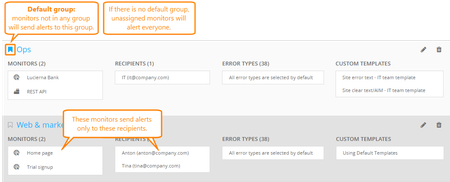
Recipient Groups UXM (or Notifier Groups in AlertSite 1.0) allow you to define who will be notified when an alert for a specific device is triggered. The default behavior for any monitor that is not assigned to a group, is to notify all contacts on the recipient list according to the rules defined for each. It does not matter if a specific contact is in a group or not, the behavior is dictated based on the monitor disposition, not the recipients. Once a monitor is assigned to at least one recipient group, it will only notify recipients assigned to that group. Monitors can be associated with as many groups as you like, as can recipients. In the UXM console, you can configure a default group by navigating to the Alerts Tab > Recipient Groups screen. Next to the heading of any recipient group, Click the Flag icon next to a recipient group you would like to assign as the default group. In the AlertSite 1.0 console, you can tell which monitors are assigned to a notifier group under the Configuration tab. Any monitor that has the icon with the computer folders next to it is assigned to at least one group. In AlertSite 1.0, you can configure a default recipient group under the notifier groups configuration menu by navigating to Notifiers > Notifier Groups screen > Then clicking the Notifier group heading. Under the notifier group edit screen in 1.0, check the option for "Default Group will be used for all unassigned site" and click "Submit" button at the top right hand corner. Under the Account Preferences tab of the settings menu (Both UXM and 1.0 console) you can also disable notification for any new monitor you create by default. You can modify the settings for each monitor individually if needed. Another popular way to work around the default behavior is to create one 'Placeholder' group and assign all monitors to it, new and old. In this way, you can be sure that the wrong people are not notified if an error is triggered. You can then assign an invalid notification contact to the Placeholder group as well, or a contact who should be notified for all errors if one exists.812Views1like0CommentsSet Primary Location via API
I am trying to add a list of monitors using the API, I have all the necessary JSON field names, but I am getting an error that the "Primary location X is not in the listed locations home_location". I have set home_location to the id of our private node servers using both the text and number. Also The error "Primary location X, the X is not the correct number of the location when getting the location via API, I didn't know if the X is an error. Just a note I did try the location that was shown in the error, but still get the error. I can click in the GUI on the private node and set the primary location ok, just not via the API. I just need to know if this can be done via API, what is the correct JSON field name and what location number I should use or is the only choice that will I have to click through my list of sites after the monitors are created. Also I could be overlooking this, but what is the JSON field name used to set up alert recipient groups? If this can't be done via API is there a way to set it for a group of monitors all at once? Thanks for your help757Views1like0CommentsCustom Properties in Alert Templates
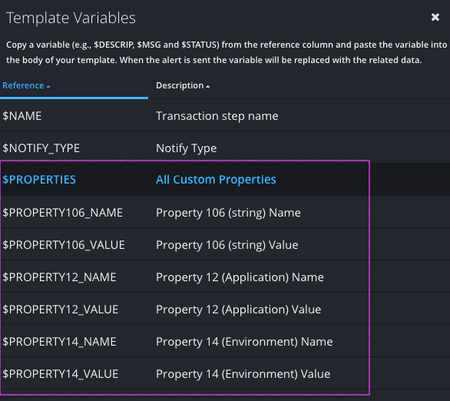
We've added custom properties to the available variables for editable alert templates. This allows you to easily add your metadata tags to alert payloads to make alert integrations even more powerful. You can add all properties with a single variable or include specific properties. Here's a quick look at how the new property variables are displayed in the alert template editor : You can read more about configuring custom properties HERE.948Views1like0CommentsActive alerts on dashboard
on the dashboard, is there a way to highlight which monitors have active alerts? I don't care about errors, I want to see which monitors are in an active alert condition (maybe a sortable column). The errors screen is ok, but you have to read thru it. You can't quickly see the active alerts.1.6KViews0likes1CommentCustomize Alert Templates
Introducing Alert Template Customization AlertSite now supports the creation of custom alert templates. Multiple templates can be created for the same alert type, allowing you to target the right alert message to appropriate recipients. You can read more about Alert Template customization in UXM or in the 1.0 console.2.2KViews2likes0Comments