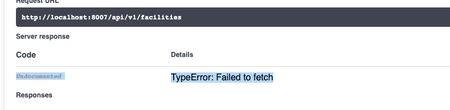
ContributionsMost RecentMost LikesSolutionsRe: Return dummy response data when using the: 'try it out' feature Thanks Helen Return dummy response data when using the: 'try it out' feature hi, I'm using the Swagger Standalone bundle:- window.onload = function () { const ui = SwaggerUIBundle({}) } Rather than returning live data from an API endpoint and database - can I return some dummy data back for a user of my swagger document? This could be in the form of a flat json file or something similar. Thanks, SolvedRe: Change domain for 'try it out' feature Thanks Helen Re: Change domain for 'try it out' feature Ah, yes - It's a CORS issue:- How do we get over this hurdle? Am I able to configure Docker to get around this? Thanks for all your help and a great piece of software. Re: Change domain for 'try it out' feature hi, Thanks for that. Using your first option - the URLs are now pointing at my API on the correct domain. I still have an issue where the server fails to load the response:- I've checked the above in my local browser and the payload returns successfully. Thanks Change domain for 'try it out' feature Hi, So currently I'm using the standalone version of swaggerUIBundle: window.onload = function () { // Begin Swagger UI call region const ui = SwaggerUIBundle({}) } On the front-end. When I enter the "try it out" feature and press the execute button; the request URL and the cURL string are both using the same domain which my page is on. My API sits on another domain however and so the response returns a page not found (as you would expect). Is there a config setting allowing me to serve my APIs from another domain? Thanks Thanks SolvedAdding a URL in topbar Hi, I'm using the standalone version of swagger UI: const ui = SwaggerUIBundle({ url: "openapi.json", dom_id: '#swagger-ui', deepLinking: true, presets: [ SwaggerUIBundle.presets.apis, SwaggerUIStandalonePreset ], plugins: [ SwaggerUIBundle.plugins.DownloadUrl ], layout: "StandaloneLayout" }) So, on the front-end and in the generated HTML, we get markup like:- <div class="topbar-wrapper"> <a rel="noopener noreferrer" class="link"> <img/> </a> </div> Question, is there an easy setting to replace the noopener norefferrer with a link: <a href="http://mydomain.com"></a> say. Or do I have to use a Javascript hack? Thanks