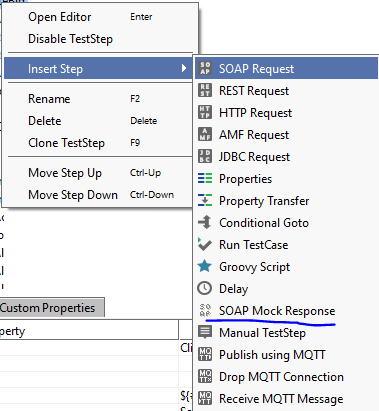
ContributionsMost RecentMost LikesSolutionsRe: Error javax.net.ssl.SSLHandshakeException found on v5.6.1 and 5.7.0 Hello KarelHusa, The logs are misleading, as the devs added more log tracking and used Wireshark to track the exchanged packages: some logs indicated that the client stopped the connection, some that the server automatically closed it. As a result it is very hard to say what actually went wrong. Our thought is that the server somehow stops the handshake as the certificate is self signed and SoapUI does not handle certificate validation bypass. From what my colleagues said, the server does require a client certificate, it is using Two-way SSL. If I run the tests in Postman it says that there is an error as the certificate is self signed but I can bypass the certificate validation and I can continue with the next request. POST https://endpoint/users/register? Error: self signed certificate After ▶ Enable SSL certificate verification - marked as disabled POST https://endoint/users/register? Warning: Self signed certificate If I try to open the WSDL in the browser, yes the browser does complain about the certificate but again, I can accept the risk and bypass the certificate validation. The idea remains, we do not plan on having anything else but self signed certificates in the test environment and the only difference at the moment is: - Even if we add the self signed certificate in the SoapUI config in 5.6.1 and 5.7.0 -> the SSL verification fails. Without this configuration it fails also. - With 5.6.0 we do not have any SSL config added into SoapUI and it works without any errors. If someone has any idea on how to get 5.7.0 working with the certificate bypass option, it would be highly appreciated. Any hack would be good at the moment since SoapUI does not have it implemented and I guess will not implement it taking into account that also other people requested it in the past without any resolution. Thank you, Daniela Error javax.net.ssl.SSLHandshakeException found on v5.6.1 and 5.7.0 -> javax.net.ssl.SSLHandshakeException found on v5.6.1 and v5.7.0 All the written suites under version 5.6.0 that used to work without any certificate configured on the test environment stopped working after upgrading to v5.6.1 and later on to 5.7.0. Why do we need to have a certificate taking into account that we run these tests mostly on test environments that use self signed certificates? We used all the old responses on this topic found on the forum and also on stack overflow and other websites but with no success. We also added a self signed certificate into Preferences > SSL Settings but because it is a self signed certificate it still didnt work (we do not expect nor want to add an authority signed certificate in the test environment). How can we bypass the certificate verification? Is there any way to bypass this in a test environment? We already spent a lot of time figuring out how to fix this issue and its no longer worth our time now. If new releases do not seek a real solution for this (something similar to what Postman has), we might need to give up Soapui for a better tool. We tried everything that we could find yet we are still stuck with 5.6.0 because of the SSL issue. Any help on this issue would be highly appreciated. Thank you Re: How to insert a REST Mock Response in my Test Case Thank you for your prompt response, nmrao . I really appreciate your input. It is a good option for those who want to mock the entire service or maybe I am missing something. I really need to add only 2-3 mock responses in my current project to mock a different service that we send/receive responses and that is not under our control. So my project includes several services that we manage and we are working on integrating it with a different service that is not under our control. So I want to have 1 mock service with 2-3 mocked requests/responses to simulate the integration with that different project. And I want to include that mock part into test suites and test cases for the integration simulation part (so a combination of our service and their mocked service). Any idea that I thought about on how to call that specific mock service response from my test suite did not work. I don't see how they have omitted that option entirely since more and more projects are using REST services :(. In any case, if someone has an idea on how to call a mock REST response into a test suite/test case please share this with us. Maybe I need to look a bit more into groovy scripting and maybe this can be done that way. Thanks again for your help. How to insert a REST Mock Response in my Test Case How can I make a REST Mock Response test step? There is only SOAP Mock Response Test Step option. Why is the REST option not available? I am using SoapUI 5.6.0. Any tips? Re: SoapUI - Folders in Projects I agree with the previous comments mentioned above. If we have many test suites, having a folder structure that could be expanded / collapsed would help a lot. For example having a very large project and having test suites grouped by modules would be easier if we could have a folder structure like: Module1: TestSuite1 -> TC1 / TC2 / TC3... TestSuite2 -> TC1 / TC2 Module2: TestSuite1 -> TC1 / TC2 / TC3... TestSuite2 -> TC1 / TC2 Also for different testing: Smoke testing module1: TS -> TC Smoke testing module2: TS -> TC Regression testing module1: TS -> TC Regression testing module2: TS -> TC If this were to be implemented the actual project structure for very large projects would be so much better. Thank you, D.