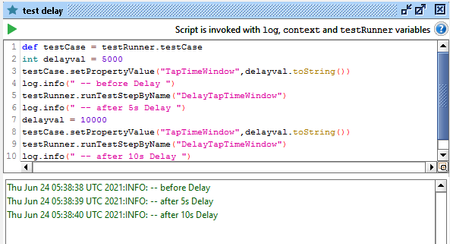
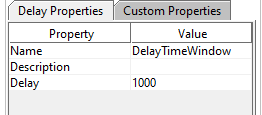
ContributionsMost RecentMost LikesSolutionsRe: Creating a custom Delay teststep via a Groovy scripting step I needed to change it to use ${#TestCase#TapTimeWindow} instead of what you used for the value of the delay Re: Creating a custom Delay teststep via a Groovy scripting step There is no visible property that I can set to change the test step from active to disabled or vice versa. I can only seem to do it when I right click on the test step and then manually selecting either Enable or Disable. Also, your concept didn't work. I am not seeing the delays. Re: Creating a custom Delay teststep via a Groovy scripting step What I mean by disabled is to set the test step to the disabled state so it looks like : I'm just about to try out your method of setting the Delay property's value to a property expansion syntax Creating a custom Delay teststep via a Groovy scripting step I managed to create a custom Delay test step via Groovy script but I can't seem to modify the step. def stepName = "DelayTimeWindow" def newPropertiesStep = testCase.getTestStepByName(stepName) if (newPropertiesStep == null) { newPropertiesStep = testCase.addTestStep('delay', stepName) } I can't seem to modify the actual delay value (in milliseconds) nor am I able to disable the test step from the normal sequential execution of the test case after I create it via code. I need to be able to set up a dynamic delay based on a value set by the 'main' script I have in the test case. The custom delay step is needed to be called by another (disabled) test step which is triggered by the 'main' test step calling it via the runTestStepByName() function. I've tried to use Thread.sleep() but it seems to have messed up the whole test case when it woke up after that sleep(). I wasn't even getting proper logging info on the script log window at the bottom of the screen after that. The test case contains multiple test steps that are all in the disabled state and only called via one main, active Groovy test step depending on multiple variables from an input spreadsheet and many of the test steps are being reused throughout the execution of the test case. SolvedRe: Trying to retrieve a property based on the value of another property in the Properties test step eventually this is what I ended up doing : if(incCount == true) { //Count the number of times an account number is used for financial transactions on the day and //updated the "Count" in the Settlements property step def propertySettlements = testRunner.testCase.getTestStepByName("Settlements") paddingNum = propertySettlements.getPropertyValue("DataRowCount").length() for(def testProperty in propertySettlements.getPropertyList()) { if(accnum in testProperty.value) { def padFlag = testProperty.name.substring(testProperty.name.length()-paddingNum) int newVal = propertySettlements.getPropertyValue("Count " + padFlag).toInteger() newVal++ propertySettlements.setPropertyValue("Count " + padFlag, newVal.toString()) } } } Re: Trying to retrieve a property based on the value of another property in the Properties test step Apologies HimanshuTayal, been busy with other parts of work to get back to this. What I am trying to do here is that while the script iterates through the properties of PropertyStep1, it updates the matching 'Count' property of the 'Serial Number' in PropertyStep2 with the new value based on the Serial Number that is encountered in PropertyStep1 Edit again : I just thought of another interesting quandary. What if the 'Count' property was added to PropertyStep2 after the property step was created, so that now PropertyStep2 looks like (as an example) : Row 1 : 1 Serial Number 1 : 12345 Row 2 : 2 Serial Number 2 : 12346 Row 3 : 3 Serial Number 3 : 12347 Count 1 : 0 Count 2 : 0 Count 3 : 0 Re: Trying to retrieve a property based on the value of another property in the Properties test step That isn't quite what I was after but it gives me something to try out. Will update this when I get the chance to think through that and perhaps adapt the code to better suit what I need. Thanks Trying to retrieve a property based on the value of another property in the Properties test step I have 2 Properties test steps set up in one of my test suites. And right now I need to retrieve values from the 2nd Properties test step based on a serial number from the first Properties test step. So, in my groovy script, I am processing through the information from the first Properties step which is something like : Row 1 : 1 Serial Number 1 : 12345 Time 1 : <timestamp 1> Row 2 : 2 Serial Number 2 : 12346 Time 2 : <timestamp 2> Row 3 : 3 Serial Number 3 : 12345 Time 3 : <timestamp 3> whereas in Property Step 2 it looks like : Row 1 : 1 Serial Number 1 : 12345 Count 1 : 0 Row 2 : 2 Serial Number 2 : 12346 Count 2 : 0 Row 3 : 3 Serial Number 3 : 12347 Count 3 : 0 Now, I need to update the Count value of Properties step 2 whenever I encounter the serial number in Properties step 1. Is there any way to do that without it getting messy..?? Also, the properties, when loaded, are sorted based on other fields, not based on the serial numbers. SolvedRe: Trying to process data from an Excel file Is that even going to be viable if I had like 1000 rows and 20 columns..?? So, there is no way to maintain an actual file pointer across the entire test case or pointer to the sheet..?? Also, eventually, I need to be able to output data to the same Excel (or if easier, a new Excel) file based on groups of rows from the input file. Trying to process data from an Excel file I'm trying to process the rows in an Excel file. Is there a way to do that by just reading in the worksheet once and then iterate through the rows.?? Each row will cause the flow of the test case to be conditionally changed as the required test steps for the active row is run depending on the values in different columns of the row. Solved