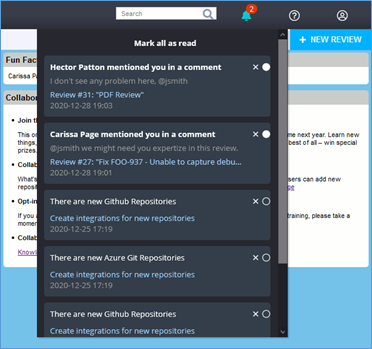
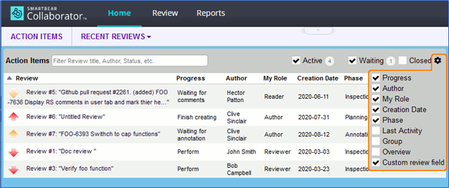
ContributionsMost RecentMost LikesSolutionsMCP Server v0.12.0 is live — what’s new and why it matters Hello MCP community, We just pushed the v0.12.0 release of SmartBear MCP Server — a solid step forward in adding new capabilities across our ecosystem of products. What’s new in v0.12.0 Zephyr support improvements — we added two new tools: one to retrieve Environments, and another to fetch a list of Test Executions. Swagger enhancements — two powerful tools added: create_api_from_prompt: generate API definitions directly from natural-language descriptions, powered by SmartBear AI, with governance and standardization applied. standardize_api: scan an existing API definition and automatically fix it to comply with standardization rules — helpful for teams managing many APIs or enforcing policies. BugSnag observability extension — added tools for querying performance data and managing network-grouping rules: list/get span groups, list spans, get traces, list trace fields, and get/set network endpoint groupings. QMetry automation & context metadata improvements — new tools for importing automation results, creating releases/cycles, and improved contextual metadata to help with LLM-based prompt handling. Misc tools & UX improvements — support for a --version command line flag to easily check which MCP version you’re running. Breaking/Changed Behavior in BugSnag integration — event threads have been removed from the “Get Error” response; instead, there is now “Get Event (by ID)”. If your automation or scripts rely on the old shape, you’ll need to update. Why this matters Teams using Zephyr now have deeper visibility into environments and test executions directly from MCP clients. That’s a big win for QA workflows and auditability. For API-first teams, the new Swagger AI-powered API creation and standardization tools could drastically speed up API lifecycle: from “idea” to “compliant spec” in one step — helping enforce consistency and governance at scale. The expanded BugSnag performance/tracing support bridges the gap between observability and AI-driven diagnostics. You can now query traces, spans, and network groupings — which makes MCP a more compelling tool for real-time debugging and error triage. Improved QMetry automation import + LLM context metadata makes it more practical to embed test results and context into AI-powered workflows — good for release automation, reporting, or even automated triage. The release overall tightens integration across the SmartBear ecosystem — pushing farther toward a unified, AI-ready platform. What to do next Upgrade to v0.12.0. If you use BugSnag integrations — especially error queries — verify your scripts against the changed “Get Error / Get Event” shape. Try out the new Swagger and Zephyr tools. Think about how these could reshape your API and QA workflows. If you’re experimenting with AI-driven workflows (e.g. auto-generating APIs or linking runtime errors to API docs) now is a good time to test and give feedback. As always: share your experiences. What works? What needs polish? Your feedback will guide what’s next. This is a big release with real substance behind it. For teams already invested in BugSnag, Swagger, Zephyr or QMetry, adopting v0.12.0 could unlock real productivity and automation opportunities. Automating Pact Test Generation with the SmartBear MCP Server and PactFlow Here is a new video demo showing how developers can use the SmartBear MCP Server together with GitHub Copilot to automatically generate and run Pact Tests right inside Visual Studio Code. In this walkthrough, you’ll see how easy it is to: ✅ Connect Copilot to a locally running SmartBear MCP server ✅ Use MCP tools to generate Pact Tests from your existing API specs and templates ✅ Filter endpoints and control file naming to fit your workflow ✅ Validate and run the generated tests directly from your terminal This example highlights how MCP can act as the bridge between your AI assistant and SmartBear’s quality ecosystem, turning natural language prompts into real, executable tests no manual setup required. Watch the full demo here: Automating PACT Tests with SmartBear MCP Server If you’re experimenting with your own MCP integrations or have ideas for other test automation workflows you’d like to see, drop your thoughts below! What’s Next for SmartBear’s MCP Server? Over the past few months, we've been busy adding tools to the SmartBear MCP server with updates/releases happening every few weeks. We’ve seen teams begin exploring how MCP can securely connect SmartBear’s API, testing, and observability tools directly into their AI assistants and IDEs with no extra setup or manual data wrangling required. Here’s what early users are getting excited about: Full Context in One Place: Developers can instantly access API definitions, test outcomes, and error insights from tools like SwaggerHub, Zephyr, and BugSnag without leaving their workflow. Agentic Automation: Teams are building AI-driven workflows that trigger tests, surface flaky results, and even connect runtime errors to missing API documentation. Secure Local Control: All data stays protected under your organization’s governance policies. MCP simply makes it easier and safer to access what you already own. Next up, we’re focusing on real-world use cases like error-driven API refinement (BugSnag + Swagger) and automated validation after fixes (BugSnag + Reflect) to show how cross-product workflows can speed up release confidence. Here is a video from a SmartBear that has been exploring how to desgin APIs and ensure best practices around API Standardization. Swagger API Governance with MCP We’d love to hear how you’re experimenting with MCP whether it’s inside your IDE, your assistant, or your CI pipeline. Drop your feedback or share what workflows you’d like to see next! Re: Collaborator Release Notifications Welcome to Collaborator v13.9! The Collaborator v13.9 release focuses on improvements to performance and security and also adds some minor modifications to the diff viewer and notifications. Please check out the What’s New page to see the full list of Collaborator changes! Performance The L2 cache has been increased to improve load time. Additionally, the processing of large commits and files has been improved. Security Remote System Link information for issue-tracking tools, like Jira, is now configurable at the template level. Previously, links were enabled at a global level and displayed in every review. Apache Tomcat was also updated in this release, which includes several of its performance and security improvements. To learn more about Collaborator v13.9, please check out the links below: Download the latest release of Collaborator. You can view the full list of fixes and improvements here: What’s New If you have any questions about licensing, please contact sales. If you have any technical support questions, please contact SmartBear Support. Best Wishes, Justin Collier & The SmartBear Collaborator Team Re: Collaborator Release Notifications Welcome to Collaborator v13.7! The Collaborator v13.7 release adds a number of smaller improvements including authentication with GitHub or Atlassian and the ability to create Simulink reviews directly from Pull Requests. There are a number of improvements in this release, so checkout out the What’s New page to keep up with all updates not covered here! GitHub & Atlassian OAuth Collaborator v13.7 extends the authentication options for users who traditionally login with a unique username & password or LDAP/AD credentials. With Collaborator v13.7, users can now authenticate through GitHub or Atlassian. Configuring OAuth Simulink Review Creation There are currently two ways to create/update Simulink reviews: users can either create a review through the Collaborator-Simulink app or users can manually upload Simulink HTML files into Collaborator. With the release of v13.7, administrators can configure Collaborator to automatically create/update reviews whenever there are changes to a Simulink model. Automatically create reviews To learn more about Collaborator v13.7, please check out the links below: Download the latest release of Collaborator. You can view the full list of fixes and improvements here: What’s New If you have any questions about licensing, please contact sales. If you have any technical support questions, please contact SmartBear Support. Best Wishes, Justin Collier & The SmartBear Collaborator Team Re: Collaborator Release Notifications Welcome to Collaborator v13.6! Introducing Simulink Model Support! Collaborator v13.6 adds a new module that provides Simulink users a way to review models with the same ease & precision that they review code or documents. Additionally, our latest version improves document review scrolling and performance. Simulink Many Simulink users currently do not have an easy, comprehensive way to peer review Simulink models. Without a peer review tool, it can be tough to ensure the model is fully reviewed, and all issues are addressed. Collaborator’s new Simulink add-on offers engineers the ability to review Simulink Models effectively and thoroughly alongside other artifacts that are part of the development lifecycle. Simulink Models Document Reviews Traditionally, Collaborator has only been able to display one document page at a time. With v13.6, Collaborator now displays portions of the current and previous page or the current and next page. The added visibility delivers a more natural document review experience for end-users. To learn more about Collaborator v13.6, please check out the links below: Download the latest release of Collaborator. You can view the full list of fixes and improvement here: What’s New If you have any questions about licensing, please contact sales. If you have any technical support questions, please contact SmartBear Support. Best Wishes, Justin Collier & The SmartBear Collaborator Team Re: Collaborator Release Notifications Welcome to Collaborator v13.5! Collaborator v13.5 is here; the latest release from the dev collaboration team at SmartBear! This new version improves the document review user experience and adds support for GitLab Pipelines. Different File Names are the Same Document It is now possible to associate a differently named file with a file that is already under review in Collaborator. For example, if you uploaded and reviewed myfile_v1.doc and now you want to upload the latest version myfile_v2.doc to Collaborator, previous versions of Collaborator would see this as two separate files. With Collaborator v13.5, users can now upload a new version to an existing version. Different File Names GitLab Pipelines Collaborator now supports GitLab’s merge request pipelines out of the box with version 13.5. GitLab Pipelines for Merge Requests To learn more about Collaborator 13.5, please check out the links below. Download the latest release of Collaborator. You can view the full list of fixes and improvements here. If you have any questions about licensing, please contact sales. If you have any technical support questions, please contact SmartBear Support. Best Wishes, Justin Collier & The SmartBear Team Re: Collaborator Release Notifications Welcome to Collaborator v13.4! Collaborator 13.4 is the latest release from the dev collaboration team at SmartBear. This new version has many great usability improvements including in-app notifications, user @mentions, version info in comments, and a collapsible chat panel in the diff viewer. In-app Notifications The Collaborator toolbar now features a notification icon to inform users if they have been mentioned in a comment or if new repositories have been added to one of the tracked remote repository servers. @Mentions It is now possible @mention another Collaborator user while creating a comment or defect. This makes it easy to notify them via email as well as through the in-app notification feature that a comment has been left for them on a review. Comment Version Info In Collaborator 13.4, version information is now added next to the date/time stamp. This makes it easy to identify and select the version that a comment or defect is associated with as users are reading comments. Collapsible Chat Panel Users now have the ability to individually collapse the Header or Chat panel in the diff viewer. Additionally, there is a new ‘Focus’ icon in the upper right-hand corner of the diff viewer that allows both panels to be collapsed simultaneously. The new collapse features make it easier to focus the entire browser window on the actual file diff. To learn more about Collaborator 13.4, please check out the links below. Download the latest release of Collaborator. You can view the full list of fixes and improvements here. If you have any questions about licensing, please contact sales. If you have any technical support questions, please contact SmartBear Support. Best Wishes, Justin Collier & The SmartBear Team Re: Collaborator Release Notifications Welcome to Collaborator v13.3! Collaborator 13.3 is the latest release from the dev collaboration team at SmartBear. This new version includes improvements to document review, our Azure DevOps integration and allows end-users to add new repositories to the managed repository lists for GitHub, GitLab, Bitbucket and Azure DevOps. Improved Document Scrolling We continue to focus on improving document review performance. In this release, we have introduced page caching to improve the loads times as users transition from one page to the next. The cache now contains the current, previous and next pages. Reading through the document and going to the next page will feel more natural. Assign Multiple Reviewers With Collaborator 13.3, review Authors can now quickly select and assign multiple people to specific participant roles. This improvement will reduce review setup time for Author’s and allows reviews to be configured more easily. Azure DevOps Reviewers Many teams like to assign reviewers in Azure DevOps to a pull request. Collaborator now adds reviewers associated with the pull request directly to the Collaborator review. This allows reviews to be created and assigned more quickly and with less effort by the Author. Allow Users to Add New Repositories Prior to Collaborator 13.3, administrators had to add all new repositories to Collaborator. Administrators can now provide access to individual users to access the remote system configurations. This allows individual users the ability to add new repositories to be monitored by Collaborator. To learn more about Collaborator 13.3, please check out the links below. Download the latest release of Collaborator. You can view the full list of fixes and improvements here. If you have any questions about licensing, please contact sales. If you have any technical support questions, please contact SmartBear Support. Best Wishes, Justin Collier & The SmartBear Team Re: Collaborator Release Notifications Welcome to Collaborator v13.2! Collaborator 13.2 is the latest release from the dev collaboration team at SmartBear. This new version includes some UI modifications as well as performance improvements and Microsoft Office plugins. Configurable Home Screen As a user you can now modify the fields that are displayed on the Collaborator Home screen. You have the ability to include Review Custom Fields as well as other predefined Collaborator fields, such as your Role, the review Phase or Last Activity. Improved Performance With Collaborator 13.2 we have improved file retrieving times for Collaborator’s pull request integrations with Azure DevOps, GitHub, Bitbucket and GitLab. In addition to improving performance for pull requests, there has also been an improvement for document review page load times inside the Diff Viewer. Microsoft Plugins The Collaborator plugin for Microsoft Word, PowerPoint or Excel makes it easy to create or update reviews with just a few clicks. When using the plugin, there is no need to save the file and upload it manually to Collaborator. Download plugins Modified Mark Fixed, Edit and Delete Process Previous versions of Collaborator forced users to expand the defect details in order for it to be Marked Fixed, Edited or Deleted. Now, these options are available on the Defect toolbar. This change will make it easier and quicker for users to modify the defects current settings. To learn more about Collaborator 13.2, please check out the links below. Download the latest release of Collaborator. You can view the full list of fixes and improvements here. If you have any questions about licensing, please contact sales. If you have any technical support questions, please contact SmartBear Support. Best Wishes, Justin Collier & The SmartBear Team

 StaffStaff