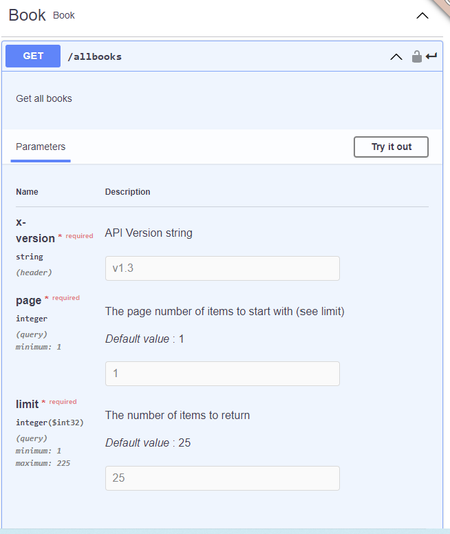
ContributionsMost RecentMost LikesSolutionsRe: User removed from an organization but still displayed as a member If this is an On-premise SwaggerHub, then this is expected behaviour. You must also remove the member from the instance itself using wither the admin console, the k8-helper function or the User Management API. Re: Saas vs on-prem Additional notes. SwaggerHub On-premise supports: Multiple Organizations (siloed) Custom Codegen Templates Customer Terms & Conditions with auditing On-premise releases lag SaaS releases by as much as 2 months. Infosec teams are usually opposed to opening the firewall to allow SaaS to talk to other internal API tooling. Re: Generate JSON Schemas If the schema is used in any API you can Export the API in "Json Resolved" format and the flat file will contain the schema in json format. converting that json schema to a suitable database schema is not something SwaggerHub can do, but there are open source tools that might help. Google "dashjoin" they do very cool stuff like this, Re: Delete SwaggerHub 2.x users using the user-management API In the on-premise User Management API there is a path “/users” that supports a DELETE method. “Deletes the specified users from the On-Premise system by email address. The authenticating user must be the On-Premise admin. Deleting the last owner of an organization will result in the organization also being deleted.” This call removes a User from all on-premise organizations and returns the license seat to the available pool. Removing a User with /orgs/{orgId}/members does not remove the user from the on-premise instance. Re: SwaggerHub 2.x initial installation database settings You can also open a Support Case with our amazing team. https://support.smartbear.com/swaggerhub/message/ Engineers love debugging cases like this !! Nerds. Re: Delete SwaggerHub 2.x users using the user-management API Also, remember to URL encode mail addresses. That always catches me out. Re: Delete SwaggerHub 2.x users using the user-management API You need to use the on-premise User Management API. Please see: https://support.smartbear.com/swaggerhub/docs/api/user-management.html Load the swagger.yaml for the latest API from the links provided. There are 2 DELETE methods, the second one is for on-premise instances. Re: Pagination with swagger 3 and open api 3 do you mean: communicate pagination to the back-end ? so using parameters: parameters: page: name: page description: The page number of items to start with (see limit) in: query required: true schema: type: integer minimum: 1 default: 1 example: 1 limit: name: limit description: The number of items to return in: query required: true schema: type: integer format: int32 minimum: 1 maximum: 225 default: 25 example: 25 Re: Standardization page stucked after unexpected system shutdown Please open a Support Case ASAP. Re: Swagger example for multipart/form-data sending file in body examples: foo: summary: A foo example value: {"foo": "bar"} bar: summary: A bar example value: {"bar": "baz"} 'application/xml': examples: xmlExample: summary: This is an example in XML externalValue: 'http://example.org/examples/address-example.xml'

 StaffStaff