kendemoorOccasional ContributorJoined 7 years ago6 Posts3 LikesLikes received1 SolutionView All Badges
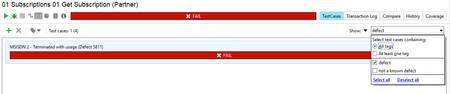
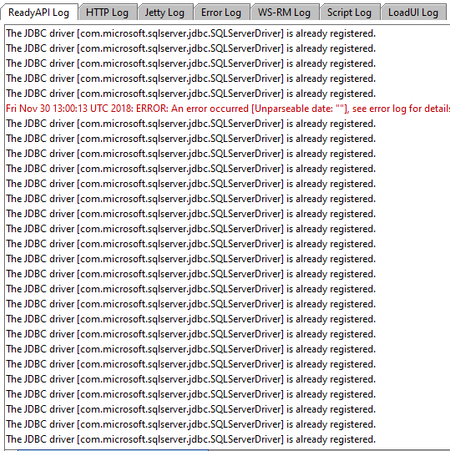
ContributionsMost RecentMost LikesSolutionsRe: How to run only testcases with a specific tag, in a full regression. Thanks, That is an interesting workaround and I could see how it could work, but for my specific use case it has some issues since I already disable/enable some testcases based on other factors. I know the functionality to filter a test run specifically based on tags already exists, since it's available when I use it on a testsuite. I'd like to find a way to specifically use this functionality on a higher level when combining test suites in a regression, without enable/disable overwrites. Screenshot of the functionality for clarity. How to run only testcases with a specific tag, in a full regression. My scenario is the following. I have a full regression with many test suites. In each of these test suites I have all my test cases tagged with "Known Defect" or "No defect" The idea was to be able to run the entire regression for only the known defects, and also for only the known working functionality. However when running my regression I seem to only be able to filter based on testsuite level tags, when running a testsuite seperately I can use testcase level tags but then I'd have to run every TestSuite seperately rather than in one large regression. Is there a way for me to run all these testsuites at once using testcase filters, or is this missing functionality from SoapUI pro? Thanks for your time Re: Slow startup is back! v1.8.0 JKambli wrote: Try this, Download nightly build 64 bit and add these settings, https://support.smartbear.com/downloads/readyapi/nightly-builds/ In your Ready API installation folder, in the Contents directory, please find the vmoptions file and open it in a text editor. Add these lines to the file: Edit the vmoptions file in Ready API Pro installation folder\bin folder for windows and for Mac Applications/Ready-API-Home.app/Contents/ to accommodate following changes, Set Xms128m and -Xmx to 4000 if your ram is 4GB or 8000 if its 8GB -XX:MaxPermSize=128m -XX:MinHeapFreeRatio=40 -XX:MaxHeapFreeRatio=70 -Dsoapui.jxbrowser.disable=true -Dtest.history.disabled=true Once you do this, go to .readyapi folder in user folder > delete the contents of the db directory. Close and restart Ready API This worked for me to fix slow startup in v2.5.0 I know this is an old topic but it worked instantly, I think it was mainly because I had over 100MB of data in the db folder. JDBC driver is already registered log spam I have a lot of JDBC steps and groovy steps that use a JDBC connection in my testing. Every time I make a JDBC connection it logs this in the ReadyAPI Log. This is making the log very hard to use and actually see the real errors because of how much this "error" is spammed. Does anyone know of a way to disable this logging? See example in the screenshot. SolvedRe: Comparing an array from Json Response to an array from JDBC response. I ended up doing groovyscript assertions, but I'd still like to know why my previous attempt didn't work. Here's my solution for reference if someone else wants to do the same. def SubscriptionGroupID = context.expand( '${Get SubscriptionGroups#Response#$[\'SubscriptionGroups\'][*][\'SubscriptionGroupID\']}' ) def Sort = context.expand( '${DataSource#Database sort}' ) def sql = Sql.newInstance("redacted","redacted","redacted","com.microsoft.sqlserver.jdbc.SQLServerDriver") DatabaseValues = sql.rows("select TOP 100 lItemID,szUser,szName,szResponsible,szFirstname,szCustomerNr,szVATNumber From Address where lItemID IN (select ContactId from PartnerContact Order by ContactId OFFSET 2 rows) ORDER BY " + Sort) assert DatabaseValues.lItemID.toString() == SubscriptionGroupID.toString() : "Not all SubscriptionGroupIDs match with database value" Comparing an array from Json Response to an array from JDBC response. Hello, I have a situation where I'd like to compare a resultset of 100 rows from both a REST call and a database query using XPath Match on the JDBC response. My issue is however that while they seemingly do hold the same values, the assertion fails anyway with the following error. I have compared every value in these two arrays and they are the same. However one seems to contain an extra space? I have checked both the Database and Rest response and neither contain this extra space. The XPathContains assertion failed for the following path: [//Results[1]/ResultSet[1]/Row[*]/LITEMID[1]/text()]. Expected value: [[1427, 1392, 1393, 1394, 1415, 2138, 2139, 2140, 2141, 2142, 2143, 2144, 2145, 2146, 2147, 2148, 2149, 2150, 2151, 2152, 2153, 2154, 2155, 2156, 2157, 2158, 2159, 2161, 2162, 2163, 2164, 2165, 2166, 2167, 2168, 2169, 2170, 2171, 2172, 2173, 2175, 2176, 2177, 2178, 2179, 2180, 2181, 2182, 2183, 2184, 2185, 2186, 2187, 2188, 2189, 2191, 2192, 2193, 2194, 2195, 2196, 2198, 2199, 2200, 2201, 2202, 2203, 2204, 2206, 2207, 2208, 2209, 2210, 2211, 2212, 2213, 2214, 2215, 2216, 2217, 2218, 2219, 2221, 2223, 2224, 2225, 2226, 2227, 2228, 2229, 2230, 2231, 2232, 2233, 2234, 2235, 2237, 2238, 2239, 2240]]; Actual value: [[1427,1392,1393,1394,1415,2138,2139,2140,2141,2142,2143,2144,2145,2146,2147,2148,2149,2150,2151,2152,2153,2154,2155,2156,2157,2158,2159,2161,2162,2163,2164,2165,2166,2167,2168,2169,2170,2171,2172,2173,2175,2176,2177,2178,2179,2180,2181,2182,2183,2184,2185,2186,2187,2188,2189,2191,2192,2193,2194,2195,2196,2198,2199,2200,2201,2202,2203,2204,2206,2207,2208,2209,2210,2211,2212,2213,2214,2215,2216,2217,2218,2219,2221,2223,2224,2225,2226,2227,2228,2229,2230,2231,2232,2233,2234,2235,2237,2238,2239,2240]]. JDBC XPath expression : //Results[1]/ResultSet[1]/Row[*]/LITEMID[1]/text() EXPECTED RESULT: ${Get SubscriptionGroups#Response#$['SubscriptionGroups'][*]['SubscriptionGroupID']} JDBC SNIPPET Results> <ResultSet fetchSize="128"> <Row rowNumber="1"> <LITEMID>1427</LITEMID> <SZUSER>email@redacted.com</SZUSER> <SZNAME>Filtersubscription</SZNAME> <SZRESPONSIBLE>FilterLastName</SZRESPONSIBLE> <SZFIRSTNAME>FilterFirstName</SZFIRSTNAME> <SZCUSTOMERNR>FilterID</SZCUSTOMERNR> <SZVATNUMBER>FilterVAT</SZVATNUMBER> </Row> <Row rowNumber="2"> <LITEMID>1392</LITEMID> <SZUSER>email@redacted.com/SZUSER> <SZNAME>Has 0 subscriptions</SZNAME> <SZRESPONSIBLE>AllValidLastName</SZRESPONSIBLE> <SZFIRSTNAME>AllValidFirstName</SZFIRSTNAME> <SZCUSTOMERNR>AllValidID</SZCUSTOMERNR> <SZVATNUMBER>AllValidVAT</SZVATNUMBER> </Row> <Row rowNumber="3"> REST SNIPPET { "ListInfo" : { "Count" : 100, "TotalCount" : 127, "HasMore" : "Yes", "Links" : { "URL" : "http://arta:8080/api/partners/mainregressionpartner/subscriptiongroups?Sort=%2BLabel", "First" : "http://arta:8080/api/partners/mainregressionpartner/subscriptiongroups?Sort=%2BLabel&offset=0&limit=100", "Previous" : null, "Next" : "http://arta:8080/api/partners/mainregressionpartner/subscriptiongroups?Sort=%2BLabel&offset=100&limit=100", "Last" : "http://arta:8080/api/partners/mainregressionpartner/subscriptiongroups?Sort=%2BLabel&offset=100&limit=100" } }, "SubscriptionGroups" : [ { "SubscriptionGroupID" : 1427, "Label" : "Filtersubscription", "LastName" : "FilterLastName", "FirstName" : "FilterFirstName", "ExternalReferenceID" : "FilterID", "VAT" : "FilterVAT", "CreatedOn" : "2018-11-21T14:11:14.763Z", "ModifiedBy" : "email@redacted.com", "LastUpdated" : "2018-11-21T14:11:14.767Z", "NumberOfSubscriptions" : 0, "Links" : { "SubscriptionGroup" : "http://arta:8080/api/partners/mainregressionpartner/SubscriptionGroups/1427" } }, { "SubscriptionGroupID" : 1392, "Label" : "Has 0 subscriptions", "LastName" : "AllValidLastName", "FirstName" : "AllValidFirstName", "ExternalReferenceID" : "AllValidID", "VAT" : "AllValidVAT", "CreatedOn" : "2018-11-21T09:10:53.463Z", "ModifiedBy" : "email@redacted.com", "LastUpdated" : "2018-11-21T09:10:53.463Z", "NumberOfSubscriptions" : 0, "Links" : { "SubscriptionGroup" : "http://arta:8080/api/partners/mainregressionpartner/SubscriptionGroups/1392" } }, { "SubscriptionGroupID" : 1393, "Label" : "Has 1 subscription", "LastName" : "AllValidLastName", "FirstName" : "AllValidFirstName", "ExternalReferenceID" : "AllValidID", "VAT" : "AllValidVAT", "CreatedOn" : "2018-11-21T09:10:53.73Z", "ModifiedBy" : "email@redacted.com", "LastUpdated" : "2018-11-21T09:10:53.733Z", "NumberOfSubscriptions" : 1, "Links" : { "SubscriptionGroup" : "http://arta:8080/api/partners/mainregressionpartner/SubscriptionGroups/1393" } }, Has anyone come across a similar issue? Or maybe has a different approach for comparing a list of data with database values? Solved