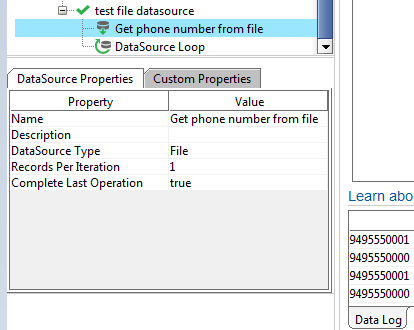
ContributionsMost RecentMost LikesSolutionsRe: recursion in Event afterRequest? Yes, testcase2 is disabled. I'm trying to run testcase2 only when the testcase1 request returns 401. recursion in Event afterRequest? I've got a SoapUI project set up: testcase1: request 1 testcase2: request 2 afterRequest script: check http status, if 401 then run testcase 2 When I run testcase1, the request in it sometimes returns 401, which means afterRequest script will run testcase2. But, when this happens I can see testcase2 get executed (and received on the server), but execution never returns to the afterRequest event script. The ReadyAPI UI shows that the tests are still running and they never complete. Here's what the event script looks like: def status = context.httpResponse.getStatusCode() if (status != 401) { return } def path = request.getPath() if (path != <request 1>) { return } def testSuite = context.getTestCase().getTestSuite() def refreshTestCase = testSuite.getTestCaseByName("testcase2") refreshTestCase.run(null, false) // never get here and UI spins forever Are there limitations on what can be done in an event script like this? It seems like SoapUI is recursing, but I added checks to keep the script from executing testcase2 a second time, so not sure if that's what's going on. Re: Why doesn't this file datasource loop terminate? Yay! Thanks richie. In my case (not shown in my question) there were several steps between the file data source and the REST call and the loop. For a data source loop step in general, set DataSource Step to the data source step (fairly obvious), and the Target Step to the step after the data source step (not so obvious). Thanks! Why doesn't this file datasource loop terminate? This file datasource uses a text file that has 10 lines in it, each line is a phone number like 9495550000 The data loop as it is doesn't terminate. What could be going wrong? The screen shot shows the test case, as well as the data log for the data source with only the first two numbers. SolvedRe: how to access a datasource result from calling groovy script That didn't work for me initially. Eventually I noticed menus not opening, so I restarted ReadyAPI app and now it works. The use case: I wanted to use a data source loop, but I need to have a nested data source and the inside data source needs to generate a variable number of objects. I have two data sources: a parent object and a variable number of child objects. The calling script will create one parent object, then a variable number of children. Would it be better to have a single data source to create both of these? Can my data source return a list? If so then I can put the data source inside a data source loop and the row count (at least for the parent objects) will be handled by the loop. But I may still have a problem with the row count for the child objects. I would appreciate any suggestions you have for this case. Thanks! how to access a datasource result from calling groovy script I've created a Groovy datasource that returns information in the results associative array available when the datasource script runs. Now I want to run that datasource from another groovy script, but don't know how to access the datasource results information after calling the datasource. The datasource looks something like this: def row = testRunner.testCase.testSteps["MyDataSource"].getCurrentRow() if (row < 100) { result["email"] = "user-" + String.format("%04d", row+1) + "@company.com" } The calling script looks like this: testRunner.testCase.testSteps["MyDataSource"].run(testRunner, context) Is it possible to access the "email" key created by the data source step? I've tried a lot of methods, none of which worked. Thanks! Solvedzero pad string in groovy script in my Groovy script I want to format an integer as a zero padded string. Something like: def row = 27 log.info "zero padded = " + Format("%04i", row) can it be done? Solvedzero pad string in groovy script in my Groovy script I want to format an integer as a zero padded string. Something like: def row = 27 log.info "zero padded = " + Format("%04i", row) This post looked promising but apparently doesn't apply to Groovy: https://community.smartbear.com/t5/TestComplete-Functional-Web/How-to-use-Format-function-to-format-a-string/m-p/65332/highlight/true#M6053 Solved