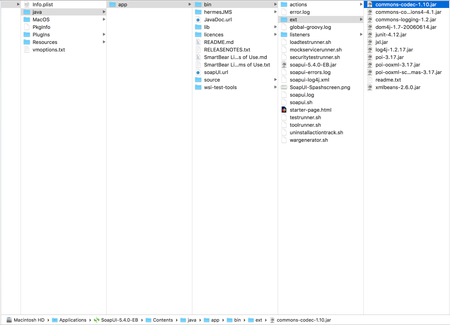
ContributionsMost RecentMost LikesSolutionsRe: REST api dear JHunt, it is working now. Thanks a lot. Re: REST api dear Jhunt, after I implement your suggestion. my REST request like this { "INTEGRATIONID" : "testIntegration", "INTERFACENAME" : "testInterface", "messages": [ "AccountName": "${Property - batch-account-contact#AccountName}", "Billing_Street": "${Property - batch-account-contact#Billing_Street}", "AccountNo": "${Property - batch-account-contact#AccountNo}", "Billing_City": "${Property - batch-account-contact#Billing_City}", "Billing_Country": "${Property - batch-account-contact#Billing_Country}" ] } I got another error message: "[{ "errorCode": "APEX_ERROR", "message": "System.JSONException: Unexpected character (':' (code 58)): was expecting comma to separate ARRAY entries at [line:5, column:25]\n\n(System Code)\n" }]" I am sorry I still confuse where I should put your code. Re: REST api dear JHunt, a question, what is property expansions? Re: REST api dear JHunt, the reason I write like this "AccountName": ${Property - batch-account-contact#AccountName} because I retrieve the data from an excel file, and that is the way to retrieve data (variable syntax in soapUI). if using the real data, my rest request is working already. REST api dear all, I have a question. I would like to write a groovy script to call REST using REST API. The same groovy script I used for SOAP request, it is working already. When I implement it and change the test case name, I got an error message "[{ "errorCode": "xxx_ERROR", "message": "System.JSONException: Unexpected character (',' (code 44)): expected a valid value (number, String, array, object, 'true', 'false' or 'null') at [line:7, column:33]\n\n(System Code)\n" }]" Please help me. Thank you. my REST request : { "INTEGRATIONID" : "testIntegration", "INTERFACENAME" : "testInterface", "messages": [ { "AccountName": ${Property - batch-account-contact#AccountName}, "Billing_Street": ${Property - batch-account-contact#Billing_Street}, "AccountNo": ${Property - batch-account-contact#AccountNo}, "Billing_City": ${Property - batch-account-contact#Billing_City}, "Billing_Country": ${Property - batch-account-contact#Billing_Country} } ] } my groovy script : //grasping data from excel import com.eviware.soapui.support.GroovyUtils; import org.apache.poi.ss.usermodel.* import org.apache.poi.hssf.usermodel.* import org.apache.poi.xssf.usermodel.* import org.apache.poi.ss.util.* //myTestCase contains the test case def myTestCase = context.testCase //open an excel file def fs = new FileInputStream("/xxx/batch-account.xlsx"); //def a workbook Workbook wb = WorkbookFactory.create(fs) //def the worksheet location in the excel file def ws = wb.getSheet("Sheet1") //count the rows def r = ws.getPhysicalNumberOfRows() log.info "number of rows : " + r // get the Property TestStep object propTestStep = myTestCase.getTestStepByName("Property - batch-account") project = testRunner.getTestCase().getTestSuite().getProject().getWorkspace().getProjectByName("SkyvvaService") testSuite = project.getTestSuiteByName("testSuite"); testCase = testSuite.getTestCaseByName("TestCase"); //read the cell for (def i=1; i<r; i++) { def row = ws.getRow(i) def c = row.getPhysicalNumberOfCells() c=c+1 for(def j=0; j<=c;j++) { log.info "row : " + i def cell = row.getCell(j) if (j == 0) { log.info "column : " + j AccountNo = cell.getStringCellValue() propTestStep.setPropertyValue("AccountNo", AccountNo) //the value is saved in the property log.info AccountNo } if (j == 1) { log.info "column : " + j AccountName = cell.getStringCellValue() propTestStep.setPropertyValue("AccountName", AccountName) //the value is saved in the property log.info AccountName } if (j == 2) { log.info "column : " + j Billing_Street = cell.getStringCellValue() propTestStep.setPropertyValue("Billing_Street", Billing_Street) //the value is saved in the property log.info Billing_Street } if (j == 3) { log.info "column : " + j Billing_City = cell.getStringCellValue() propTestStep.setPropertyValue("Billing_City", Billing_City) //the value is saved in the property log.info Billing_City } if (j == 4) { log.info "column : " + j Billing_Country = cell.getStringCellValue() propTestStep.setPropertyValue("Billing_Country", Billing_Country) //the value is saved in the property log.info Billing_Country } } log.info "Row #. " + r // to run the SOAP request def step = context.testCase.testSteps['REST-integrateBatch'] step.run(testRunner, context) } wb.close() Solvedjava.io.FileNotFoundException (No such file or directory) hi, I have a SOAP request test case like this import com.eviware.soapui.support.GroovyUtils; import org.apache.poi.ss.usermodel.* import org.apache.poi.hssf.usermodel.* import org.apache.poi.xssf.usermodel.* import org.apache.poi.ss.util.* //myTestCase contains the test case def myTestCase = context.testCase //open an excel file def fs = new FileInputStream ("/Users/eko/Documents/soapUIworkspace/sky/logindata-2016.xslx") //def fs = new FileInputStream() //def a workbook Workbook wb = WorkbookFactory.create(fs) //def the worksheet location in the excel file def ws = wb.getSheet("Sheet1") //count the rows ///def r = ws.getPhysicalNumberOfRows() // get the Property TestStep object propTestStep = myTestCase.getTestStepByName("Properties - ichain-account-contact") project = testRunner.getTestCase().getTestSuite().getProject().getWorkspace().getProjectByName("SkyService") testSuite = project.getTestSuiteByName("testSuite"); testCase = testSuite.getTestCaseByName("TestCase"); wb.close() --- when I ran this test, I got an error message, "java.io.FileNotFoundException (No such file or directory)". I checked many times the file and the directory is exist. But when ran another file, logindata.xlsx, it works, only this file works and no error. Other files give the same error, "java.io.FileNotFoundException (No such file or directory)". It is very strange. Please help. my test step running infinite dear all, I have a test step, when I run manually, it runs well. But when I ran it from a groovy script it is running infinite. here is my groovy script: //this code is working //grasping data from excel import org.apache.poi.ss.usermodel.* import org.apache.poi.hssf.usermodel.* import org.apache.poi.xssf.usermodel.* import org.apache.poi.ss.util.* //myTestCase contains the test case def myTestCase = context.testCase //open an excel file def fs = new FileInputStream ("/Users/xxx/Documents/soapUIworkspace/xxx/logindata.xlsx") //def a workbook Workbook wb = WorkbookFactory.create(fs) //def the worksheet location in the excel file def ws = wb.getSheet("Sheet1") //count the rows def r = ws.getPhysicalNumberOfRows() // get the Property TestStep object propTestStep = myTestCase.getTestStepByName("Property - addingAccount") project = testRunner.getTestCase().getTestSuite().getProject().getWorkspace().getProjectByName("xxxx") testSuite = project.getTestSuiteByName("testSuite"); testCase = testSuite.getTestCaseByName("TestCase"); //read the cell for (def i=0; i<r; i++) { def row = ws.getRow(i) def c = row.getPhysicalNumberOfCells() log.info "row "+i //if (!(i == 0)) { // runner = testCase.run(new com.eviware.soapui.support.types.StringToObjectMap(), false); //} for(def j=0; j<c;j++) { def cell = row.getCell(j) if (j == 0) { log.info j user = cell.getStringCellValue() propTestStep.setPropertyValue("name", user) //the value is saved in the property log.info user //log.info cell.getStringCellValue() } else { log.info j pass = cell.getStringCellValue() propTestStep.setPropertyValue("value", pass) //the value is saved in the property log.info pass //log.info cell.getStringCellValue() } } runner = testCase.run(new com.eviware.soapui.support.types.StringToObjectMap(), true); //Thread.sleep(3000) } log.info r wb.close() thank you. error mesage java.lang.noclassdeffounderror dear all I have this script run --- import org.apache.poi.ss.usermodel.* import org.apache.poi.hssf.usermodel.* import org.apache.poi.xssf.usermodel.* import org.apache.poi.ss.util.* def fs = new FileInputStream ("/Users/Documents/soapUIworkspace/logindata.xlsx") Workbook wb = WorkbookFactory.create(fs) def ws = wb.getSheet("Sheet1") def r = ws.getPhysicalNumberOfRows() for (def i=0; i<r; i++) { def row = ws.getRow(i) def c = row.getPhysicalNumberOfCells() for(def j=0; j<c;j++) { def cell = row.getCell(j) log.info cell.getStringCellValue() } } log.info r wb.close() ..... when I ran it, I got an error message "java.lang.noclassdeffounderror org/openxmlformats/schemas/spreadsheets/x2006/main/ctextensionlist" (attached). I am using soapUI-5.4.0 EB. I already insert the jar files in the ext and lib folders. please help Re: reading file from excel file dear Rao, I also already re-started the tool. And still got that error. Re: reading file from excel file dear Rao, I did copy all jars, in the ext folder. Please see my attachment.