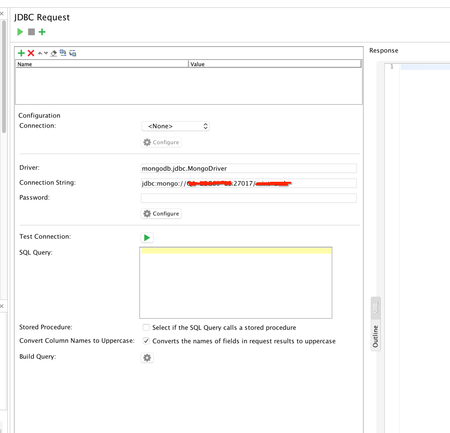
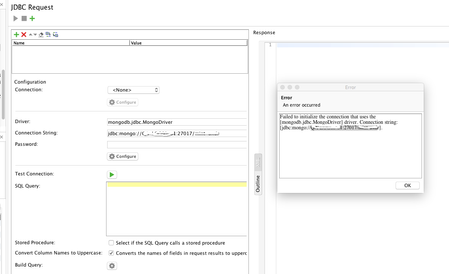
ContributionsMost RecentMost LikesSolutionsRe: Can't register MongoDB jdbc driver to use with JDBC test step in SoapUI I'm talking about the setting in my initial message here p.2 where I set up the driver for Mongo and the when I select this driver from the list in JDBC Test Step or put the driver name manually like here: When I try to test the connection, I'm getting: Re: Can't register MongoDB jdbc driver to use with JDBC test step in SoapUI Thanks nmrao , but what about registering db connection and creating db connection step with that connection? Am I doing something wrong in there? Re: Can't register MongoDB jdbc driver to use with JDBC test step in SoapUI nmrao This link is somewhat helpful. I already used all info from that lil to setup driver, but it still doesn't work as JDBC test step. In logs snippet last record is saying registering 5 JBDC drivers from extension library and then a list of drivers, but there is no Mongo driver in this list. That's why I assumed that this is driver issue. Here is how I setup my DB connection and test step: Server is up and running because I can connect to it with standalone app with the same settings. Also I've created a script test step where I import this library and create a DB connection and can fetch the data, but for the convenience I need to setup it as JDBC test step. (Script stopped working since my last run, just nothing happens SoapUI freezes only force quite and restart helps - but this is separate issue.) First of all should I use mongo-java-driver: <groupId>org.mongodb</groupId> <artifactId>mongo-java-driver</artifactId> <version>3.5.0</version>? or mongoldb-driver: <groupId>org.mongodb</groupId> <artifactId>mongodb-driver</artifactId> <version>3.5.0</version>? or both? Script was working with Java Driver. Here is the script contents: And thanks for helping me out with this nmrao appreciate it. Re: Can't register MongoDB jdbc driver to use with JDBC test step in SoapUI This didn't help. I mentioned in my initial message that I've put driver .jar file in /bin/ext folder. Can't register MongoDB jdbc driver to use with JDBC test step in SoapUI I need connect to MongoDB instance during my tests to execute some queries. I order to achieve that I made the following: 1. Added latest MongoDB Java driver jar file mongo-java-driver-3.5.0.jar to java/app/bin/ext/ and java/app/lib (second one just in case, I'm working on Mac). 2. Created new JDBC Driver entity: 3. Created a connection entity in environment with host:port:table_name. 4. Created a JDBC Test step with query. When ReadyAPI starts I see the following: Wed Nov 15 15:36:41 EST 2017:INFO:Adding [/Applications/ReadyAPI-2.0.2.app/Contents/Resources/app/bin/ext/mongodb-driver-3.5.0.jar] to extensions classpath Wed Nov 15 15:36:41 EST 2017:INFO:Adding [/Applications/ReadyAPI-2.0.2.app/Contents/Resources/app/bin/ext/mysql-connector-java-5.1.40-bin.jar] to extensions classpath Wed Nov 15 15:36:41 EST 2017:INFO:Adding [/Applications/ReadyAPI-2.0.2.app/Contents/Resources/app/bin/ext/ojdbc6.jar] to extensions classpath Wed Nov 15 15:36:41 EST 2017:INFO:Adding [/Applications/ReadyAPI-2.0.2.app/Contents/Resources/app/bin/ext/postgresql-9.3-1102.jdbc41.jar] to extensions classpath Wed Nov 15 15:36:41 EST 2017:INFO:Adding [/Applications/ReadyAPI-2.0.2.app/Contents/Resources/app/bin/ext/sqljdbc42.jar] to extensions classpath Wed Nov 15 15:36:41 EST 2017:INFO:Registered 5 JDBC drivers from extensions directory: [com.mysql.jdbc.Driver, com.mysql.fabric.jdbc.FabricMySQLDriver, oracle.jdbc.OracleDriver, org.postgresql.Driver, com.microsoft.sqlserver.jdbc.SQLServerDriver] So driver is added to class path but not registered. And then I try to test connection to db I got the following: Wed Nov 15 15:38:10 EST 2017:ERROR:An error occurred when getting a driver for the connection string [jdbc:mongo://XXXX:27017/Table]. Wed Nov 15 15:38:10 EST 2017:ERROR:java.sql.SQLException: No suitable driver java.sql.SQLException: No suitable driver at java.sql.DriverManager.getDriver(DriverManager.java:315) at com.eviware.soapui.support.jdbc.JdbcUtils.initConnection(JdbcUtils.java:55) at com.eviware.soapui.impl.wsdl.support.connections.DefaultDatabaseConnectionContainer.testDatabaseConnection(DefaultDatabaseConnectionContainer.java:225) I've searched this community and googled this problem, but no luck. Anyone knows what I'm doing wrong? I tried native mongo driver and different versions of jdbc driver. Also tried different variants of driver class with no result. Re: How can I use a variable in Property transfer? I thought that double quotes around ReadyAPI parameter name are serving this purpose. Anyways, PaulMS thanks for help, appreciate that. Re: How can I use a variable in Property transfer? Hi, I encountered same issue, when using test case property for a JSONPath query. It just stops working (returns nothing). Any ideas for a workaround? For path like this $[*][?(@.displayName==ABCD)]['id'] - property transfer correctly finds the value an puts it to Test Case property, but when I use another test case property instead of explicit string ABCD like this: $[*][?(@.displayName=="${#TestCase#AccountNumber}")]['id'] it stops working just returns null. Ivan. Re: how can I change testRunner.testCase.testSteps[0].targetTestCase.name and id? Thanks, nmrao. This script works perfectly. Found some more useful things in your github repo. Re: how can I change testRunner.testCase.testSteps[0].targetTestCase.name and id? Hi nmrao, If I run your script in debug mode as a Groovy step in Ready API, case and step objects have null reference and nothing happens. Re: how can I change testRunner.testCase.testSteps[0].targetTestCase.name and id? nmrao Seems like exactly what I want. Let me try this and I'll reply back.