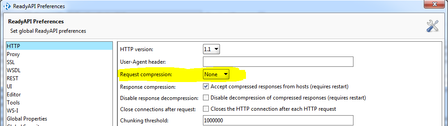
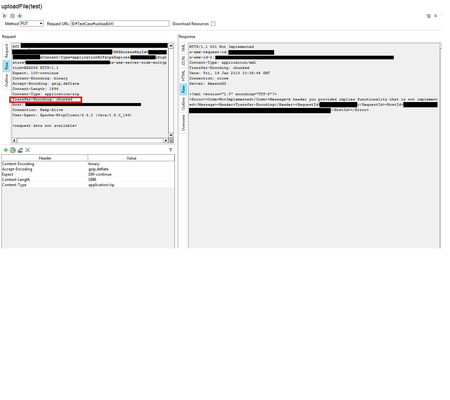
ContributionsMost RecentMost LikesSolutionsHow do you force transfer encoding NOT to be included? Im setting the Content-Length yet its still chunking, as you can see its impacting my upload to S3 Is it possible to set the compression type at request level? Is it possible to set this for a single request only? im in a scenario where a single test step out of 14 needs to have this compression set to gzip to pass (and if its on the other 13 will fail). I have tried setting it to none and then applying the folowing headers: Content-Encoding: gzip Accept-Encoding: gzip,deflate however this doesn't work. Thanks R Re: how do you stop a zip file upload to s3 having the headers appended ive just found that this guy has the same issue https://community.smartbear.com/t5/SoapUI-Open-Source/Put-Object-to-AWS-S3-using-multipart-form-data/td-p/126761 and it went unanswered how do you stop a zip file upload to s3 having the headers appended Hi, I have a test step which uploads a file to Amazon s3 using a PUT. i have attached the zip file to my test step and chosen not to cache it. When I run the test step the file is padded out with extra headers that i do not want, for example: PUT <amazon stuff> Accept-Encoding: gzip,deflate Content-Type: multipart/form-data; boundary="----=_Part_33_1379518672.1495112195626" MIME-Version: 1.0 Content-Length: 2033 Host: <amazon bits> Connection: Keep-Alive User-Agent: Apache-HttpClient/4.1.1 (java 1.5) ------=_Part_33_1379518672.1495112195626 Content-Type: application/zip; name=test.zip Content-Transfer-Encoding: binary Content-Disposition: form-data; name="test.zip"; filename="test.zip" <the zip content> creates a file on s3, all good... but when i try and unzip the file it is a "corrupted archive", if i open the file in notepad it contains the Content-Type: application/zip; name=test.zip Content-Transfer-Encoding: binary Content-Disposition: form-data; name="test.zip"; filename="test.zip" at the top of the file which it shouldn't How do i perform a property transfer on a json response that has a leading $ as an example assume the following has been returned as a response from my get step { "$respondants": [{ "uuid": "5bddcd1a-e8ac-40b4-82c4-7e7c10cee110" }, { "uuid": "5bddcd1a-e8ac-40b4-82c4-7e7c10cee111" }] } I'm wanting to get $respondants[0].uuid in a property transfer but I keep getting the result Path 'respondants' is not found in the current context, its like its ignoring the leading $. what am I doing wrong? Solved