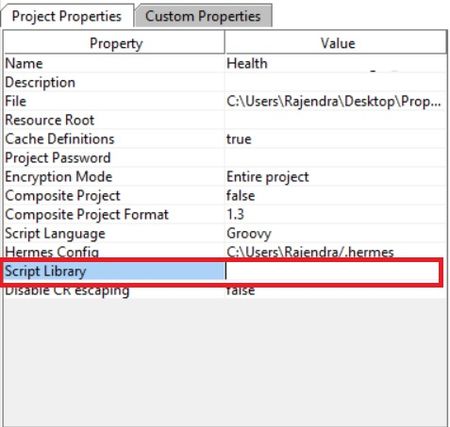
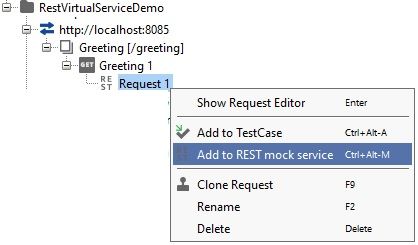
ContributionsMost RecentMost LikesSolutionsRe: How to get request-URI from raw request content using groovy script Hi, Thanks for quick replay, it is giving out put as follows: ${#Project#server}/version_{#Project#apiVersion}/login but i need in raw format like: demo.app.com/version_1.0.0/login Any idea how to get this? Thanks, Rajendra How to get request-URI from raw request content using groovy script Hi Support, How to get request-URI from raw request content using groovy script(i want to use this script in groovy step) I am using READY API 2.2.0. for example in following example i need get request-URI="/version_1.0.0/login" Following is my Raw request content: GET https://demo.app.com/version_1.0.0/login Accept-Encoding: gzip,deflate Cookie: AC1799C04C5F97FAB7B5AC4E3D355D1741794DD381D43F572DE830AF4111F0CB5161FB Content-Length: 0 Host: demo.app.com Connection: Keep-Alive User-Agent: Apache-HttpClient/4.5.2 (Java/1.8.0_144) Thanks, Rajendra How to set and get project level property 'Script Library' using groovy script in SOAPUI Pro Hi Support, How to set and get project level property 'Script Library' (look at the following screenshot)using groovy script. I am using Ready API 2.2.0 Please respond ASAP. Thanks, Rajendra How to Upload a CSV file Via Groovy Script using SOAPUI Open Source ? Hi all, Can anybody share me the sample script to Upload a CSV/Excel/txt file Via Groovy Script using SOAPUI Open Source version. Thanks, Rajendra Re: how to insert Multiple records in REST request? if you can provide sample REST request and the values you need to pass?? I can provide solution for you. -Rajendra Re: Show test steps also in JUnit report Yes This is good feature,makes easy to find and debug point of failure. It is must have feature. Thanks, Rajendra Re: Need help to Deploy REST Mock Service as War on Tomcat I doubt on SOAP UI Opensource capabilities, will it support to Deploy REST Mock Service as War on Tomcat? Because lots of questions are floating in various forums and none of the question answered properly. Re: Need help to Deploy REST Mock Service as War on Tomcat No not yet, I tried in many ways ,but issue not resolved . i don''t have any options left to try. Thanks, Rajendra Need help to Deploy REST Mock Service as War on Tomcat Hi All, I am able to create virtual Rest Service On SOAPUI and It is working fine within the SOAPUI interface. But i am not able to deploy as seperate virtual Rest Service as war on tomcat. I have created an REST virtual service using: SOAPUI Opensource Version : 5.4.0 -Open Source Java JDK installed on machine: 8.0_151 Tomcat version: apache-tomcat-8.0.49 Here i am listing the Request and Expected Response Request: GET http://localhost:8085/greeting HTTP/1.1 Accept-Encoding: gzip,deflate Accept: application/json Host: localhost:8085 Connection: Keep-Alive User-Agent: Apache-HttpClient/4.1.1 (java 1.5) Expected Response: HTTP/1.1 200 OK Content-Type: application/json Content-Encoding: gzip Content-Length: 54 Server: Jetty(6.1.26) {"id":1,"content":"Hello, World!"} Using Following Steps i have created REST virtual service and Tested: Created an empty project Renamed project as 'RestVirtualServiceDemo' Created Sample service interface using following proceduire: Right click on Project: Selected option 'New REST service From URI' from context menu Entered ' http://localhost:8085/greeting' and click on 'OK' button 4. Now I expanded the created interface and clicked 'Add to REST mock service' option 5. Step -4 Created a REST Mock Service with default name as "REST MockService 1" as shown below: 6. Added expected mock response ,by double clicking on Response 1 under 'REST MockService 1' as shown below: 7. Configured Rest Mock Service Options as shown below: 8. Started Mock service: 10. Created Test Step for the same Step and Sent Request to Mock service and got response as expected: HTTP/1.1 200 OK Content-Type: application/json Content-Encoding: gzip Content-Length: 54 Server: Jetty(6.1.26) {"id":1,"content":"Hello, World!"} 11. Using Deploy as war option ,war file generated 12. Following options are used to generate war file: Note: I also tried most of the permutations and Combinations of above settings , nothing helped Now Closed SOAPUI application. Copied generated HelloWorldvirtService.war file local <TOMCAT_HOME>\webapps\ folder. 15 Started tomcat. 16 Application Deployed successfully without any errors. Tomcat Server console log: 12-Feb-2018 15:23:08.073 INFO [main] org.apache.catalina.startup.VersionLoggerListener.log Server version: Apache Tomcat/8.0.49 12-Feb-2018 15:23:08.077 INFO [main] org.apache.catalina.startup.VersionLoggerListener.log Server built: Jan 19 2018 20:21:23 UTC 12-Feb-2018 15:23:08.077 INFO [main] org.apache.catalina.startup.VersionLoggerListener.log Server number: 8.0.49.0 12-Feb-2018 15:23:08.077 INFO [main] org.apache.catalina.startup.VersionLoggerListener.log OS Name: Windows 10 12-Feb-2018 15:23:08.077 INFO [main] org.apache.catalina.startup.VersionLoggerListener.log OS Version: 10.0 12-Feb-2018 15:23:08.078 INFO [main] org.apache.catalina.startup.VersionLoggerListener.log Architecture: amd64 12-Feb-2018 15:23:08.078 INFO [main] org.apache.catalina.startup.VersionLoggerListener.log Java Home: C:\Program Files\Java\jdk1.8.0_151\jre 12-Feb-2018 15:23:08.078 INFO [main] org.apache.catalina.startup.VersionLoggerListener.log JVM Version: 1.8.0_151-b12 12-Feb-2018 15:23:08.078 INFO [main] org.apache.catalina.startup.VersionLoggerListener.log JVM Vendor: Oracle Corporation 12-Feb-2018 15:23:08.079 INFO [main] org.apache.catalina.startup.VersionLoggerListener.log CATALINA_BASE: C:\app\apache-tomcat-8.0.49 12-Feb-2018 15:23:08.079 INFO [main] org.apache.catalina.startup.VersionLoggerListener.log CATALINA_HOME: C:\app\apache-tomcat-8.0.49 12-Feb-2018 15:23:08.079 INFO [main] org.apache.catalina.startup.VersionLoggerListener.log Command line argument: -Djava.util.logging.config.file=C:\app\apache-tomcat-8.0.49\conf\logging.properties 12-Feb-2018 15:23:08.080 INFO [main] org.apache.catalina.startup.VersionLoggerListener.log Command line argument: -Djava.util.logging.manager=org.apache.juli.ClassLoaderLogManager 12-Feb-2018 15:23:08.080 INFO [main] org.apache.catalina.startup.VersionLoggerListener.log Command line argument: -Djdk.tls.ephemeralDHKeySize=2048 12-Feb-2018 15:23:08.080 INFO [main] org.apache.catalina.startup.VersionLoggerListener.log Command line argument: -Djava.protocol.handler.pkgs=org.apache.catalina.webresources 12-Feb-2018 15:23:08.081 INFO [main] org.apache.catalina.startup.VersionLoggerListener.log Command line argument: -Dignore.endorsed.dirs= 12-Feb-2018 15:23:08.082 INFO [main] org.apache.catalina.startup.VersionLoggerListener.log Command line argument: -Dcatalina.base=C:\app\apache-tomcat-8.0.49 12-Feb-2018 15:23:08.082 INFO [main] org.apache.catalina.startup.VersionLoggerListener.log Command line argument: -Dcatalina.home=C:\app\apache-tomcat-8.0.49 12-Feb-2018 15:23:08.083 INFO [main] org.apache.catalina.startup.VersionLoggerListener.log Command line argument: -Djava.io.tmpdir=C:\app\apache-tomcat-8.0.49\temp 12-Feb-2018 15:23:08.085 INFO [main] org.apache.catalina.core.AprLifecycleListener.lifecycleEvent Loaded APR based Apache Tomcat Native library 1.2.16 using APR version 1.6.3. 12-Feb-2018 15:23:08.090 INFO [main] org.apache.catalina.core.AprLifecycleListener.lifecycleEvent APR capabilities: IPv6 [true], sendfile [true], accept filters [false], random [true]. 12-Feb-2018 15:23:08.574 INFO [main] org.apache.catalina.core.AprLifecycleListener.initializeSSL OpenSSL successfully initialized (OpenSSL 1.0.2m 2 Nov 2017) 12-Feb-2018 15:23:08.667 INFO [main] org.apache.coyote.AbstractProtocol.init Initializing ProtocolHandler ["http-apr-8080"] 12-Feb-2018 15:23:08.675 INFO [main] org.apache.coyote.AbstractProtocol.init Initializing ProtocolHandler ["ajp-apr-8009"] 12-Feb-2018 15:23:08.676 INFO [main] org.apache.catalina.startup.Catalina.load Initialization processed in 892 ms 12-Feb-2018 15:23:08.701 INFO [main] org.apache.catalina.core.StandardService.startInternal Starting service Catalina 12-Feb-2018 15:23:08.702 INFO [main] org.apache.catalina.core.StandardEngine.startInternal Starting Servlet Engine: Apache Tomcat/8.0.49 12-Feb-2018 15:23:08.728 INFO [localhost-startStop-1] org.apache.catalina.startup.HostConfig.deployWAR Deploying web application archive C:\app\apache-tomcat-8.0.49\webapps\HelloWorldvirtService.war 12-Feb-2018 15:23:13.613 INFO [localhost-startStop-1] org.apache.jasper.servlet.TldScanner.scanJars At least one JAR was scanned for TLDs yet contained no TLDs. Enable debug logging for this logger for a complete list of JARs that were scanned but no TLDs were found in them. Skipping unneeded JARs during scanning can improve startup time and JSP compilation time. 12-Feb-2018 15:23:13.743 INFO [localhost-startStop-1] org.apache.catalina.startup.HostConfig.deployWAR Deployment of web application archive C:\app\apache-tomcat-8.0.49\webapps\HelloWorldvirtService.war has finished in 5,015 ms 12-Feb-2018 15:23:13.745 INFO [localhost-startStop-1] org.apache.catalina.startup.HostConfig.deployDirectory Deploying web application directory C:\app\apache-tomcat-8.0.49\webapps\docs 12-Feb-2018 15:23:13.768 INFO [localhost-startStop-1] org.apache.catalina.startup.HostConfig.deployDirectory Deployment of web application directory C:\app\apache-tomcat-8.0.49\webapps\docs has finished in 23 ms 12-Feb-2018 15:23:13.770 INFO [localhost-startStop-1] org.apache.catalina.startup.HostConfig.deployDirectory Deploying web application directory C:\app\apache-tomcat-8.0.49\webapps\examples 12-Feb-2018 15:23:13.974 INFO [localhost-startStop-1] org.apache.catalina.startup.HostConfig.deployDirectory Deployment of web application directory C:\app\apache-tomcat-8.0.49\webapps\examples has finished in 204 ms 12-Feb-2018 15:23:13.975 INFO [localhost-startStop-1] org.apache.catalina.startup.HostConfig.deployDirectory Deploying web application directory C:\app\apache-tomcat-8.0.49\webapps\host-manager 12-Feb-2018 15:23:14.001 INFO [localhost-startStop-1] org.apache.catalina.startup.HostConfig.deployDirectory Deployment of web application directory C:\app\apache-tomcat-8.0.49\webapps\host-manager has finished in 26 ms 12-Feb-2018 15:23:14.001 INFO [localhost-startStop-1] org.apache.catalina.startup.HostConfig.deployDirectory Deploying web application directory C:\app\apache-tomcat-8.0.49\webapps\manager 12-Feb-2018 15:23:14.023 INFO [localhost-startStop-1] org.apache.catalina.startup.HostConfig.deployDirectory Deployment of web application directory C:\app\apache-tomcat-8.0.49\webapps\manager has finished in 22 ms 12-Feb-2018 15:23:14.023 INFO [localhost-startStop-1] org.apache.catalina.startup.HostConfig.deployDirectory Deploying web application directory C:\app\apache-tomcat-8.0.49\webapps\ROOT 12-Feb-2018 15:23:14.044 INFO [localhost-startStop-1] org.apache.catalina.startup.HostConfig.deployDirectory Deployment of web application directory C:\app\apache-tomcat-8.0.49\webapps\ROOT has finished in 21 ms 12-Feb-2018 15:23:14.050 INFO [main] org.apache.coyote.AbstractProtocol.start Starting ProtocolHandler ["http-apr-8080"] 12-Feb-2018 15:23:14.057 INFO [main] org.apache.coyote.AbstractProtocol.start Starting ProtocolHandler ["ajp-apr-8009"] 12-Feb-2018 15:23:14.062 INFO [main] org.apache.catalina.startup.Catalina.start Server startup in 5385 ms After this ,virtual web service running on tomcat must be accessible from browser. but i am not able to connect virtual service from browser. Tried to access virtual service From browser using following URl's: http://localhost:8080/greeting/ http://localhost:8085/greeting/ Any clue where i am doing mistake in this process? Thanks in Advance, Raj Re: How can I autoreplay one of my testcases?Hi knees , Just by giving break you can stop looping but it is better to know you stopped looping becoz you reached the condition. Also asynchronous is Boolean value and this will decide test case to run in parallel or sequential mode. Here is the corrected code snippet: boolean async=true:// true to run parallel and false to run sequential for (i = 0; i < 3; i++) { def testCase = testRunner.testCase.testSuite.project.getTestSuiteByName("Medewerkers").getTestCaseByName("Niet-gekeurde medewerkers verwijderen") def properties = new com.eviware.soapui.support.types.StringToObjectMap () def async = false testCase.run (properties, async) if (i == 2) { test runner.cancel("i value reached to 2" ) break;} } Hip it helps _Rajendra Prasad Reddy Penumalli