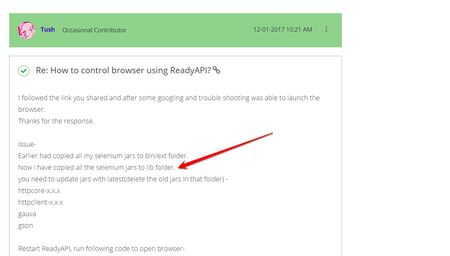
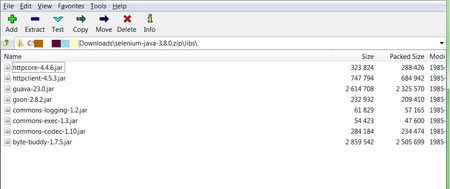
ContributionsMost RecentMost LikesSolutionsRe: How to control browser using ReadyAPI? Is it working now? I suggested to add the files in 'lib' folder. Re: How to control browser using ReadyAPI? Hi, did you copy the files to lib folder and check? Please refer to my solution above. Thanks Re: How to control browser using ReadyAPI? Hi ranujn, Please check the selenium version you downloaded. Try some other version/ link. PFA: Re: How to control browser using ReadyAPI? Yes sanj,it works. Able to run my selenese code in ReadyAPI itself. Follow the above mentioned steps of updating the jars, it should work. Re: How to control browser using ReadyAPI? I followed the link you shared and after some googling and trouble shooting was able to launch the browser. Thanks for the response. Issue- Earlier had copied all my selenium jars to bin/ext folder. Now i have copied all the selenium jars to lib folder. you need to update jars with latest(delete the old jars in that folder) - httpcore-x.x.x httpclient-x.x.x gauva gson Restart ReadyAPI, run following code to open browser- ********************************************* import org.openqa.selenium.* import org.openqa.selenium.chrome.ChromeDriver import java.util.concurrent.TimeUnit //Initiate WebDriver System.setProperty("webdriver.chrome.driver", "filePath/chromedriver.exe"); log.info(System.getProperty("webdriver.chrome.driver")); WebDriver driver=new ChromeDriver() //Setup Environment driver.manage().timeouts().implicitlyWait(30, TimeUnit.SECONDS) driver.get("http://www.apc.com"); //Your Code Thread.sleep(10000) driver.quit() ************************************** How to control browser using ReadyAPI? Tool: ReadyAPI 2.2.0 (Liscensed) I have a requirement to - 1. Open browser, pass an IP of a machine(Say A) 2. Do some changes in that machine via broswer 3. Run API tests against another system(Say B) 4. After tests are complete, Log back into 'A' via browser to make changes in A. We use selenium(different IDE) to automate the browser controls of 'A', but are not able to link it to ReadyAPI to run API tests. Tried this- https://support.smartbear.com/readyapi/docs/testing/integrations/selenium/integrate.html But couldn't run the script provided Is there a way to automate the entire requirement in ReadyAPI itself? Can we handle browser automation in readyAPI? SolvedRe: Unable to maintain session between Test Suites. It will be helpful if you could provide the steps to resolve the issue. Re: Unable to maintain session between Test Suites. After running "Login" test case, I extract the session ID from the Login response header. def harResponse = context.expand( '${#[Lib#startSession#login]#HarResponse#$[\'headers\'][7][\'value\']}' ) I then pass this value to cookie parameter in my API requests. Re: Unable to maintain session between Test Suites. In 'Lib' testsuite, we extract and save the session ID to a variable using groovy script. Then I add header parameter named 'cookie' to all my API requests and pass the variable value. I am able to execute my tests this way. Issue: I have to update my API's everyday. While I do this I need to keep adding Header parameter to all my API's,which is a gruesome process. yes,I need to use the same cookie across all the test cases and test Suits. Re: Unable to maintain session between Test Suites. I tried sending the cookie via Header, but while running the test case multiple instances of "Cookie" headers were created. Is there any other way to maintain a single session across all the Test suites?